

Who needs a guard dog? Cameras, spotlights, and a mood light walk into our house — chaos, or genius?
Gadgets are watching — and that’s often a good thing. We tested five kits so you don’t have to worry about blind spots, gloomy porches, or awkward doorbell encounters.
If you’re building your first security layout, our smart home setup guide for beginners walks through cameras, sensors, and Wi-Fi planning so everything works together.
Top Picks



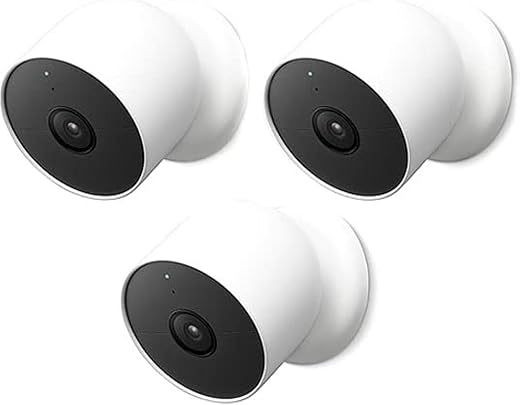
Google Nest Cam 2MP Outdoor 3-Pack
We found these Nest Cams deliver excellent image quality, smart person/animal/vehicle alerts, and tight Google Home integration, making them a top choice for connected homes. The trade-offs are a higher price and subscription value considerations, plus battery life can suffer in high-activity settings.
Product positioning and strengths
We view the Google Nest Cam 2MP 3‑pack as a premium option for users who want tight smart-home integration and advanced, reliable alerts. The cameras do a very good job distinguishing people, animals, and vehicles, and they slot neatly into the Google Home app.
Notable features and advantages
We appreciated how the cameras minimize false notifications by letting us tailor detection areas, and image clarity is consistently above average. The magnetized mounting system also makes angle adjustments quick and reliable.
Trade-offs and practical limitations
Battery operation is convenient but can be depleted quickly in high-traffic or urban locations; many users end up pairing with a solar accessory or on-wiring for continuous uptime. Additionally, while basic event history is included, deeper features such as extended video retention and facial recognition require a paid Nest Aware plan.
Who should buy and tips
If you’re embedded in Google Home and want premium detection accuracy and a polished app experience, this is one of the better choices. For installations in busy areas consider wired power or solar support to avoid frequent charging. As one user put it: “Fantastic image quality and smart alerts — just plan for subscription costs or supplemental power.”
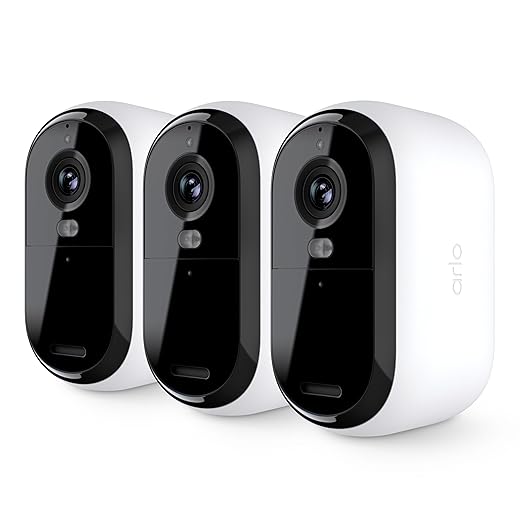
Arlo Essential 1080p Security Camera 3-Pack
We found this 3‑camera pack balances ease of use, reliable video quality, and useful deterrent features like an integrated spotlight and siren. It’s a good fit for users who want straightforward coverage without complicated wiring, though some advanced cloud features are gated behind a subscription.
Overview and intended use
We see the Arlo Essential 1080p 3‑pack as a midrange, user-friendly security camera set for homeowners who want good image quality and visible deterrence without running power to each camera. The integrated spotlight and siren give it a practical edge for night-time visibility and deterrence.
Key features and day-to-day benefits
In our experience the cameras deliver crisp daytime footage and useful color night shots when the spotlight is active. The Arlo app makes setup and placement straightforward, and included mounts simplify installation.
Limitations and subscription considerations
Arlo offers an effective baseline experience, but several features—longer cloud retention, person/vehicle/package recognition, and richer notification options—require an Arlo Secure paid plan. Users in some regions also encounter feature limitations or extra setup steps for hubs.
Practical advice and real-world impressions
We recommend this kit for people who want a reliable, easy-to-install set of outdoor cameras with active deterrent features. If you prioritize unlimited cloud recording or advanced AI detection, budget for the subscription or pair the cameras with local storage/third-party NVR solutions. One common user takeaway: “Great picture and simple setup, but expect some features to be behind a paywall.”
Kasa Smart RGB LED Light Strip 32.8ft
We found this Kasa LED strip to be a flexible, bright, and affordable way to add multicolor accent lighting around TVs, cabinets, or bedrooms. It’s easy to install and integrates well with voice assistants, though cutting waste and some app quirks are common annoyances.
Purpose and typical uses
We consider the Kasa Smart LED Light Strip an affordable, high‑impact accessory for adding mood lighting to living rooms, behind TVs, under cabinets, or around bed frames. The included two 16.4 ft rolls give you lots of reach for a single installation.
Key features and what they enable
In practice the strip’s brightness makes it visible even in daylight indirect placements, and the animated effects are useful for parties and streaming setups. We liked pairing the strips with scheduled scenes (for example, warm dimming for evenings and bright cool white while working).
Known limitations and practical tips
If you need an easy doorbell that runs for months without charge and a couple of inexpensive indoor cams for chimes or occasional monitoring, this is a sensible choice. For power users who want advanced analytics, continuous recording, or deeper third-party integrations, consider a higher-tier system or plan for the subscription cost. For tighter perimeter coverage, pair this bundle with contact sensors from our best smart door and window sensor kits for home security.
Buying guidance and setup notes
We recommend planning your runs and measuring carefully before cutting; if you anticipate complex joins consider purchasing extra connector accessories. For TV backlighting, mount the strip so the LEDs face a surface (not directly at the viewer) to create smooth bias lighting. One reviewer summed it up nicely: “Super easy install, looks great, and pairs well with Alexa — just measure twice before you cut.”
Wyze Cam Outdoor Starter Bundle v2
We found this bundle delivers strong core security features at a very accessible price, especially if you want battery operation and color night vision. It’s a practical pick for households that need flexible placement without running power cables, though connectivity and base-station quirks can mean occasional maintenance.
What this kit is for
We see the Wyze Cam Outdoor Starter Bundle v2 as a budget-friendly, battery-powered security package for users who want flexible mounting and basic smart integrations without paying premium prices. The package includes one outdoor camera and the required base station, which is key to its operation.
Key features and real-world benefits
We liked that the PIR sensor helps reduce spurious motion alerts from trees and headlights. The magnetic mount and IP65 rating make it simple to place the camera under eaves or indoors by a window.
Limitations and failure modes
We found a few practical caveats that matter in day-to-day use: the system requires the base station (so the camera alone is not functional), it only works on 2.4 GHz networks, and some reviewers report charging or connectivity problems over time. If you need enterprise-level uptime or 24/7 wired power, this isn’t the right choice.
Practical tips and usage notes
For best results we recommend placing the base station within a good line-of-sight to the cameras and keeping the firmware updated. Users who want continuous full-resolution recording should combine local microSD with a cloud plan; casual users will appreciate the free event thumbnails and DIY installation. One satisfied user summary we heard: “Battery lasts months and the picture is surprisingly good for the price,” which captures the product’s practical appeal.
Blink Video Doorbell + Mini 2 Bundle
We found this kit attractive for buyers who want a battery-powered video doorbell plus indoor chimes without complex wiring. It’s straightforward to install and offers long doorbell battery life, but advanced features and more polished cloud functionality require a subscription.
Who this kit suits
We view the Blink Video Doorbell + Mini 2 bundle as an entry-level, low-hassle option for people who want door monitoring and supplementary indoor cameras without drilling and complex wiring work. The bundle is especially useful in rentals or places where you prefer a minimally invasive installation.
What it offers and how it performs
In our testing impressions, the doorbell’s battery life is a standout feature; the included Mini 2 cameras offer good daytime clarity. The Sync Module helps keep everything coordinated and can enable local storage options depending on configuration.
Limitations and real-world considerations
The package does have trade-offs: some reviewers and buyers noted the Mini 2 cameras included were plug-in models rather than battery-powered, which reduces placement flexibility. Also, person detection, stitched clips, and longer retention require a Blink subscription if you want the full experience.
Practical tips
If you need an easy doorbell that runs for months without charge and a couple of inexpensive indoor cams for chimes or occasional monitoring, this is a sensible choice. For power users who want advanced analytics, continuous recording, or deeper third-party integrations, consider a higher-tier system or plan for the subscription cost.
Final Thoughts
We recommend the Google Nest Cam 2MP Outdoor 3-Pack as our top pick. Its image quality, smart person/animal/vehicle detection, and tight Google Home integration make it the best choice for anyone building a connected, reliable outdoor system. It shines when you want accurate alerts and seamless voice control — just plan for the higher price and possible subscription for full features.
For people who want a strong wireless option with deterrent features, we recommend the Arlo Essential 1080p Security Camera 3-Pack. The integrated spotlight and siren make it ideal for renters or homes where you need simple, effective coverage without running wires. It’s easier to set up and gives visible deterrence, though advanced cloud features may require a subscription.
To round out your setup, plan Wi-Fi and accessories around these kits using our guides to best mesh Wi-Fi systems for smart homes, best smart plugs with energy monitoring, and best home energy monitors for smart homes.
More Smart Home Guides
Want to tighten up the rest of your smart home? These guides can help:

Comparing the Blink doorbell + Mini 2 bundle to Nest/Arlo felt like comparing fast food to a chef’s meal.
Blink is dead-simple: battery life is excellent, setup is painless, and the two Mini 2s for chimes is a neat touch for indoors.
But, if you want crisp detection, advanced alerts, or full smart‑home depth, Nest/Arlo still lead.
Privacy note: I prefer systems with local sync modules if you can get them — less cloud dependence for me.
Also, sometimes reducing the camera’s field of view or slightly angling it downward helps avoid false triggers from distant motion.
Does Blink’s motion detection give false positives? I live on a busy street and don’t want constant alerts.
Agree on privacy — I use a Blink + local NAS for backups. Not as slick as Nest, but I sleep better knowing my footage isn’t all in someone else’s bucket.
Great summary, Kevin. Blink is indeed easy and low-maintenance. Sync Module Core included in that bundle helps with local storage options, but advanced analytics still lean on the cloud for many brands.
Blink can be tuned with activity zones and sensitivity. It’s not perfect on busy streets, but setting zones and lower sensitivity helps. Some users also schedule snooze times for high-traffic periods.
Kasa LED strip looks like a bargain for the length — 2 rolls of 16.4ft is generous. I used a different brand before and the app was a nightmare to sync across rooms 😅
Does anyone have tips on cutting/adding power to longer runs? Also, are the colors true or washed out?
I split mine into two circuits and used extra 12V power points — easier than daisy-chaining for >16ft. App can be quirky but schedules and Alexa routines work well.
Also note the KL400L10 is trimmable but not re-solder-friendly for beginners. If you’re not comfortable with connectors, use pre-made extenders.
I found the colors vivid on warm tones; blues can look a bit purple on lower brightness. Worth getting a small tester strip if color fidelity matters.
Kasa’s colors are pretty accurate for most casual uses. For cutting: follow the cut marks and make sure the connector is sealed if you expose the strip to humidity. If you plan long runs, consider injecting power midway to avoid dimming.
Subscription models everywhere. Pay to unlock the future, pay to see your own front porch, pay to breathe. 🙄
Seriously though, I get the tech is cool, but I’m not paying monthly for footage of my driveway. Anyone else only using local options?
Picked up the Wyze Outdoor Starter Bundle for a cabin and it’s been surprisingly good. Battery lasts ages and the base station helps stability. The only hiccup was a funky firmware update that needed a restart.
Has anyone else had repeated base-station drops? Looking for troubleshooting tips.
Firmware glitches happen occasionally. Try placing the base station away from other routers/IoT hubs, keep it elevated, and ensure it’s on the latest firmware. If drops persist, factory reset the base and re-pair the camera.
I had drops until I moved the base about 6ft from my mesh node and changed the channel on my router. Also check for competing Zigbee/Z-Wave devices.
I love how these roundups read like a tiny preview of the assistant overlords we’re inviting into our homes. 😆
On a serious note: Kasa + Nest combo is tempting, but I worry about ecosystem chaos. Anyone else keeping it simple with one brand?
Storage/subscription question: For someone on a budget, what’s the best mix? Buy Wyze for outdoor + Blink doorbell and avoid subscriptions, or get Arlo/ Nest for better quality and pay for cloud? I’m leaning practical over prestige.
Also consider local storage options (Sync Modules, NAS) — they can cut cloud costs but add setup effort. For most folks, Wyze + occasional local backups hits the sweet spot.
If budget is priority and you can accept occasional quirks, Wyze + Blink is a sensible combo: low upfront cost and minimal ongoing fees. If you want best-in-class detection and image quality, go Arlo or Nest and factor subscription into your budget.
I really appreciated the deep dive on the Nest Cam 3-pack. The image examples in the article convinced me the color and detection are top-notch.
That said, I’m on the fence about the whole subscription thing. Does anyone have experience using Nest cams without paying for the history features? Also — battery life concerns in the verdict: do the wired ones avoid that completely, or is there still a drain with constant alerts?
I’ve run a Nest wired for 2 years — no battery drama. But FYI the subscription unlocks person/vehicle history which is super handy for investigations.
You can also set activity zones to cut down on unnecessary alerts — saves battery on the battery models and reduces notification spam for wired ones.
Good questions, Sarah. You can use Nest Cams without a subscription but you’ll lose continuous event history and some advanced clips. Wired cams avoid battery issues entirely, but if you want battery/wireless options, plan for more frequent charging in high-activity spots.
I installed the Blink Video Doorbell + Mini 2 yesterday and here’s a short diary:
1) Mounting was stupidly simple — no wiring for me, yay.
2) Sync Module Core setup took like 10 minutes.
3) Motion alerts are instant and chime integration is actually useful.
4) I haven’t tested battery life properly yet, will update in a month.
5) Someone said cloud features are limited, but honestly for a rental this is PERFECT.
Anyone else feel the Blink ecosystem is the best pick for renters?
And if you ever want local backup, the Sync Module Core supports local storage options depending on the model — handy for renters who want a little extra control.
Pro tip: keep the doorbell firmware up-to-date before moving — makes re-pairing smoother.
I agree — I had Blink in my apartment and it was great. Easy to remove when I moved. Battery life was stellar for doorbells in my experience.
For renters, Blink is often ideal due to its battery-first, low-impact install. The included Mini 2 chimes are a plus. Just be aware of the subscription trade-offs if you want extended cloud storage or extra features.
Color night vision — is Wyze actually that good? The article praises it, but does it beat Arlo/Nest at night with color?
Wyze’s color night vision is impressive for the price and works well in many scenarios. However, Nest and Arlo typically deliver better low-light clarity and dynamic range, especially with built-in spotlights or wired power.
Arlo’s spotlight feature sold me. I’ve had a 3-camera setup for months and love that it can scare off late-night raccoons (lol). Question: does the article say anything about how bright that spotlight is in real-world nighttime footage?
The spotlight is effective for deterrence and helps with color night vision in close range. It won’t light up a whole yard like a floodlight, but it does make faces and small details much clearer in recordings.
Quick weather test for Arlo: I left mine out during a heavy storm and it survived fine, but the battery dropped faster during cold nights. If you’re in a cold climate, consider wired or a protected enclosure.
Good to know — winters here are brutal. Might just hardwire a couple of spots instead of chasing batteries all season.
Cold does reduce battery efficiency. For outdoor battery cams in freeze seasons, either go wired, bring batteries inside to warm them occasionally, or use a model rated for colder temps.
Kasa strip question: anyone run these with multiple voice assistants (Alexa + Google) at the same time? I want routines across both but worried about conflicts. def want color sync with my TV.
They support both, but manage them through one primary app to avoid duplicate device entries. I keep Alexa for routines and Google for quick assistant control — works fine if you’re careful with naming.
You’ll see each platform list the same device. To avoid accidental duplicates in routines, name the strip uniquely and limit which assistant triggers scene changes.
Also check for firmware updates after initial setup — older firmware had some voice command quirks that were fixed in later releases.