

Which smart sidekick will actually make your life easier (and not just talk back)?
We love gadgets, but we hate clutter. Voice assistants and smart hubs should organize our lives, not add noise.
We tested six compact and full-size devices. Expect BIG kitchen screens, compact bedside helpers, and a hub that speaks every smart-home language — with clear picks for each use case.
For more context on assistants and hubs, see our Smart Home Setup Guide for Beginners and comparison We Compare Nest Audio (3-Pack) vs Echo Dot — Our Verdict.
Top Picks


15.6-inch Full-HD Kitchen Smart Display
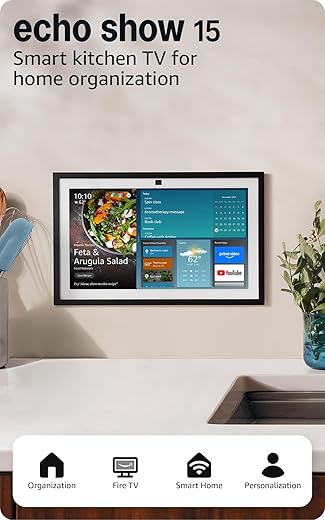
We found this large Full-HD smart display excellent for family organization, combining calendars, widgets, and built-in Fire TV for entertainment. It doubles as a centralized hub for smart home control while delivering strong sound and useful video calling features.
Overview and intended use
We view this model as a kitchen- and family-focused smart display that sits on the wall or counter and acts as both an entertainment center and an organizational hub. It blends a large, high-resolution screen with a smart home dashboard and Fire TV streaming.
Standout features
Benefits and limitations
The size and display clarity make it far more readable across a busy kitchen than smaller smart displays, and the integration with Alexa and your smart devices streamlines common tasks. That said, the footprint is significant — we recommend measuring counter or wall space before buying. Also, privacy-conscious users should use the shutter and mic/camera controls as needed.
Practical tips from our testing
If you’re planning your first full setup, our Smart Home Setup Guide for Beginners can help you decide where this big screen fits with smaller speakers and displays.
Overall, we recommend this for households that want the largest, most capable Alexa display for organizing family life and enjoying Fire TV content in the kitchen or living area.
8-inch Wall-Mount Alexa Smart Hub
We found this hub excels as a central, wall-mounted control station for smart homes, offering broad device compatibility and a clear dashboard. Its focus on device management and camera views makes it ideal for families who want a fixed, always-available smart home console.
What it is and who it's for
We see the Echo Hub as a purpose-built wall-mount smart home control panel that keeps device controls, camera feeds, and routines in a single visible place. It's aimed at households that want a permanent console rather than relying solely on phones or portable smart displays.
Key features and everyday benefits
Practical strengths and limitations
We especially appreciate how the proximity sensor and dashboard make common controls faster than tapping through phone menus. The device is designed for permanence — wall mounting options and HDMI-like mounting adaptors are useful in a fixed install. However, powering the Hub can be fiddly: it needs a USB-C PD solution with specific PD ratings and many users end up creating custom PoE splitters or concealed wiring to avoid visible cords.
Usage tips and real-world insight
We recommend this to anyone who wants a clean, always-available smart home control center and doesn't mind doing a bit of planning for power and mounting.
10-inch Max Smart Display with Camera
We found this model to be particularly strong for video calling and as a digital photo frame thanks to its larger 10" HD display and auto-framing camera. The stereo speaker setup also gives it a notable edge for music and media in medium rooms.
Designed for connection and media
We see this device as a larger, media-forward smart display that emphasizes communication — video calls, messages, and shared family content. The 10" screen makes text and visuals easier to read across a room, while the camera keeps subjects in frame during calls.
Notable capabilities
Practical observations and trade-offs
In our testing the display was excellent for communal spaces like kitchens or living rooms where video calls and shared media matter. That said, some users have reported occasional screen or boot issues that required replacement; buy from a retailer with a good return policy. Also, if you need simultaneous multi-camera views, current software limits may not show all feeds at once.
How to get the most from it
When you’re ready to expand to more devices and routines, our guide How to Connect Our Google Nest Hub to Smart Home Devices Fast walks through a similar Google Home setup step by step.
We recommend this to households that prioritize video calling quality and want a larger, more capable Google Assistant display for shared spaces.
Compact Siri-Powered HomePod mini
We found this compact speaker delivers surprisingly rich, room-filling sound for its size and integrates seamlessly with Apple devices and HomeKit. It's a great pick if you already live in the Apple ecosystem and want reliable Siri control and multi-room audio.
Where it fits and who should buy
We view the HomePod mini as the best compact speaker/hub for users who are already committed to Apple's ecosystem. It provides clear benefits when paired with iPhones, iPads, Macs, and Apple TV, and acts as a HomeKit hub for remote control of smart devices.
What it does well
Limitations and practical notes
Renewed units may occasionally show setup or pairing hiccups, so we recommend buying from sellers who offer clear return or support policies. The HomePod mini is less extensible than some Alexa-based hubs — third-party skill variety and non-Apple smart-home workflows can feel constrained. For those heavily invested in non‑Apple services, that trade-off is worth weighing.
Tips for getting the most from it
To compare Siri, Alexa, and Google in more detail, you can also check How We Compare 5 Alexa and Google Assistant Deals.
We recommend the HomePod mini to Apple users who want an elegant, compact speaker that doubles as a capable Siri-powered smart home hub and multi-room audio node.
Aeotec SmartThings Compatible Hub Gateway
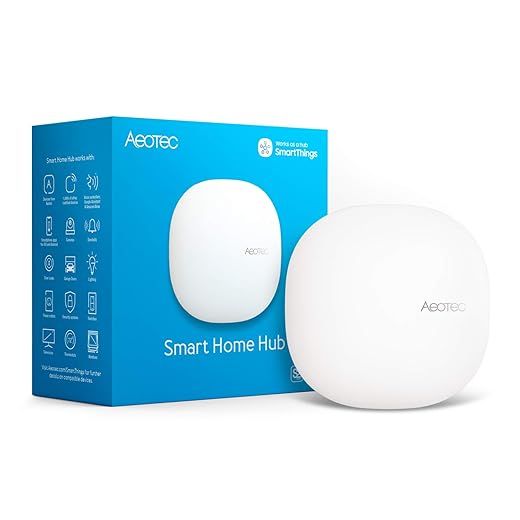
We find this hub to be a robust bridge for households using Z-Wave, Zigbee, Matter, and Wi‑Fi devices, giving access to a wide ecosystem without vendor lock-in. It’s a strong choice for DIY smart home setups that need broad compatibility and local automations.
Purpose and audience
We recommend the Aeotec Smart Home Hub for people building a mixed-protocol smart home who need a single gateway to connect Z‑Wave, Zigbee, Matter, and Wi‑Fi devices. It is managed through Samsung SmartThings, which provides a wide range of integrations and automation tools.
Key features and real-world benefits
Practical limitations and tips
Pairing large numbers of devices can be time-consuming and sometimes requires device-specific reset procedures; migrating devices from an older hub can be especially manual. Camera integrations are possible but can be less straightforward than with ecosystems that focus heavily on video hardware. For power users, SmartThings plus community drivers can extend functionality but expect a learning curve.
Our recommended use cases
For a closer look at how SmartThings stacks up against a lighting-first bridge, read We Compare: Philips Hue Bridge vs SmartThings Hub.
We recommend this hub for hobbyists and DIY smart-home builders who value protocol flexibility and are comfortable spending time on setup and occasional troubleshooting.
Compact 7-inch Google Assistant Display
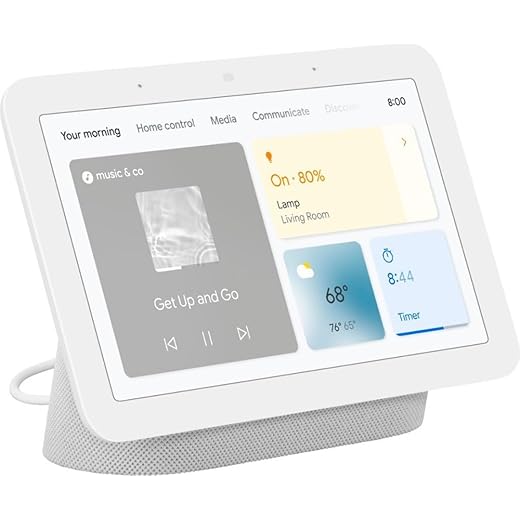
We find this compact display ideal for kitchens or bedside tables where space is tight but helpful features are valued. It delivers reliable Assistant functionality, good sound for its size, and convenient smart home controls without high cost.
Small size, broad usefulness
We think this 7" smart display hits a strong balance between size, cost, and everyday functionality. It’s unobtrusive on a nightstand or kitchen counter yet provides voice control, timers, media playback, and basic smart home control.
Key features and how we used them
Practical strengths and things to watch
During our use, the device repeatedly proved useful as a small, always-on assistant. However, some users report that the display doesn’t mirror the full functionality of the phone’s Google Home app — advanced device settings and certain streaming options can be more limited. If you rely heavily on third-party streaming apps (TuneIn, specific radio apps), check that your preferred services are available or work smoothly.
Who should buy this
We recommend it to anyone seeking an affordable, compact smart display for basic media, timers, and household controls. It’s a good entry point into an Assistant-powered home, especially where space or budget is constrained.
To grow beyond this starter display, use our guide How to Connect Our Google Nest Hub to Smart Home Devices Fast as a roadmap for adding more Google-compatible devices.
Final Thoughts
Best for families and media: 15.6-inch Full-HD Kitchen Smart Display (9.2 out of 10). We recommend this as our top pick when you want one hub that doubles as a family command center and an entertainment screen. It handles calendars, widgets, video calls, and built-in Fire TV with strong sound. Buy this if you want a central, visible display in the kitchen or living area to manage schedules, stream shows, and make hands-free video calls.
Best for DIY smart homes and broad compatibility: Aeotec SmartThings Compatible Hub Gateway (8.3 out of 10). We recommend this when you have or plan to mix Z-Wave, Zigbee, Matter, and Wi‑Fi devices. It’s the practical choice for local automations, avoiding vendor lock-in, and bridging legacy sensors and newer smart devices. Choose this if you need a reliable hub to tie different protocols together and want more control over automations.
Related Smart Hub and Assistant Guides
Want more help planning your hub and voice assistant setup?

Reading this made me realize I own three Alexa devices and still can’t get a single routine to work the way I want. Amazon, stop making my lights tango at 3am! 😂
On a serious note: anyone have tips for keeping routines simple and not over-automating? I keep adding triggers and they just conflict.
I made that mistake too. Now I keep an ‘archive’ list of old routines so I can restore if needed instead of layering new ones.
If you’re into tinkering, try using SmartThings or Home Assistant to orchestrate complex automations — more stable than stacking Alexa routines sometimes.
Good advice. Also, audit your routines monthly — disable or delete ones you don’t use. Try naming them clearly and avoid using time-based and sensor-based triggers that can overlap.
Start with one or two core routines (morning/night) and stick to each device assigned to only one routine. Overlapping triggers are usually the culprit.
Also check for device groups vs individual device commands — groups can be sneaky and trigger extra actions.
Aeotec Smart Home Hub sounds ideal for my setup — I run a bunch of Z-Wave sensors and a few Zigbee bulbs. A couple of practical questions:
– Does it support local automations without cloud dependency?
– How smooth is pairing with SmartThings and Alexa?
Looking for advice from someone who’s used it as a central bridge.
I’ve run it for 8 months: local automations work well for basic rules (schedules, triggers). For very custom logic I still use a local server (Home Assistant), but Aeotec is great if you want an easier setup.
The Aeotec hub supports local automations through SmartThings for many devices, reducing cloud reliance. Pairing with SmartThings is native and typically smooth; Alexa integration is straightforward once devices are exposed in SmartThings. However, some advanced Zigbee/Z-Wave device features may still rely on cloud services depending on the driver/handler.
All these smart displays sound great until you remember there’s a camera staring at you while you eat cereal. 😅
Serious question: which of these have the best privacy controls? I don’t want a camera on 24/7.
If you’re really paranoid, go for the smaller Nest Hub 7″ (no camera), or put a little physical cover over the camera. Works fine for me 😂
Good point. The Nest Hub Max has a physical camera shutter on some models and a quick toggle in settings to disable the camera/mic. Echo devices offer a mic/camera off button too and the Show 15 includes quick privacy controls. Always review settings after setup.
Price vs performance question: I’m torn between the Echo Show 15 and the Nest Hub Max. The Show 15 seems like a media/kitchen beast, but the Nest Hub Max looks sleeker for video calls.
How do they compare for sound quality and screen responsiveness? Anyone switched between them?
If you want one that’s visible across the whole kitchen, go Show 15. If you’re mostly at a desk and do Zoom-like calls, go Nest.
I switched from a Show 10 to a Nest Hub Max for better Google Assistant integration. Calls were noticeably better on the Nest.
Sound: Show 15 gave me more bass in the kitchen, but Nest’s stereo imaging is nicer for music.
Echo Show 15 has larger Full HD display and Fire TV built-in — great for media and family dashboards. Nest Hub Max has better auto-framing for video calls and strong stereo sound for its size. For pure video calls, Nest Hub Max wins; for content and bigger screen utility, Echo Show 15 is better.
Thinking about the HomePod mini (renewed) because I’m deep in the Apple ecosystem.
I have a few questions:
1) Any reason to avoid a renewed unit? Reliability concerns?
2) How well does the HomePod mini play with non-Apple devices if I want some Alexa or Google devices mixed in?
3) Is Siri still behind Alexa/Google in practical smart-home commands?
I’d appreciate real-world input—I’ve been on the fence for a while.
Siri sometimes won’t understand complex routines that Alexa handles, but if you only need simple stuff (lights, timers, music), it’s fine.
I bought a renewed one last year — works like new. Seller offered 90-day warranty. No issues so far.
FYI: If you rely on multi-room across very different brands, it can get messy. HomePod mini is great inside Apple-only setups.
Renewed HomePod minis are usually factory-certified and can be a good value; check the seller’s return policy and warranty. HomeKit is Apple’s strong suit — HomePod mini integrates best with Apple devices. For mixed ecosystems, you’ll get basic playback, but deep automations and voice control are smoother if you stick mainly with Apple/HomeKit. Siri is improving but still trails Alexa/Google for third-party integrations.
Love the Echo Show 15 recommendation — we put one in the kitchen and it’s become the family command center. The calendar widgets and reminders are super handy for coordinating pickups and after-school stuff.
Quick question: does anyone know if the newest model supports third-party calendar sync (like Outlook) reliably? Thinking of wall-mounting it but want the calendar to stay synced.
I’ve been using it with my Outlook for a month. Works fine, but sometimes events added from my phone take a minute to appear on the Show. Nothing major.
We wall-mounted ours last week. Tip: make sure you use the official mount or a VESA-compatible one rated for the weight — it sits flush and looks great.
Yes — the Echo Show 15 supports linking to Microsoft Outlook calendars via your Amazon account settings. It can show multiple calendars as widgets. If you run into issues, unlinking and re-adding the account usually fixes sync hiccups.
Which of these is best for video calls? I have family overseas and want something that doesn’t make me look like a potato on camera. Nest Hub Max seems likely, but curious about the Echo Show 15’s camera quality too.
Nest Hub Max for sure — my grandparents’ faces look way sharper on it vs older Echo Shows.
If lighting is poor in your space, consider adding a lamp behind the camera — that helps more than any device lol.
For video calls specifically, Google Nest Hub Max usually gives cleaner video and has auto-framing which helps. The Echo Show 15 can do calls too and the larger screen is great for group calls, but Nest tends to edge it out for camera features.
I appreciate the roundup calling out the Aeotec hub for multi-protocol homes. For anyone building a DIY system:
– Start by mapping out every device and protocol you need (Z-Wave, Zigbee, Matter, Wi‑Fi).
– Decide whether you want cloud reliance or local control (local = more privacy, possibly more setup).
– Aeotec is a solid middle-ground if you want broad compatibility without running your own server.
Anyone else have tips for a smooth DIY transition?
Good checklist. Also recommend labeling devices physically/virtually as you install them and keeping a simple spreadsheet of device IDs and locations — it saves time troubleshooting later.
Agree on the spreadsheet. Also, invest in a good Z‑Wave stick if you plan to migrate devices or use Home Assistant in the future.
We recently installed the Amazon Echo Hub (8″) as a wall-mounted control panel and it’s been great for quick camera feeds and light control. It’s much faster than pulling up an app on my phone.
Anyone tried integrating Wyze cams with the Echo Hub? I’m wondering if camera motion alerts show up on the dashboard.
Wyze camera integration can be limited depending on the skill or third-party bridge; direct Wyze feeds may not always show native motion alerts on Amazon dashboards. Some users use RTSP or a third-party skill/bridge to expose feeds and alerts more reliably.
I use a Wyze to Home Assistant bridge and then expose cameras to Alexa — it’s a bit of work but motion events do show up on my Echo Show. Not native, though.
Got the HomePod mini (renewed black) for my living room speakers and multi-room audio. It pairs seamlessly with my iPhone and the piano/voice separation for music is surprisingly good.
Question: can I reliably mix HomePod minis with a Nest Hub for whole-home audio? Or will that be a headache?
If you stream from apps that support both AirPlay and Chromecast, you could manually control different rooms, but it’s not seamless.
Mixing HomePod minis with Nest devices for multi-room audio isn’t natively supported — Apple’s AirPlay 2 works best within Apple devices. For cross-platform whole-home audio, consider a streaming standard both support (like Chromecast or Bluetooth speakers) or use separate zones.
Yeah, I tried grouping HomePods and Google speakers — they don’t play nicely together. Two ecosystems, two zones is the easiest approach.
The Google Nest Hub 7″ is PERFECT as a bedside smart display. Compact, not blinding at night, and works as a decent alarm clock.
I’ve had mine for a year and it handles timers, weather, and sleep sounds flawlessly. Also the ‘Night Mode’ dims it just right.
Does it play Spotify reliably? I had weird hiccups with streaming on older Nest devices.
Glad it’s working well for you — the 7″ is often underrated for bedroom use. The ambient EQ and low-light brightness are excellent for overnight.
Second this. I use routines for bedtime and it saves so much time. The touch controls are nice and not too sensitive.