

We pit the Philips Hue Bridge against the SmartThings Hub—who really rules our smart home, and which one actually saves us time, money, and headaches?
We tested the Philips Hue Bridge NAM and SmartThings Hub 3rd Gen to help buyers choose between a lighting-focused bridge and a multiprotocol smart home hub. We compare compatibility, setup, performance, and which users each serves best in everyday use. For more hub and speaker matchups, explore our Smart Hubs & Voice Assistants guides.
Lighting Central

We find this bridge excels when your focus is Hue lighting: setup is simple, automations and remote access are robust, and the Zigbee mesh delivers dependable local control. For lighting-first installs it offers the best feature set and stability, though it isn’t intended as a universal smart‑home hub.
Home Integrator

We consider this hub a strong choice when you want a single brain for diverse smart devices beyond lighting — it supports Zigbee and Z‑Wave and offers wide third‑party compatibility. However, its greater power comes with added complexity and occasional cloud dependency for certain integrations.
Philips Hue Bridge
SmartThings Hub Gen3
Philips Hue Bridge
SmartThings Hub Gen3
Philips Hue Bridge
SmartThings Hub Gen3
Hardware, Protocol Support, and Compatibility
Physical design and intended use
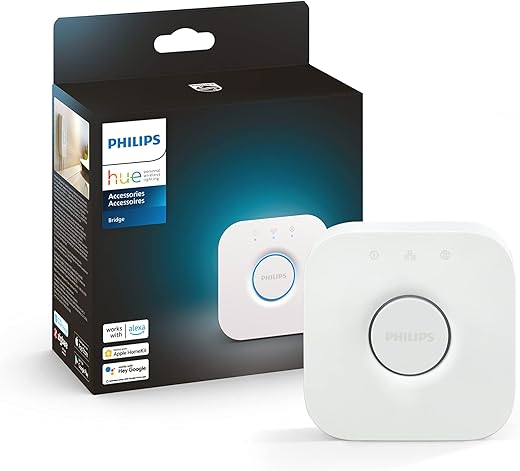
We view the Philips Hue Bridge as a compact, single-purpose bridge optimized for lighting: a small white hub that sits on your LAN and focuses on managing Hue bulbs, strips, and accessories. It includes a power adapter and Ethernet cable and is designed to sit behind your router.


The SmartThings Hub 3rd Gen is a more general-purpose dome-shaped hub with Ethernet (and cloud) connectivity intended to act as the central controller for a whole-home array of sensors, locks, thermostats, and cameras.


Radio protocols and device limits
We compare protocol support directly:
Remember: Z‑Wave frequencies differ by region. Check the SmartThings regional model before buying to match your country’s Z‑Wave band.
Ecosystem and voice-assistant compatibility
We found Hue integrates tightly with the Philips ecosystem and provides native Apple HomeKit and Matter support; Alexa and Google work via Hue account linking. SmartThings offers broad Alexa and Google Assistant support and extensive third‑party/cloud integrations, but it does not offer native HomeKit support—HomeKit access requires third‑party bridges or Matter-enabled workflows.
Feature Comparison
Setup, App Experience, and Integration
Initial setup
We found the Philips Hue Bridge setup almost foolproof: plug in power and Ethernet, open the Hue app, and follow the guided pairing. The Bridge downloads firmware automatically and keeps most lighting control local, so lights respond even if your internet drops.


The SmartThings Hub setup covers more device types, so it requires a few more steps—account linking, enabling integrations, and occasionally updating device handlers. Samsung’s app walks us through it, but expect extra taps for Z‑Wave devices and third‑party gear.


App usability
The Hue app focuses on lighting: clean scene creation, entertainment sync, and easy firmware management. Nontechnical users can build rooms and schedules quickly.
SmartThings’ app is broader: it surfaces sensors, locks, cameras, and routines in one place, which is powerful but can feel cluttered. If you prefer a screen-based controller with simpler tiles, our How to Connect Our Google Nest Hub to Smart Home Devices Fast guide shows how a Nest Hub can sit alongside either bridge.
Automations and cloud
Voice assistants and HomeKit
We link Hue natively to HomeKit, Alexa, and Google; Matter support improves cross‑platform access. SmartThings links well with Alexa and Google but lacks native HomeKit—HomeKit access usually needs Matter or third‑party bridging.
Performance, Reliability, Security, and Ecosystem
Reliability and latency
We tested real‑world responsiveness. The Philips Hue Bridge keeps most lighting logic local, so switches, schedules, and scenes respond instantly with minimal latency even if the internet drops. SmartThings delivers broader automation but some cross‑vendor rules and cloud connectors can introduce variable delays—local Zigbee/Z‑Wave actions are fast, but cloud‑to‑cloud tasks may be slower or fail when external services change.
Mesh stability and firmware cadence
Hue builds a robust Zigbee mesh where mains-powered Hue lights act as reliable repeaters; firmware updates are frequent and focused on lighting features and stability. SmartThings manages mixed meshes (Zigbee + Z‑Wave + Wi‑Fi) which gives flexibility but increases the chance of edge cases where protocol interactions cause instability.
Security and privacy
We value local execution for a smaller attack surface. Hue’s local control model limits cloud exposure for basic lighting control; it also receives regular firmware patches. SmartThings offers powerful cloud services and remote monitoring, which broaden functionality but rely on account integrations—this increases the importance of strong passwords and two‑factor authentication.
Ecosystem depth and scalability
Hue excels for lighting quality, entertainment sync, and official accessories (dimmers, motion sensors). SmartThings supports a far wider range of third‑party accessories and whole‑home automation expansion, making it the better long‑term choice for diverse device types.


Final Verdict: Which Hub Should You Buy?
We recommend the Philips Hue Bridge if you prioritize best-in-class lighting, simplicity, and tight Hue/HomeKit integration — it’s the clear winner for lighting-centric users.
For most buyers who want broad device support (Zigbee + Z‑Wave), advanced automations, and whole-home monitoring, the SmartThings Hub is our overall pick. Ready to choose? Pick Hue for unmatched light control; pick SmartThings for maximum flexibility. We tested setup, stability, and ecosystem depth across both hubs during our review. If you’re still deciding between Google- and Alexa-led homes overall, our How We Compare 5 Alexa and Google Assistant Deals breakdown can help.
Related Smart Hub Guides
Want more help planning your hub and assistant setup?

Does the SmartThings Hub 3rd gen support Z-Wave locks out of the box? Thinking about a front door upgrade.
I paired a Yale Z-Wave lock with ST last year — worked fine, battery life hasn’t been an issue. Just follow the manual’s inclusion mode steps.
Yes, the 3rd-gen SmartThings hub supports Z-Wave, so it should pair with most Z-Wave locks. Make sure the specific lock model is listed as compatible (and check whether any extra setup steps are needed).
Been tinkering with SmartThings for months now.
If you want complex automations involving sensors, cameras, locks, and non-light devices, SmartThings is the glue.
It supports Zigbee + Z-Wave + cloud protocols, so you can hook weird devices together.
That said, stability depends on what device handlers/drivers you use.
It’s powerful but occasionally requires patience to troubleshoot.
Agreed. If you’re okay diving into community handlers and occasional resets, ST shines. Otherwise Hue for lights + a minimal hub might be less headache.
Also, pro tip: use wired Ethernet for the hub if possible — cuts down on weird delays and pairing time.
Good tip on Ethernet — many users don’t realize the WAN vs local network difference for hub responsiveness.
Can confirm. I moved my hub to wired and automations feel snappier. Worth the small cable run.
Nice summary, Ethan. That’s exactly the trade-off many users face: flexibility vs. plug-and-play simplicity.
Nice roundup — thanks! Quick question: does the Philips HUE Bridge NAM support third-party Zigbee bulbs as reliably as Hue bulbs? I’m thinking of mixing brands to save $$ but don’t want flakiness.
Worth adding: some sellers sell Zigbee repeaters (plug-in smart plugs) that help network stability if you mix brands and live in a bigger house.
Good question, Liam. The Hue Bridge generally works best with Hue bulbs — third-party Zigbee bulbs can work but you might lose some advanced features and occasionally see pairing quirks. If you plan to mix brands, SmartThings tends to be more flexible with non-proprietary devices.
I mixed a few brands for a year and had to re-pair one bulb every few months. If you want zero fuss, stick to original Hue lights.
Setup was a nightmare for me, ngl. Hub wouldn’t join my network, app kept timing out, and I swear I muttered curse words at the router 😂
Been there. Turn off guest/isolated Wi-Fi and ensure 2.4 GHz is active during pairing. Those tiny things cause the biggest headaches.
Sorry you had that experience, Mason. Network issues are often the culprit — try disabling IPv6 or firewall rules temporarily during setup, or use the hub’s Ethernet port if available.
Both hubs have their pros, but I ended up picking SmartThings because I wanted Z-Wave for the garage and Zigbee for lights.
Also, I liked the idea of a central automation hub rather than many vendor-specific apps.
Pretty stable. Had to tweak a few device handlers but overall solid.
Same route here. If you’re into mixing brands, ST saves a lot of app-swapping.
Makes sense — SmartThings is often chosen for hub centralization. How’s your device mix holding up?
Quick technical note about Zigbee channels and interference:
1) Zigbee operates around 2.4GHz — same as Wi-Fi, so channel planning matters.
2) Hue bridges tend to pick channels automatically, but in crowded networks you might want to force a less-crowded Zigbee channel.
3) SmartThings hubs also let you change channels (depending on firmware) but it’s more involved.
4) If your home has many Wi-Fi networks, consider moving your Wi-Fi to non-overlapping channels to reduce noise.
5) Proper placement of the hub/bridge reduces retransmits and pairing failures.
I changed my router’s channel after seeing dropped Zigbee packets and it helped a lot. Worth the effort.
Great breakdown, James — very practical advice. Channel planning is underrated for reliability.
Does anyone know if the Hue Bridge can be integrated into SmartThings? I want my Hue scenes to trigger ST automations without cloud hops.
Thanks! Good to know about color transitions — I’ll test before committing.
I did it last year — it worked for basic on/off and scenes, but color temperature transitions were a bit weird through ST.
Yes — you can integrate Hue with SmartThings. SmartThings can discover the Hue Bridge and use it as a device source, but some advanced Hue features might not fully map over. The integration method has improved over time.
If you need precise lighting effects, you might keep those automations in the Hue app and have ST trigger simpler commands.
I went with Hue Bridge first and loved how simple it was. Later added SmartThings for sensors and it’s been pretty smooth — two hubs, one happy home 🙂
Same here. Two hubs but zero regrets — each does what it does best.
That’s a very common and sensible approach, Emily — use the best tool for each job.
Cloud-to-cloud? Ugh, nothing like relying on someone else’s server to turn off a lamp 😂
I get the convenience, but local control should be a priority. Anyone had issues when internet went down?
Agreed. The distinction can be confusing; documentation varies per device and integration.
Thanks Rachel — that’s exactly why I’m leaning Hue for critical lighting. Wish SmartThings would clarify which automations are local vs cloud.
Internet outage here for 3 hours last month — Hue still worked for lights via the bridge, but my cloud-only Alexa routines failed. Learned to keep local automations where possible.
Great point, Noah. Hue Bridge allows local control for lights (Scenes and most basic controls), whereas SmartThings has some local execution on the hub but many integrations still rely on cloud. Both have pros and cons if your internet is flaky.
Firmware updates made me nervous at first. Do updates ever brick Hue Bridges or SmartThings hubs? Any rollback options?
Rarely do official firmware updates brick devices, but glitches can happen. Neither platform offers a formal rollback for end users. Best practice: don’t update in the middle of a critical routine, and back up configurations when possible (SmartThings has export options via community tools).
Had one awkward update on ST that required a reboot, but not a brick. Patience and a quick community search usually helps.
Thanks — good to know. I’ll schedule updates when I’m home so I can watch the process.
How many devices can each hub realistically handle? I’m thinking 50+ devices in future 😬
Also—does anyone know if the Hue bridge supports THAT many bulbs? lol 🤷♀️
I run ~60 Zigbee devices across 2 Hue Bridges + ST. Works fine but requires planning for scene distribution.
SmartThings can handle dozens of devices; users commonly run 50+. For Hue Bridge, the official limit is 50 lights per bridge (or around that), though sometimes people push it. For large setups, multiple Hue Bridges or combining with ST is a solution.
I’ve been using Hue for lighting scenes and it’s honestly lovely.
The Bridge is fast, scenes load instantly, and the app is polished.
But SmartThings gives me sensors, locks, and a single place for automations.
If I had to pick: Hue for lights, SmartThings for full home automation.
Also, Philips’ firmware updates have been pretty smooth for me.
Same here — Hue for lighting, ST for rules. Only downside is juggling two apps sometimes, but worth it for reliability.
Thanks for sharing your setup, Olivia — that split use is exactly what a lot of readers do. Using both can be the best-of-both-worlds approach.