

Plug in the cheer — which smart plugs keep your lights merry, your bills tiny, and your privacy intact?
Holiday lights shouldn’t come with a surprise bill.
We tried seven smart plugs to see which save energy, protect privacy, and actually make holiday setups easier. Short setup. Clear energy data. No nonsense.
Smart plugs are just one part of the story. For full holiday control, also check How We Chose 4 Smart Home Hubs: Cyber Monday 2025/26 to see which hubs play best with Matter, Thread, and mixed smart homes.
Top Picks




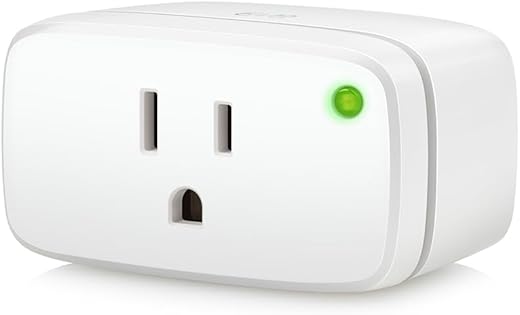
Eve Energy Matter Over Thread Plug
We appreciate the Eve Energy for its Matter over Thread support and strong privacy stance — no cloud dependency or forced registration. Its responsiveness and local control make it an excellent high-quality option for energy-aware homes.
If you’re building a Thread-first setup and want deeper consumption data across circuits, pair Eve plugs with the ideas in Best Home Energy Monitors for Smart Homes to track whole-home usage, not just individual outlets.
Future-facing connectivity and privacy
We recommend Eve Energy when you want the advantages of Thread (low latency, mesh stability) coupled with Matter interoperability and a strict privacy approach. Because Eve avoids cloud services, all control and automation happen locally once the device is paired to a compatible hub or border router.
Energy insights and real-world benefits
The plug reports energy consumption and integrates smoothly with Apple Home and other Matter ecosystems. In practice, that means highly responsive automations and accurate on/off state reporting that we found superior to many Wi‑Fi-only offerings. It’s especially useful for identifying vampire loads and scheduling high-draw devices away from peak pricing windows.
Practical considerations
To realize Thread’s benefits you’ll need a compatible hub or Thread border router (recent Apple, Google Nest Wi‑Fi Pro or certain Echo and SmartThings devices). Also, while the plug is rated to 15A, a few users reported inrush or load edge cases with motors or AC compressors; test high-current loads before relying on it for heavy appliances.
Overall, Eve Energy stands out as our premium pick: excellent performance in Thread-based setups, strong privacy and reliable energy monitoring make it ideal for serious smart-home users focused on automation and savings.
Kasa Matter Smart Plug with Energy
We found this plug reliable and easy to set up, delivering Matter compatibility and useful energy monitoring. Its compact form factor and safety certifications make it a dependable choice for holiday lighting and everyday appliances.
Want more ways to log and trim your plug loads? Compare this Kasa pick with the rest of our favorites in Best Smart Plugs With Energy Monitoring before you commit to one brand for your tree, wreaths, and window lights.
What it is and why we like it
We recommend this plug when you want Matter interoperability and straightforward energy monitoring in one compact package. It’s designed to be easy to set up via the Kasa app and works with Apple Home, Alexa, Google Assistant and SmartThings once commissioned.
Key features and practical benefits
The primary benefit is future-proofing: Matter compatibility reduces the friction of mixing ecosystems during the holidays when you might be joining multiple devices and voice assistants. The energy meter lets us track how much power string lights or seasonal decorations actually use so we can schedule and cut unnecessary runtime.
Limitations and real-world insights
It runs on 2.4 GHz Wi‑Fi only, so it won’t join Thread meshes or 5 GHz networks. For many users that’s fine, but if you plan to build a Thread-based smart home you may prefer a Thread-capable plug. Also, while Matter reduces cross-platform friction, some advanced setup steps still happen in the vendor app.
Overall, we see this as a strong value pick for holiday energy savings: easy scheduling, trusted safety ratings and good energy feedback let you automate decorations and appliances with confidence.
meross Matter Smart Plug with Monitoring
We appreciate the Meross plug for its Matter compatibility, privacy-forward design and practical energy tracking. It’s a great option if you want Matter integration without mandatory cloud registration.
Running a mixed ecosystem with Alexa, Google, and Apple devices in the same house? See how the rest of your voice gear stacks up in How We Compare 5 Alexa and Google Assistant Deals so your plugs and speakers stay in sync.
Why choose it
We recommend Meross when privacy and energy visibility are priorities. The plug advertises Matter interoperability and a local-first approach — meaning you can avoid cloud registration and still control devices via HomeKit, Alexa or Google after a one-time setup.
How it helps reduce holiday energy use
The built-in consumption meter is particularly useful for seasonal setups: we can schedule strings of lights and compare their actual cost versus assumptions. The app also supports timers, overheat alerts and a standby-killer mode to cut vampire draws.
Practical caveats
This is Matter over Wi‑Fi and requires iOS 16.1 / Android 8.1 or later for the best onboarding experience. Some advanced networking setups (multicast/mDNS restrictions) can interfere with HomeKit discovery and may need router adjustments. Firmware updates have improved stability, but initial pairing can be mixed on complex networks.
In short, Meross balances privacy, energy insight and Matter compatibility, making it a solid choice for holiday automation where data control and power tracking matter.
Tapo P115 Mini Smart Plug with Energy
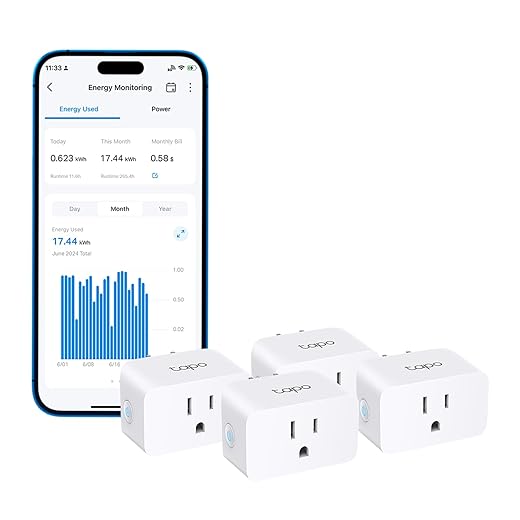
We like this plug for its clear energy reporting and compact footprint that preserves adjacent outlets. The Tapo app makes scheduling and cost-tracking straightforward, making it an efficient pick for holiday lighting control.
Why this matters for holiday energy management
We recommend the Tapo P115 when you want high-value energy tracking in a compact package. Its ability to log usage and estimate bills makes it easy to compare different holiday setups — for example, comparing the run cost of LED string lights versus incandescent replacements.
Practical benefits and examples
We used the scheduling capability to restrict decorative lights to evening hours and to limit EV charging to off-peak windows. The app’s ability to accept tiered electricity rates is especially useful for users with time-of-use billing: it helps minimize costs by shifting loads to cheaper periods.
Considerations before you buy
This plug is Wi‑Fi based and does not support Thread or Matter. While setup is typically painless, recessed or tight exterior outlets may still present fit challenges despite the compact design. If you require local Matter control or a Thread mesh, consider a Thread-enabled product instead.
For the money, the P115 gives us a practical combination of energy intelligence and scheduling — a reliable pick to keep holiday energy costs in check.
Wyze Outdoor Dual-Outlet Smart Plug
We like this for weather-exposed holiday displays thanks to its IP64 rating and two independently controlled outlets. Energy monitoring and a built-in light sensor add practical automation for outdoor lights and inflatables.
If your yard display also needs cameras watching the driveway or front walk, pair this outdoor plug with our picks in Our Top 7 Security Cameras With Cloud Discounts Now for a full lights-plus-surveillance setup.
Designed for outside holiday use
We recommend Wyze Outdoor when you need reliable outdoor control for lights, inflatables or pumps. It’s built to resist rain, dust and freezing temperatures while giving two outlets you can control independently — perfect for pairing up lights and accessories at a single location.
Smart features that save energy
Beyond weatherproofing, this plug offers energy monitoring and a light sensor so you can automate behavior based on ambient light without relying on Wi‑Fi. That means lights can come on at dusk and turn off at dawn even if the network is temporarily down. The app lets us set schedules, vacation/randomized modes and alerts when monthly consumption exceeds thresholds.
Limitations and installation tips
It operates on 2.4 GHz Wi‑Fi only and is not designed for Thread or Matter. Keep the plug’s size and outlet location in mind — rubber covers and mounting orientation matter to keep it protected. For best range place it where it can see a strong Wi‑Fi signal or use a nearby extender.
For outdoor holiday displays we find it delivers strong durability and the controls you need to limit runtime and energy waste while keeping decorations looking their best.
VOCOlinc HomeKit Smart Plug 4-Pack
We like VOCOlinc for households invested in Apple HomeKit thanks to tight integration and reliable Siri control. It’s compact, supports schedules and timers, and is a good choice when you want simple, dependable automations.
HomeKit household and planning more upgrades later? Read We Found 6 Best Voice Assistant + Smart Hub Deals to decide whether you’ll lean Apple-first, Alexa-first, or keep things multi-platform.
Best for Apple-centric households
We recommend VOCOlinc for users who prioritize HomeKit integration and require a plug that just works with Siri and Apple automations. Its plug-and-play approach makes it quick to add into scenes and schedules in the Home app.
Everyday use and energy-saving scenarios
We’ve used these to automate morning coffee makers, control holiday display zones and gate power to vampire loads overnight. The ability to revert to off after power loss adds a safety advantage for appliances that should not restart automatically.
Caveats from our testing and reviews
Some users report occasional connectivity dropouts depending on router configuration, so placement relative to Wi‑Fi coverage matters. VOCOlinc’s firmware update experience can also vary; a small number of users noted delayed or inconsistent updates.
Overall, VOCOlinc is a dependable, no-fuss plug for HomeKit households wanting straightforward holiday and daily automations.
Govee Smart Plug with Energy Monitoring
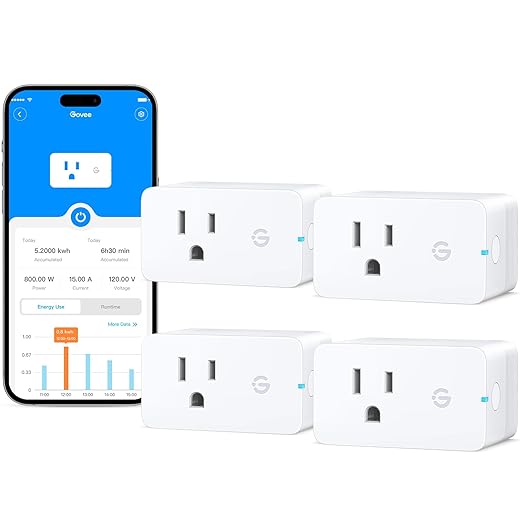
We found these to be a cost-effective way to add energy monitoring and scheduling to multiple outlets. The Govee Home app provides useful history and group controls for seasonal setups, though advanced users may prefer Matter/Thread solutions.
If you’re already using Govee strips or lamps, you can match these plugs with color accents from Our Top 7 Low-Light Smart Lights for Holiday Ambiance to build a full budget-friendly holiday lighting scene.
Value-oriented choice for multi-outlet setups
We recommend Govee when you want to outfit several locations quickly on a limited budget. The 4-pack and energy-monitoring features make it practical for seasonal lighting and appliance control without a large upfront cost.
How it helps cut holiday energy bills
The Govee app lets us group plugs, create schedules, and inspect energy usage to discover high-consumption items. For example, you can run string lights only during high-visibility evening hours and check a 30-day usage chart to estimate cost savings.
Practical notes and limits
These plugs rely on the Govee ecosystem rather than Matter, so cross-platform portability is limited. Setup generally works well via Bluetooth discovery, but locating the right device model in the app can be confusing at first. For users wanting local-first Matter operation, this is not the best fit.
Overall, Govee offers a wallet-friendly route to meaningful energy insights across multiple holiday zones, and we’d recommend them when cost and scale are priorities.
Final Thoughts
We recommend the Eve Energy Matter Over Thread Plug as our top pick if you run a Thread-enabled home and care about LOCAL control and privacy. Its Matter-over-Thread support, fast responsiveness, and no-cloud-required design make it ideal for smart holiday lighting that reacts instantly and keeps your data off the internet. Pair it with a Thread border router (HomePod mini, Apple TV 4K, etc.) for the best experience.
For a more general-purpose option that’s compact and simple to deploy for lots of indoor lights and appliances, choose the Kasa Matter Smart Plug with Energy. It offers easy setup, reliable Matter compatibility, and built-in energy tracking — perfect for running and monitoring tree lights, wreaths, and seasonal inflatables without losing the outlet next to it.
If you specifically need rugged outdoor capability, keep the Wyze Outdoor Dual-Outlet Smart Plug in mind — its IP64 rating, two independent outlets, and light sensor make it the practical pick for weather-exposed displays.
More Holiday Smart-Home Deal Guides
Want more ideas before you lock in all your Black Friday and holiday buys? Try these next:
- Our Top 6 Smart Home Gifts Under $50 for Black Friday
- Our Top 7 Low-Light Smart Lights for Holiday Ambiance
- Our Top 7 Security Cameras With Cloud Discounts Now
- We Found 6 Best Voice Assistant + Smart Hub Deals
- How We Chose 4 Smart Home Hubs: Cyber Monday 2025/26
- Govee RGBIC LED Strip Lights: Insane Multi-Color Drama

Nice list. Quick question: the Kasa KP125M and the Tapo P115 are both 2.4GHz-only — does that limit anything for reliability? My router has both 2.4 and 5GHz bands and I always worry about smart home devices getting kicked off.
Also, are there any safety or load differences between the U.S. plugs (15A/1800W) and the overseas ones? I live in a 120V home so I guess it’s standard, but want to be safe for big inflatables.
2.4GHz-only is very common for smart plugs because 2.4GHz has better range and penetration. It doesn’t reduce reliability if your router broadcasts both bands — just make sure the smart plug is connected to the 2.4GHz SSID (some routers combine them; disabling band steering during setup can help).
Regarding load: 15A/1800W is standard for most North American smart plugs and fine for lights and single inflatables, but avoid plugging multiple high-draw heaters or large blowers into one plug.
I had flaky reconnections until I separated my SSIDs (2.4 vs 5). Once I forced the plugs onto 2.4 they were rock solid. Also pro tip: put heavier stuff on its own dedicated outlet, not a smart plug rated for 15A if the device draws near that.
As an Apple user I’m leaning toward VOCOlinc for HomeKit-first control. I’m curious though about the tradeoffs: the roundup gave VOCOlinc an 8.0 — what would make someone pick VOCOlinc over the Matter plugs like Eve or Kasa? Is it just HomeKit reliability or something else?
Also, any tips on grouping VOCOlinc plugs for scenes? I’m a bit new to HomeKit automations.
I use VOCOlinc in my bedroom and it just works with Siri. If you want ‘set and forget’ HomeKit stuff, it’s a solid choice. If you need Matter-based future-proofing, go with Eve or Kasa.
One more note: VOCOlinc is often more plug-and-play. If you don’t want the extra setup of a Thread network or you don’t own a Thread border router, VOCOlinc keeps things simple.
If you plan to expand beyond HomeKit later, consider Kasa Matter — it’ll give you the best of both worlds, assuming you’re okay with some cloud features.
VOCOlinc is a great pick if your home is heavily invested in HomeKit and you want simple, dependable Siri control without worrying about cross-platform quirks. It’s straightforward and compact. The tradeoff vs. Matter plugs: fewer cross-ecosystem features (Matter unlocks easier cross-platform interoperability) and sometimes less advanced energy analytics.
For grouping in HomeKit: create a ‘Room’ or ‘Accessory Group’ in the Home app and add the VOCOlinc plugs there, then use Scenes to toggle multiple plugs together.
Wyze Plug Outdoor = lifesaver for my Christmas yard chaos 😂
I got tired of dragging extension cords and unplugging everything in the rain (seriously, why am I still doing that in 2025?). The dual outlets are clutch because I can run the inflatable AND the spotlights separately. The light sensor feature turned them on at dusk automatically which saved me from 30 ‘did you turn on the lights?’ texts from my neighbor.
Only gripe: the app’s schedule UI is a little clunky and I had one weird disconnect during a storm. But overall 10/10 for outdoor use — very sturdy and worth it for displays.
Glad it worked out! The Wyze Outdoor’s IP64 rating handles splashes and rain but not full submersion, so it’s ideal for typical outdoor holiday lights. For storms, a quick power cycle usually reconnects them; if disconnects persist check Wi‑Fi signal strength near the outlet.
FYI I paired mine with a cheap outdoor Wi‑Fi extender because my router was too far away. Worked perfectly and no issues since.
If you add an extender, place it somewhere sheltered and avoid daisy-chaining extenders. Better to use one reliable extender or a mesh node.
You can also use IFTTT (Wyze supports it) to create more complex schedules if you don’t like the stock app UI. Took me ten minutes and solved my scheduling headaches.
Totally agree — installed them last year and they survived a Nor’easter. The dual outlets saved me from buying two separate outdoor plugs. The app could use an overhaul though 😅
Great roundup — thanks! A couple thoughts about the Eve Energy (Matter) plug:
1) The privacy angle sounds ideal for me (no cloud registration) — can someone confirm that it really works locally with Apple Home without any hub?
2) I wasn’t sure if Thread requires a Thread border router (HomePod mini or Apple TV) for the over-Thread benefits — is that right?
3) Also curious how responsiveness compares to the Kasa Matter plugs for quick on/off during holiday light scenes.
I want something rock-solid for holiday lighting and to avoid having my plugs rely on cloud services. Any real-world experiences appreciated!
I have both Eve and Kasa. With a HomePod mini (border router) the Eve is noticeably faster — instant basically. Kasa is fine for timers and schedules but a tiny lag on manual toggles. If privacy matters to you, Eve’s no-cloud approach is a big plus.
One more tip: if you’re building a network of Thread devices, place the border router centrally and add a few Thread-capable devices to strengthen the mesh — that’ll keep the Eve plugs super responsive.
Short answers: Eve Energy will work locally with Apple Home, but to use Matter over Thread you need a Thread border router (HomePod mini, Apple TV 4K, or a compatible SmartThings hub). If you don’t have a Thread border router, Eve still works via HomeKit over Wi‑Fi.
As for responsiveness, users often report Eve over Thread as snappier than Wi‑Fi-only plugs like Kasa, especially when the Thread network is healthy.
Anyone compared the energy readings between Kasa, Meross, and Govee? I’m trying to figure out which gives the most accurate kWh numbers. Thinking of using them to track holiday lighting costs.
I used a Kill A Watt to compare: Kasa was within ~3% of the Kill A Watt, Meross ~4%, Govee ~6%. For general holiday cost tracking all were fine — only if you’re doing exact energy audits does the small error matter.
In our testing and user reports: Kasa and Meross (Matter-enabled models) tend to be more consistent and reliable for short-term monitoring. Govee is good for budget-minded setups and gives useful historical data, but advanced users sometimes note small discrepancies vs. power-meter references. If you need the most accurate readings, pick a model with UL/ETL certification and compare occasional readings against a handheld power meter.