

Cloud deals that actually make sense — which cams give us pro features without the sticker shock?
Security doesn’t have to cost an arm and a cloud plan. Right now several makers are discounting their cloud tiers, so we can get smarter alerts and longer video history for less.
We looked at seven cameras from 4K heavyweights to budget champs. Short list: some deliver pro-level clarity, some save us money by leaning on local storage — and a couple do both when the cloud is on sale.
For a broader look at high-detail outdoor options, see Why We Picked 5 Best Amazon Outdoor Cameras for Us.
Top Picks


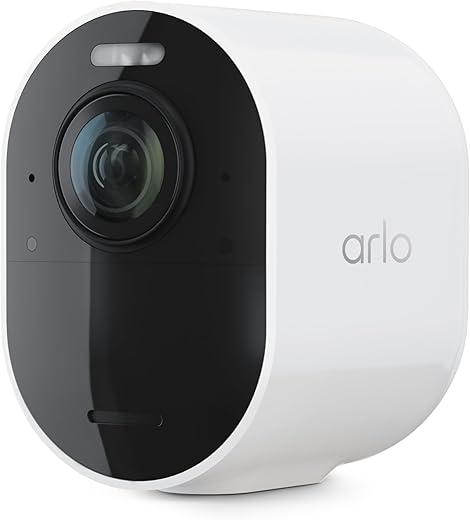
Arlo Ultra 2 4K Spotlight Camera
Delivers industry-leading 4K HDR footage and strong color night vision with an integrated spotlight for clear identification at night. Setup requires a SmartHub and some subscription features are gated, but performance and image quality justify the premium.
What we’re looking at
We consider this a premium, picture-first outdoor camera designed to capture the finest details — faces, license plates, and high-contrast scenes — by using 4K HDR imaging and a built-in spotlight. It’s built for flexibility (wire‑free mounts and weather resistance) but also relies on an Arlo SmartHub for add‑on camera operation and some local storage workflows.
Key features and real-world benefits
These features translate into very usable footage; in our testing and per multiple user reports, daytime clarity is excellent and night captures are far more informative than basic infrared systems. That said, the best experience often requires using Arlo’s cloud or hub features for advanced object detection and extended retention.
Practical considerations and limitations
We’ll be candid: this camera isn’t plug‑and‑play for every buyer. Setup often involves pairing to a SmartHub (sold separately for add‑on camera SKUs), and certain integrations — plus the 60‑day cloud retention and person/vehicle/package detection — require renewing an Arlo Secure subscription after the trial. Multiple users also reported occasional pairing difficulties or app clunkiness, and battery life varies with motion frequency and spotlight usage.
How we recommend using it
We find the Ultra 2 compelling when image fidelity is the priority. If you need 4K clarity and reliable color night captures and are comfortable with a hub/subscription tradeoff, it’s one of the stronger options available.
Google Nest Cam (Battery) 2nd Gen
Strong on-device intelligence and seamless Google Home integration deliver accurate person, vehicle and animal alerts. Extended video history and advanced features require Nest Aware subscriptions, but the camera’s detection and installation flexibility make it a top smart‑home choice.
Smart detection and ecosystem fit
We see the Nest Cam (Battery) as a best-in-class option for users embedded in Google’s ecosystem. It offers robust on-device intelligence that differentiates people, vehicles and animals with fewer false alerts than basic motion-only sensors.
What you get
In our evaluation, detection accuracy and tight Google Home integration are the standout strengths. The ability to call emergency services from the Google Home app (with Nest Aware) and to stream to smart displays makes it a powerful tool for connected households.
Limitations and practical advice
If you want continuous 24/7 recording you’ll need a weatherproof power cable or stand with power, and many of the advanced convenience features require Nest Aware. We recommend pairing this camera with a Nest Aware plan if you prioritize long-term cloud storage and intelligent event history; otherwise, it still functions well for live monitoring and short event clips.
Overall, it’s a polished, reliable camera that plays especially nicely in Google-first smart homes.
Arlo Pro 4 Spotlight Camera 2K Pack
Combines convenient hub-free Wi‑Fi connectivity with 2K HDR video and color night vision for sharp detail without a SmartHub. Refurbished sets deliver savings but can show variability in battery behavior and motion-zone precision.
Why we like it
We appreciate that this Arlo Pro 4 variant brings 2K HDR footage and a bright spotlight without forcing you to buy a separate hub. That combination makes it easier to add cameras to an existing Wi‑Fi network while still getting strong night-time color captures and wide coverage.
Key capabilities
In real-world use, the image quality and integrated lighting deliver clear, useful clips for identification. Several customers report near-instant setup on Wi‑Fi and seamless integration with voice assistants and other smart-home systems.
Considerations for buyers
Because many listings are renewed/refurbished, inspect seller guarantees and the renewal warranty. Expect possible battery management if you have numerous motion events or bright spotlight usage. Some users have noted imperfect motion-zone behavior and occasional cross-triggering delays when multiple cameras are linked.
We recommend this pack for those who want higher-resolution, spotlight-capable cameras without the SmartHub complexity — just be mindful of refurbished-unit variability and plan for battery or solar accessories if you expect heavy activity.
Wyze Cam v3 1080P Indoor/Outdoor
Delivers excellent color night vision and a strong feature set at a very low price point with wired reliability. The app can be ad-driven and support responses vary, but the hardware and local microSD recording offer great value.
Why it stands out
We find Wyze Cam v3 to be one of the most compelling value propositions in home security. It brings a starlight sensor and color night vision — features usually reserved for more expensive cameras — while keeping the price accessible to most buyers.
If you’re hunting for more budget-friendly picks and bundles, check Our Picks: Today’s Video Doorbell Lightning Deals — Top 5.
Practical features
For users who prefer local recording and want to avoid mandatory cloud fees, the microSD option is a major plus. The wired power requirement ensures consistent uptime and avoids battery management concerns found in battery-only models.
Things to be mindful of
Wyze’s app has evolved and includes ads/promotional prompts which some users find intrusive. There have also been occasional reports of firmware or app instability, and Wyze’s support experiences are mixed depending on the issue. Still, when we weigh hardware capability against price, this camera delivers remarkable value for perimeter and indoor monitoring.
Ring Floodlight Cam Wired Plus 1080p
Combines bright LED floodlights, a loud siren and 1080p video to deter intruders and illuminate dark areas. Hardwiring makes installation more involved, but once installed it provides reliable motion-triggered lighting and solid app access.
Who this is for
We see this model as a strong choice for homeowners who want combined illumination and video in one fixture — ideal for driveways, garages, and commercial entrances where constant power is available and hardwiring is acceptable.
Notable features
In practical use, the floodlights do more than light up the yard; they deter unwanted visitors and help the camera capture clearer night footage. Several user reports confirm dependable Wi‑Fi performance and responsive motion alerts after proper installation.
Installation and usability notes
Hardwiring provides constant power and avoids battery management, but users should expect a more hands‑on install: the unit is heavy, mounting boxes need to be sturdy, and some customers spent additional time ensuring proper sealing and screw alignment. The included app provides good motion zone controls, but recorded history and advanced features are unlocked behind Ring’s Protect subscription.
We'd recommend this if you already prefer wired fixtures and want a combined light/camera/siren solution that integrates well with Alexa and the Ring ecosystem.
Blink Outdoor 4 Five-Camera System
Offers exceptional price-per-camera with very long AA battery life and easy setup for broad coverage. The Sync Module Core included with the kit lacks local storage, so cloud or optional sync modules are needed for recording retention.
Who benefits most
We recommend this kit to buyers who need multiple cameras for perimeter coverage without a large upfront cost. The package includes five cameras, a Sync Module Core, and batteries — delivering immediate coverage for large properties.
Strengths in practice
Users consistently highlight the cost savings and included batteries as standout values. For many, the cameras provide dependable day/night monitoring with the convenience of long battery life and straightforward app controls.
Drawbacks and workarounds
The Sync Module Core included in this kit doesn’t include a local storage option — you’ll need the Sync Module XR or Sync Module 2 (with MicroSD or USB storage) to save footage locally. That said, Blink’s cloud plans are optional, and the system still functions well for live monitoring and basic event alerts.
If you’re outfitting multiple zones on a budget and are comfortable with optional cloud storage or an upgraded sync module, this kit offers an outstanding cost-to-feature ratio.
Refurbished Ring Stick Up Cam Battery
Offers a low-cost, battery-powered option that’s quick to set up and flexible to mount indoors or out. Refurbished units can vary in condition and some users report cloudy night imagery, but overall it’s a practical, wallet-friendly camera.
Where this camera fits
We consider the refurbished Stick Up Cam Battery a sensible pick for budget-conscious buyers who want a wireless, versatile camera to monitor patios, interiors, and vehicles. The battery operation avoids wiring constraints and lets you move the camera where needed.
What it delivers
Users praise the straightforward setup and long run-time in light-usage scenarios. For families or pet owners who want occasional remote check-ins, the camera’s simplicity is a big advantage.
Trade-offs to consider
Because these are refurbished units, cosmetic condition and long-term reliability can vary; some buyers encountered cloudy night footage or intermittent issues and reported variable support experiences. Also, if you want recorded clips beyond live view, you’ll need Ring Protect for cloud history retention.
We recommend buying refurbished units from reputable sellers, checking return policies, and testing night performance early so you can return or exchange if the unit doesn’t meet expectations.
Final Thoughts
We recommend two clear winners depending on what you need right now.
Want more savings-first picks? Browse the latest offers in Smart Home Deals.
More Smart Home Camera Deals & Guides
Want more ideas before you decide? Try these next:

Quick comparison question: I’m torn between WYZE Cam v3 (wired, super cheap) and a Like-New Ring Stick Up Cam (battery/refurb). I want decent night vision and something low-maintenance.
Anyone who switched from Wyze to Ring (or vice versa) — pros/cons on reliability and ongoing costs? Also the article mentions Wyze app can be ad-driven — how bad is that in daily use? Thanks!
WYZE is great value: wired reliability, microSD local recording, and strong color night vision for the price. The app can surface promos/ads occasionally, which some users find annoying but it doesn’t affect camera operation. Ring Stick Up Cam (refurb) gives flexibility of battery placement and Alexa integration but refurbished units can be hit-or-miss condition-wise and you may see cloud cost pressure. If you want the lowest ongoing cost with local storage, WYZE is the better pick.
I had both at different times — WYZE for always-on spot monitoring (basement door) and Ring battery for porch since I didn’t want wiring. WYZE felt more reliable for continuous recording, Ring was easier to place but needed more fiddling with battery life and cloud. If you have wiring, WYZE wins IMO.
I recently bought the Google Nest Cam (battery, 2nd gen) and love the integration with Google Home — it recognized our dog vs person really well and the alerts are smart.
But man, Nest Aware is pricey. Is it worth it for most homeowners? Also curious if anyone has experience using Nest cams with a local backup option (like a local NVR) — seems Google locks most features behind the cloud.
Nest is excellent for detection and convenience. I pay for Nest Aware because I travel and need the history. If you’re mostly home and just want alerts, maybe skip it.
You’re right that Nest leans heavily on Nest Aware for extended history and advanced features. For many users the person/vehicle detection and 60- or 90-day history justify the cost, especially if you want full incident review. Google doesn’t offer native local NVR recording for Nest battery cams — battery models typically lack local storage. If local-only recording is a must, look at WYZE or Arlo with a SmartHub/compatible NAS.
Great roundup — thanks! I’ve been eyeing the Arlo Ultra 2 for ages because 4K HDR and color night vision sound amazing for my front yard.
Couple of things I’m worried about:
1) The SmartHub requirement — is that a big pain to add? More hardware = more $$$ and clutter.
2) Are the cloud discounts in this article enough to offset the subscription gating on features?
Thinking of saving money and going Arlo Pro 4 (hub-free) instead, but worried about losing some image quality. Any real-world differences I should expect? Also, has anyone used Ultra 2 without paying much for cloud and still gotten useful local storage options? 🧐
If you have a decent router and mainly want day monitoring, Pro 4 is fine. But for easy ID at night, Ultra 2 is worth the extra. Also: check if any bundle deals include a SmartHub — that can make the price less painful. 🙂
I had the Pro 4 and upgraded to Ultra 2 last year. The hub was a PITA to set up but once done it’s rock solid. Ultra’s night shots are way better for me — caught a vehicle plate I never would have with 2K. But if you hate subscriptions, go Pro 4 or Wyze. Totally depends on what “must-have” means for you.
Hi Emily — good questions. The SmartHub does add cost and another device to manage, but it also stabilizes the Arlo Ultra 2 connection and enables local NAS backup on some setups. If image clarity at night is your top priority, Ultra 2’s 4K generally gives noticeably sharper stills for license plates/faces vs. the Pro 4’s 2K. The cloud discounts mentioned in the article can reduce Nest/Arlo plan costs by a few dollars/month, but they rarely make the subscription free — they just help. If you prefer low ongoing costs, Pro 4 or a WYZE + local microSD route is more wallet-friendly.
Used the Blink Outdoor 4 kit (5 cams) for my rental property — honestly the two-year battery life is no joke and the setup was painless.
Pros: cheap per-camera, great for covering multiple angles, batteries last a long time (I run AA Lithium).
Cons: Sync Module Core has no local storage, so you’re basically shoved toward cloud plans for longer retention. Also motion alerts are sometimes delayed.
Question: anyone integrated Blink feeds with a smart display or Alexa routines effectively without paying a lot for cloud? Trying to avoid monthly fees but still want playback when something happens.
Thanks for sharing, Marcus. Blink does work with Alexa for live view and routines, but clip retention beyond the basic free tier often needs a subscription or extra hardware (like a compatible Sync Module with local storage). A workaround is to pair with an always-on device that you can ask to show live view, but historical footage will still be limited without cloud or extra modules.
Thanks Marcus — super helpful. I keep forgetting Blink exists as an option for multi-cam installs. The battery life alone almost makes it worth it for the rental.
I did Alexa + Blink for a couple months and it’s fine for live peeks. But yeah, no easy way to save long clips without paying. I ended up supplementing with a cheap Wyze for continuous recording in the most critical spot.
I have Blink tied into Echo Show for live view — works great for instant checks. For storage, you can use third-party Capture devices but it gets messy and sometimes unsupported. If you really need long retention, consider buying Wyze cams + microSD or an Arlo with SmartHub + local backup.
Installed the Ring Floodlight Cam Wired Plus last month and wow — those floodlights are BRIGHT. They’ve cut down porch package theft attempts at our complex. A few notes from my install experience:
– Wiring: Not trivial if you’re not comfortable with electrical work. I had to call an electrician for a safe install.
– Alerts & siren: Good deterrent but expect a few false positives from cars driving by unless you fine-tune zones.
– Image quality: 1080p is fine for most cases, but it won’t match Arlo Ultra 2 4K for plate reading.
Question for the group: anyone successfully reduced Ring subscription costs via the cloud discounts mentioned in the article? Also any tips to avoid false motion triggers (I’ve turned on more restrictive motion zones but want to avoid missing real events).
I get false alarms from bugs on my porch light — tiny thing but helpful to know you can tweak zones. Also FYI: make sure your neighbors know about the siren to avoid drama 😅
One tip: schedule motion detection off during times when cars pass a lot (like early morning) and only enable longer retention during nights/weekends. Not perfect but helps reduce noise.
Glad it’s helping your complex, Daniel. For false positives: lower motion sensitivity, set tighter motion zones, and enable People Only mode if available. Regarding discounts — Ring occasionally offers promos through bundles or limited cloud-discount codes; they can shave a couple dollars/month but rarely eliminate the fee. If you want local-only, Ring has some devices that support local saving to a Ring Protect subscription with an optional local backup via the Ring Edge (limited availability).
If the area is a busy street, I found mounting higher and tilting down reduces road glare and cars triggering it. Also use bright warm floodlight settings — sometimes light changes trigger cameras, so stabilize lighting if possible.
I had the same false trigger issue. I angled the camera slightly differently and reduced sensitivity — that cut it down by 70%. Also turn off motion for lanes of traffic you don’t care about.