

Why spend more? Six clever smart-home gifts under $50 that actually do the job.
Black Friday, meet common sense. We rounded up smart-home gear that adds real utility — not gimmicks — for under $50.
We picked things that are quick to set up, useful every day, and play nicely with assistants. Short install. Long payoff.
For more under-$50 picks and updated deal tracking, see Smart Home Deals Under $50: Best Smart Home Gadgets (2026).
Smart-home budget a bit higher? Take a look at We Found 6 Best Voice Assistant + Smart Hub Deals for bigger-ticket smart displays and hubs that pair nicely with these under-$50 gifts.
Top Picks Under $50


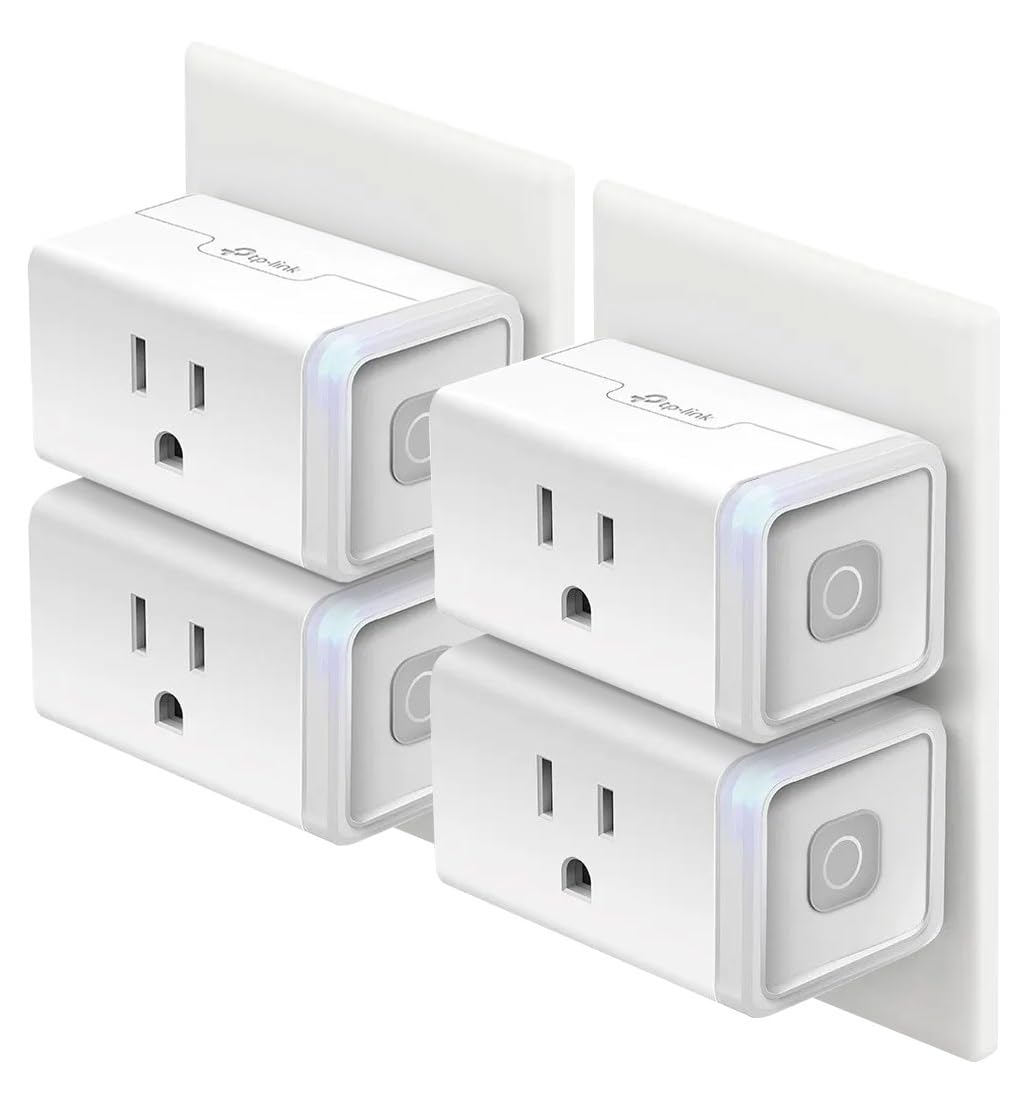
Kasa HS103P4 4-Pack Smart Plugs
We find these plugs to be a dependable, no-nonsense way to add voice and schedule control to lamps, fans, and seasonal lights. The app and Alexa integration are mature and reliable, making them an excellent starting point for home automation.
What makes these stand out
We consider the Kasa HS103P4 an essential basic building block for smart homes. These smart plugs add voice control, remote access, and scheduling to ordinary devices without changing fixtures or wiring.
Want inspiration for what to actually plug into those smart outlets? Our guide to Our Top 7 Low-Light Smart Lights for Holiday Ambiance shows how to turn lamps and accent lighting into cozy, automated holiday scenes.
Everyday usage and features
We rely on these for predictable tasks: automating lamps on dusk, setting charging routines, and controlling holiday displays. The scheduling and timer options make them ideal for energy saving and security routines.
Practical limitations and tips
They require a 2.4 GHz Wi‑Fi network during setup, which can trip up users on combined or 5 GHz-only networks. The Kasa app handles most needs well, though some power users prefer integrating them into broader platforms like SmartThings or Home Assistant for complex automations.
Who should buy
If you want an inexpensive, reliable way to make dumb devices smart and integrate them into voice routines or automations, these plugs are an excellent Black Friday purchase. They deliver consistent performance with minimal fuss.
Wyze Cam Pan v3 1080p Pan-Tilt Camera
We appreciate the Pan v3 for packing pan/tilt coverage, color night vision, and weather resistance into a sub-$50 camera. It gives excellent coverage for porches, driveways, or larger indoor spaces when you want rotation and tracking on a budget.
Overview and intended use
We view the Wyze Cam Pan v3 as a feature-rich budget PTZ (pan-tilt-zoom) camera that’s flexible enough for both indoor and sheltered outdoor placements. It’s aimed at users who want broad coverage without buying multiple fixed cameras.
If you need fixed-position coverage to back up this pan-tilt cam, compare it with the picks in Our Top 7 Security Cameras With Cloud Discounts Now for doorways, garages, and side yards.
Standout features and how they help
In practice, the pan/tilt gives us a way to scan a yard or living room without physically moving hardware. The color night vision is especially useful when you need color cues for identification. Two-way talk and a built-in spotlight/siren add active deterrence options.
Caveats and setup notes
The camera only supports 2.4 GHz Wi‑Fi, which can be an issue if your router broadcasts a combined SSID or you rely on 5 GHz-only networks. The Wyze app is capable but persistent upsell prompts can be annoying; most basic functions work fine without a subscription, though advanced CV/person detection and cloud features are gated.
Practical recommendation
For the price, we recommend this as the best pan-tilt option under $50 if you want wide coverage and good low-light performance. If you rely heavily on cloud CV features, plan for the potential subscription cost or lean on local microSD storage instead.
Amazon Echo Pop Compact Alexa Speaker
We find it delivers surprisingly full sound for such a small footprint and covers basic smart-home needs with minimal fuss. Its combination of low price, compact design, and Alexa functionality makes it an easy recommendation for bedrooms, kitchens, and small spaces.
What it does and who it's for
We see the Echo Pop as a purpose-built compact Alexa speaker for tight spaces — bedside tables, countertops, and small rooms. It prioritizes affordability and convenience over deep audiophile fidelity, but for everyday listening, alarms, timers, and smart-home control it performs very well.
Key features and real-world benefits
Because it’s so small, we especially appreciate it as an entry-point device: it lets us add voice control to rooms that wouldn’t justify a larger Echo. For example, we use one on a nightstand for alarm routines and another in the kitchen for hands-free timers and pantry list updates.
Limitations and practical tips
We don’t expect this to replace larger Echo units for high-volume listening. The small cabinet limits low-end depth compared with full-size speakers, and the device must stay plugged in. Also, homes with several Alexa devices may experience multiple wake-ups if someone speaks loudly — placing devices slightly further apart or adjusting volume can help.
Bottom line
We recommend the Echo Pop if you want a compact, inexpensive way to add voice control and decent sound to small rooms. It’s an especially good Black Friday pick for building a multi-room Alexa setup without a big budget.
Govee RGBIC 16.4ft LED Strip Lights
We like the RGBIC effect for producing multiple colors along the strip simultaneously, which creates richer, layered lighting compared with standard RGB strips. It’s ideal for mood lighting, accent walls, and parties where dynamic color effects matter.
What the strip delivers
We view the Govee RGBIC strip as a creative, visually striking lighting solution rather than a simple functional light source. Where a single-color or single-zone strip gives basic accent lighting, RGBIC opens up layered gradients and flowing effects that look great behind TVs, shelving, or headboards.
Features that matter in daily use
In practice, we use the app to create wake-up scenes and party modes; the music sync reacts well to bass and mid-range audio and can transform a room for movie nights. The tape is 16.4 ft, which covers a lot of perimeter without needing extensions.
Installation tips and limitations
The adhesive is strong on clean, flat surfaces but will fail if the mounting surface is dusty, textured, or greasy — we recommend thoroughly cleaning and drying the mounting area. Also, this model is intended for indoor use, and the product notes call out that it does not support Alexa directly, so voice control requires extra steps or bridges.
Who should choose this
Choose Govee if you want expressive, colorful ambient lighting that’s easy to tweak from your phone. It’s a great gift for teens, gamers, or anyone who enjoys dynamic lighting for mood and media.
LIFX Mini White Wi‑Fi Dimmable Bulb
We like that it provides bright, high-quality warm-white light without requiring a hub, and that it integrates with Alexa, Google Assistant, and HomeKit. It’s a solid choice where reliable, adjustable white lighting is needed without adding extra hardware.
Why we recommend it
We consider the LIFX Mini White a convenient way to upgrade traditional lighting to smart control without adding hubs. It’s aimed at users who want dependable, dimmable warm-white lighting that works with existing voice assistants and HomeKit.
Already in the Apple ecosystem and planning a bigger setup later? Compare this bulb with bridge-based systems in We Compare: Philips Hue Bridge vs SmartThings Hub before you commit to one platform.
Notable features and everyday benefits
In our experience, the bulb produces a pleasing, bright warm-white that works well in living rooms and bedrooms. The LIFX app offers more advanced control and scenes than basic built-in platform options, which we appreciate for fine-grained schedules and integrations.
Practical notes and troubleshooting
Some users report occasional network or setup hiccups, especially after router changes; a hardware reset procedure is usually effective. We also note the bulb’s dome makes it slightly larger than standard incandescent bulbs, so verify fixture clearance. Color temperature skews warm (more yellow) relative to neutral daylight bulbs, which is a preference consideration rather than a flaw.
Final verdict
If you want a quality, hub-free white smart bulb with HomeKit support and good brightness, this is a strong pick under $50. It’s especially useful where precise white dimming and reliable voice integration are priorities.
Blink Mini 2 Dual Camera Kit
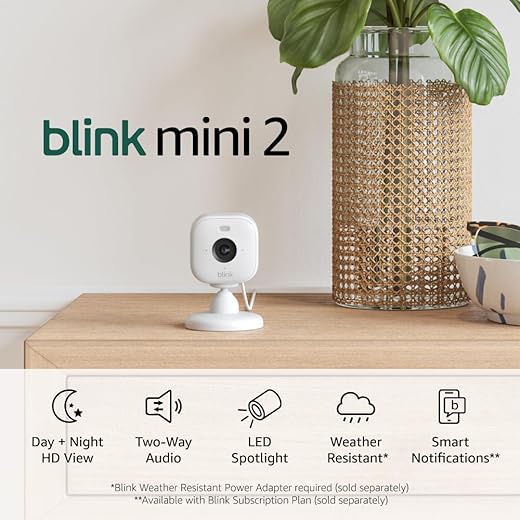
We value the Blink Mini 2 for its straightforward plug-and-play approach, bright night view, and reliability for general home monitoring. It’s a sensible choice for users who want easy coverage without complicated networking or high costs.
Who should consider it
We see the Blink Mini 2 as an ideal choice for renters, pet owners, or anyone who wants a non-invasive, affordable camera system. The included two cameras make it easy to cover two key zones — entryway and living room, for instance.
Key strengths in day-to-day use
In our testing, live view and motion alerts were dependable. The cameras are small and unobtrusive; we appreciated using one as a plug-in chime for a Blink Video Doorbell so we get audible notifications inside.
Limitations and deployment tips
If you depend on continuous recording, note that extended streaming or storage features generally tie into Blink subscription options or require additional local storage modules. The Mini 2 is made for convenience rather than professional-grade surveillance; it’s best used as part of a broader, layered approach to home monitoring.
Final takeaway
For people who want a working, inexpensive camera system that’s easy to install and manage, the Blink Mini 2 bundle hits the mark. It’s a reliable everyday monitor with sensible features for the price.
Final Thoughts
For the most useful and broadly appealing gift, we recommend the Kasa HS103P4 4-Pack Smart Plugs. They turn ordinary lamps, fans, and holiday lights into schedulable, voice-controlled devices in minutes — ideal for anyone new to home automation or someone who appreciates instant convenience.
If you want to give security and coverage instead, choose the Wyze Cam Pan v3 1080p Pan-Tilt Camera. Its pan/tilt range, color night vision, and weather resistance make it our top pick for porches, driveways, or larger indoor rooms where a single, affordable camera needs to cover more ground.
More Smart Home Gift Guides
Want more ideas before Black Friday deals disappear? Here are more guides worth checking next:
- Our Top 7 Low-Light Smart Lights for Holiday Ambiance
- We Found 6 Best Voice Assistant + Smart Hub Deals
- How We Compare 5 Alexa and Google Assistant Deals
- Why We Picked 5 Best Amazon Outdoor Cameras for Us
- Our Top 7 Security Cameras With Cloud Discounts Now
- Our Top 7 Smart Plugs for Holiday Energy Savings Deals
- Govee RGBIC LED Strip Lights: Insane Multi-Color Drama

Great roundup — thanks!
I’ve been eyeing the Kasa Smart Plug 4-pack for a while. Love the idea of turning lamps and holiday lights on schedules.
Quick question: do these HS103 plugs work reliably with Alexa routines, or do you still see hiccups? I’m also curious if anyone has used them with smart home groups (like ‘bedtime’ to turn off multiple plugs).
Also, are there any gotchas about the app? I’m not super technical and just want something that ‘works’.
I’ve had a 4-pack for over a year. Zero drama for lights and fans. Use them in a ‘Goodnight’ Alexa routine and they all switch off together. Tip: name them clearly in the Kasa app so Alexa picks up understandable names.
I had one drop offline once after a router change — easy fix: unplug, plug back in, and restart the Kasa app. Not a big deal. 🙂
If your router is old, these like 2.4GHz, so make sure your network supports that. Otherwise pretty much plug-and-play.
Thanks, Sarah — glad you found the list helpful. The Kasa HS103 plugs integrate well with Alexa and usually behave reliably in routines and groups. The Kasa app is straightforward for creating schedules and scenes; once you add the plugs to Alexa, you can group them with other devices or add them to routines. Occasional hiccups can happen after firmware updates, but a quick toggle or re-linking the account typically resolves it.
Does the WYZE Cam Pan v3 actually hold up outdoors? The roundup says IP65-rated but I’m not sure what that means in practice. Would it survive a covered porch that gets splashed on and is exposed to winter temps?
Also keep in mind connectivity — if your Wi‑Fi is weak at the camera location you might get lag. Consider a Wi‑Fi extender if needed.
Good question. IP65 rating means it’s protected against dust and low-pressure water jets from any direction, so splashes and rain are generally fine. However, it still needs mains power (no batteries) and it’s best to mount it in a spot sheltered from direct exposure (like heavy wind-driven rain). For harsh winter conditions, consider a small covered mounting spot or a weather hood; some users add a sheltered enclosure for extra protection.
I have one on my porch (under the awning) for 6 months now — survived rain and snow just fine. Just watch the power cable routing so it doesn’t soak.
Echo Pop review resonates with me — bought one for the guest room and it’s surprisingly full sounding for its size. Minimal setup and Alexa worked instantly. Worth it for the price.
Also fun to group them for multi‑room music if you have more than one. Great little speaker for background music.
Glad it worked out, Oliver. As a note — if you have privacy concerns, the Echo Pop has a mic mute button and you can disable voice purchasing and drop in features in settings.
I bought the Govee RGBIC strip last month after reading reviews like this and I mostly love it. The color effects are wild and the music sync actually works for parties.
But (there’s always a but) the app can be flakey with Bluetooth control — sometimes the strip won’t respond unless I stand really close to the controller. I tried the Wi-Fi mode but setup was confusing.
Anyone else struggle with the app? Is there a reliable workaround? Also: would LIFX be a better pick if I only want white lighting for my desk area?
One more tip: disable battery saving on your phone during initial Bluetooth pairing and make sure the strip firmware is up to date via the Govee app. Firmware updates have fixed many connectivity quirks.
If you’re techy, you can get an ESP32 controller and integrate strips into Home Assistant, but that’s overkill. For simple use, try the app update + a power cycle.
Thanks for the honest share, Linda. Govee’s RGBIC strips can run in Bluetooth or Wi‑Fi modes depending on the model — Bluetooth range issues do pop up if the strip/controller is far from your phone. If your model supports Wi‑Fi, try setting it up that way so you can control it from anywhere on the network. For pure white, the LIFX Mini White is an excellent alternative (HomeKit support and reliable Wi‑Fi) — but it won’t give you the RGB effects, obviously. If you need both ambient color and reliable remote control, some people pair the Govee for color zones and LIFX for task lighting.
I had the same issue — fixed it by moving the controller closer to the Wi‑Fi router during setup, then switching to Wi‑Fi control in the app. After that it’s been stable.
LIFX is solid for work/desk lamps since the whites are nice and consistent. Govee wins for wow-factor color though. Depends on what you care about most.
Thinking of gifting the Kasa plug + Echo Pop to my dad who still uses an old lamp with a twisty switch.
Pros: saves him from getting up to turn lights off (lazy win 😂)
Cons: getting him to remember voice commands might be a struggle.
Any tips for setting up something that a non-tech parent won’t mess up? Like ‘one-button’ routines or physical remote options?
Great gift idea! To keep things simple, set up routines with single-phrase Alexa commands (e.g., ‘Alexa, goodnight’) and create named Alexa routines that do everything (turn off plugs, dim lights). You can also enable tactile options: a smart plug plus a physical smart button (some brands have a simple Bluetooth/Wi‑Fi button) can give a single-press control without voice. Finally, label the plug’s physical outlet or the Echo device with a sticky note so your dad knows what to say.
I gave my mom an Echo and taught her 2 commands only: ‘Alexa, lights on’ and ‘Alexa, lights off.’ She learned fast because it was only two actions. Stick to the essentials at first.
Also consider enabling brief voice confirmations in Alexa so the device says back what it did (helps reassure non-tech users). Good luck — parents usually adapt quicker than we expect!
Anyone confirm the LIFX Mini White’s HomeKit integration is still solid? I need a bulb that reliably shows up in scenes and automations without flaking out. Also worried about the LIFX app — should I rely on HomeKit only?
I use LIFX with HomeKit for several bulbs and haven’t had issues. Just keep the bulbs on the same Wi‑Fi band and avoid frequent power cycling.
LIFX Mini White generally integrates well with HomeKit and works fine in scenes and automations. If you use HomeKit as your main control plane, you’ll get the most reliable local automations. The LIFX app is useful for direct bulb firmware updates and advanced settings, but you can typically rely on HomeKit for day-to-day control.
I’ve been debating between Blink Mini 2 and the Wyze Pan for indoor pet monitoring. Blink Mini 2 seems easy and reliable, but I keep hearing about subscription fees for video clips. Can someone explain what you actually get without paying?
Also: anyone tried using Blink for puppies (they move a ton)? Motion alerts are super annoying if the sensitivity isn’t adjustable.
Puppies = motion 24/7 😂 I ended up using a combination: Blink for check-ins + a cheap Wyze cam with SD card for overnight footage. Works well.
Pro tip: point the camera a little above floor level so tail wagging and ground reflections trigger it less often.
Short version: Blink offers live view and basic camera functions without a subscription, but cloud storage for motion clips typically requires a subscription. Blink also offers a local storage option via a USB module with some camera kits, which can save clips locally without monthly fees. Regarding motion sensitivity, Blink Mini 2 has sensitivity settings you can tweak, but pets can still trigger frequent alerts — adjusting zones (if available) or lowering sensitivity helps. Wyze has continuous recording options (with SD card) on some models which can be useful for pets.
If you need constant recording for behavior monitoring, look for models that support local microSD continuous recording (Wyze and some others). Blink is great for quick check-ins and live view if you’re okay with occasional subscription costs for cloud history.
I use Blink for my cat. Alerts are frequent but usable — I lowered sensitivity and set quiet hours. If you want fewer false alerts, Wyze with SD card is better because you can review footage without relying on cloud clips.