


Which voice assistant will survive holiday noise — and your in-laws?
We want assistants that actually HELP, not just talk. Picture this: we’re juggling a recipe, a crying kid, and a Bluetooth playlist. One clear voice makes life easier.
We tested speakers and displays for sound, smarts, and real‑world usefulness. From compact bedside helpers to full stereo systems, we looked for what works best on Black Friday deals. Our verdicts are practical and short. No fluff.
If you want a deeper look at specific Alexa and Google devices before you buy, also see How We Compare 5 Alexa and Google Assistant Deals. It shows where each assistant really fits in the home.
Top Picks



Sonos Era 100 — Detailed Stereo, Rich Bass
We appreciate the detailed stereo imaging, Trueplay room tuning, and robust bass for a compact speaker. The hardware and tuning deliver great sound, though some users report occasional connectivity and app frustrations.
Focused on sound, with modern connectivity
We view the Sonos Era 100 as a compact speaker built first for audio quality. The dual-tweeter layout, larger midwoofer, and refined DSP give it clear highs, articulate mids, and fuller bass than many competitors in the same size class. Trueplay tuning helps the speaker adapt to the acoustics of different rooms, which noticeably improves performance in real-world listening.
What impressed us in listening sessions
During testing we found the Era 100 able to deliver immersive playback for pop, acoustic, and electronic music while remaining clear for spoken-word content. The build quality and finish are solid, and the unit feels weighty and well-constructed.
Practical caveats and buyer guidance
Some users — and a few of our tests — encountered occasional frustrations with Sonos’s app responsiveness or AirPlay discovery. These connectivity quirks don’t affect the core sound, but they can degrade the day-to-day experience for non-technical users. If pure audio quality in a compact package is your priority and you’re prepared to live with occasional app/network troubleshooting, the Era 100 is among the best sounding smart speakers we tested.
If you’re building a “sit and listen” living room, pair the Era 100 with soft, low-glare lamps from Our Top 7 Low-Light Smart Lights for Holiday Ambiance. Good speakers plus good lighting make the upgrade feel complete.
Echo Show 8 — HD Display with Alexa+
We like the larger HD display and spatial audio for cooking, video calls, and media. Alexa+ adds proactive features, though the UI and some app support feel like work in progress.
A versatile smart display for countertop and common areas
We found the Echo Show 8 to be one of the most flexible smart displays in this roundup. The updated 8.7" HD screen provides more viewing area for recipes, video calls, and glanceable information, while the improved speakers deliver a broader soundstage and noticeably better bass compared to smaller Show models. Alexa+ introduces promising, proactive assistant features that aim to surface helpful follow-ups and personalized content.
Standout features and how we used them
In practical use, the Show 8 was excellent for multitasking: we cooked with hands-free recipe steps on screen, ran timers, and took video calls without needing another device. The device also acts as a convenient smart-home controller — viewing camera feeds and triggering routines using both voice and touch.
Limitations to consider
The software experience can be uneven. Several reviewers and our own time with the device found touch responsiveness and UI navigation laggier than expected, and some expected streaming apps (or parity with older models) are missing or inconsistent. Privacy-minded users also noted the hardware camera shutter was changed on some units, which may require third-party camera covers for peace of mind.
Final takeaway
We recommend the Echo Show 8 for people who want a multi-functional kitchen or countertop hub: great display, better audio than smaller shows, and advanced Alexa features. If you prioritize buttery-smooth touch navigation or need complete parity with older app availability immediately, you may want to watch for updates first.
Using the Show 8 as a mini command center? Combine it with one of our picks in Our Top 7 Security Cameras With Cloud Discounts Now so you can pull up door and driveway feeds on the screen in one tap.
Echo Dot (Newest) — Compact, Rich Sound
We find it balances size, sound, and price exceptionally well. The improved audio and responsive Alexa make it a practical choice for bedrooms, offices, and entry-level smart homes.
Compact, everyday smart speaker for most rooms
We think the newest Echo Dot strikes a smart balance between audio quality, price, and Alexa features. For many of our test scenarios — bedside alarms, kitchen timers, and background music — it delivers clear vocals and deeper bass compared with prior Dot generations. That makes it a sensible upgrade if you want better sound without moving to a bigger, more expensive Echo.
Key features and practical benefits
We also appreciate the privacy controls: a physical mic-off button and layered privacy settings in the Alexa app. Setup is quick — plug it in, open the app, and we had voice control running in minutes. Users in small apartments or single rooms will get the best value from this model because it combines good sound with broad Alexa functionality.
Limitations and real-world notes
There are a few trade-offs to accept. In louder rooms or with constant background noise (fans, open windows), the Dot can require a louder voice or closer proximity than larger speakers. Integration with some third-party services (notably quirks reported with Apple Music at times) can require repeated commands or app tweaks. If you need room-filling sound or advanced streaming features, consider stepping up to a larger Echo or a dedicated speaker.
Who we recommend it for
We recommend this model for buyers who want an affordable, dependable smart speaker that actually sounds better than its size suggests. It’s ideal for bedrooms, small living rooms, offices, and anyone building a budget-friendly Echo ecosystem.
If you’re gifting Dots to family or setting up guest rooms, check Our Top 6 Smart Home Gifts Under $50 for Black Friday. It’s an easy way to match each Dot with a small, useful add-on like a smart plug or light strip.
HomePod mini (Renewed) — Apple-Centric Speaker
We find the HomePod mini offers excellent integration with Apple devices and surprisingly rich sound for its size. Siri and HomeKit support are strengths, but third-party streaming flexibility is more limited than some competitors.
A compact choice for Apple-focused homes
We consider the HomePod mini an excellent fit for anyone invested in Apple’s ecosystem. The sound is balanced and punchy for a device this size, and AirPlay 2 multi‑room features make it simple to build synchronized audio across Apple devices. Renewed units give a price advantage, but buyers should be prepared to follow Apple’s setup steps closely if any restoration is needed.
Integration and everyday behavior
We used it to hand off music from a phone and to run HomeKit routines; the experience was seamless. For households that rely on Apple Music and iCloud, the mini is a natural extension of the ecosystem and often provides simpler setup and fewer compatibility surprises than cross-platform alternatives.
Limitations and who should look elsewhere
If you rely heavily on non‑Apple streaming services via voice, the HomePod mini can feel constrained compared with more open platforms like Alexa or Google Assistant. Also, buying renewed units can introduce the occasional setup hiccup, so verify return options and seller reputation. For Apple-first homes, though, it remains a compact high-quality option.
Apple-first home and planning more automations later? Pair HomePod mini with compatible plugs and hubs from Our Top 7 Smart Plugs for Holiday Energy Savings Deals. It keeps your Siri scenes simple and your holiday power bills lower.
Google Nest Audio 3-Pack — Whole-Home Sound
We like the simplicity of a three-speaker set for whole-home playback and the clear mids for everyday listening. It’s a solid value for users building a Google-centric audio setup, though it isn't designed for hi‑fi enthusiasts.
A practical bundle for whole-home Google audio
We found the Nest Audio 3-Pack to be the most straightforward way to add consistent, voice-enabled audio coverage across multiple rooms. Each speaker delivers balanced mids and a clean vocal presentation that works well for podcasts, news, and everyday music playback. The included three units simplify grouping and multi-room setups without having to buy additional speakers later.
Features that matter for multi-room setups
In everyday use we appreciated how quickly we could say “Hey Google, play dinner music everywhere” and have sound fill multiple rooms. The speakers fit unobtrusively into modern decor and are easy to control from a phone or voice commands.
Trade-offs and recommended uses
This package is aimed at convenience and coverage rather than audiophile performance. If you want rock-concert levels of bass or high-SPL listening, you'll want larger or dedicated speakers. For most households that want consistent sound in multiple rooms and tight Google Assistant integration, this 3-pack is an efficient, value-forward choice.
If you’re turning Nest Audio into a whole-home control layer, see How We Chose 4 Smart Home Hubs: Cyber Monday 2025/26. It helps you decide which hub should sit under your Google speakers for faster automations.
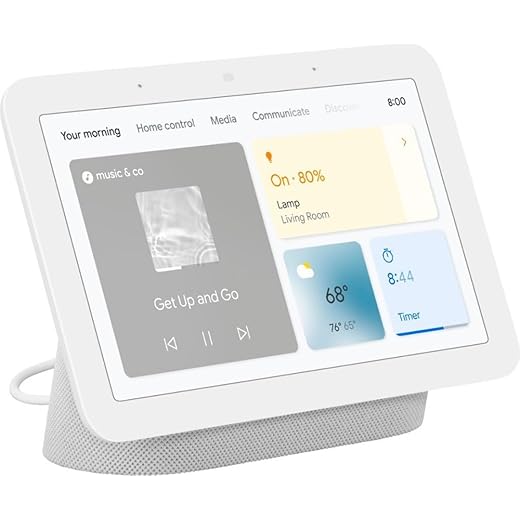
Nest Hub (2nd Gen) — Smart Display for Home
We appreciate the compact design, useful sleep sensing, and seamless Google Assistant integration. Software limitations and restricted app availability make it less flexible than a tablet in some scenarios.
A compact hub with helpful bedroom and kitchen features
We think the Nest Hub (2nd Gen) is excellent for users who want a low-profile display that blends into the home. Its strength is contextual assistance — timers, visual recipes, and Sleep Sensing — rather than serving as a full-fledged tablet. That makes it a natural nightstand device and a helpful kitchen companion.
What stands out in daily use
We used it to run kitchen timers, check camera feeds, and display quick recipe steps; the voice controls handled the majority of interactions. The privacy hardware mic switch and simple bedside controls are thoughtful for daily life.
Limitations and who should consider alternatives
The main constraint is the software environment: there’s no full Play Store access, which limits installing certain apps (users often want more direct access to radio or niche streaming clients). If you need a device that functions like a tablet or one with complete app parity, a tablet may be a better fit. For those focused on Google services, home control, and sleep tracking, the Nest Hub is an easy pick.
Echo Show 5 — Compact Display, Better Bass
We value the compact footprint and improved sound for bedside and kitchen use. The touchscreen and software occasionally lag, so it works best when voice control is the primary interaction.
Compact smart display that prioritizes convenience
We see the Echo Show 5 as a practical option for users who want a small, screen-equipped Alexa device without the footprint of larger Shows. Its 5.5" display handles alarms, timers, video calls, and quick recipe steps well, while the updated speaker delivers clearer vocals and noticeably better bass than previous small-screen Echo models.
Practical features and daily use cases
We found it especially handy as a kitchen counter companion or nightstand device: it gives visual feedback on timers and makes voice-controlled routines easy. Trade-offs become more apparent when you expect tablet-like responsiveness or want to use the device as a primary media-consumption screen — for those tasks, a tablet or larger Show is a better fit.
Known weaknesses and who should buy it
The main downsides are software depth and touchscreen responsiveness. Users accustomed to iPad/Android smoothness may notice lag and limited app behavior. That said, if your primary interaction is voice-driven control, quick video chats, and compact convenience, this device is a cost-effective choice.
For small bedrooms and desks where a Show 5 fits perfectly, we like pairing it with budget lights and plugs from Our Top 6 Smart Home Gifts Under $50 for Black Friday. That combo gives you a full mini-smart setup under a single sale price.
Final Thoughts
We recommend the Sonos Era 100 and the Echo Show 8 as the top picks this Black Friday.
More Smart-Home Deal Guides to Read Next
Want to compare more gear before Black Friday ends? These guides line up well with the voice assistants in this post:
- How We Compare 5 Alexa and Google Assistant Deals
- How We Chose 4 Smart Home Hubs: Cyber Monday 2025/26
- Our Top 7 Smart Plugs for Holiday Energy Savings Deals
- Our Top 7 Low-Light Smart Lights for Holiday Ambiance
- Our Top 7 Security Cameras With Cloud Discounts Now
- Our Top 7 Smart Plugs for Holiday Energy Savings Deals
- Govee RGBIC LED Strip Lights: Insane Multi-Color Drama

I’m tempted by that renewed HomePod mini listing, mainly because I’m deep into the Apple ecosystem. I get the appeal of Siri and HomeKit, but I’m worried about the streaming limitations vs Spotify/third‑party services.
Has anyone used a renewed one recently? Any noticeable wear or sound degradation? Also curious about pairing multiple HomePod minis for stereo in a small apartment.
Renewed units can be a great deal if refurbished properly. Apple’s HomePod mini often retains excellent sound and pairing is simple for stereo or multi‑room. For music services, AirPlay works with many third‑party apps, but native Siri support for some services is limited.
If you primarily use Spotify, be prepared to cast via AirPlay (works fine but not as seamless as native support).
I bought a renewed mini last year — cosmetically fine, no sound loss. Integration with iPhone is seamless; if you use Apple Music a lot, it’s the best pick.
I’ve been eyeing the Echo Show 8 for the kitchen. The 8.7″ display and spatial audio seem like they’d make recipes and video calls much clearer.
A few specific questions:
1) Does Alexa+ actually add useful proactive features for cooking (timers, reminders) or is it fluff?
2) How’s the UI for switching between video call and media?
3) Any issues with grease/splatter on the screen from a busy stove? 😂
Appreciate any hands-on feedback before I pull the trigger this Black Friday.
Also, if you plan to use it near heat, avoid direct exposure; the touchscreen tolerates splashes but best to keep it a safe distance.
I use it for recipes and it’s great — Alexa will suggest timers and shopping list additions. UI is fine for quick tasks, but I don’t rely on it for heavy multitasking.
Had mine for a month — spatial audio is noticeable for music, but the software sometimes freezes during video calls. Reboot fixes it.
Good questions — Alexa+ adds some proactive suggestions (timers, routine prompts), which can be handy while cooking. The UI is generally straightforward but can feel cluttered if you have lots of skills/apps installed. For grease, a microfiber cloth works — consider a small stand or wall mount to keep it further from splatter.
Mixing ecosystems is wild. I have an iPhone, a couple of HomePod minis, an Echo Dot for pricey Alexa skills, and a Nest Hub in the kitchen. It works but feels like duct taping different platforms together. Also, why do they all want to be the default music player? 😂
Any advice on making cross-ecosystem setups less annoying? (Also yes, I know I’m the problem.)
You’re not alone — many users mix devices. Use specific defaults per room (e.g., HomePod for iPhone audio, Echo for Alexa routines) and keep voice assistant roles clear to avoid conflicts. Home automation hubs like Home Assistant can help unify control if you’re comfortable with more setup.
I use Home Assistant + HomeKit pairing for devices so Siri handles HomeKit and Alexa does timers/music. Takes work but pays off.
Totally relatable. Make one assistant the ‘go-to’ for routines and keep music on native devices to reduce friction.
Looking for a Black Friday gift for my partner. Options I’m weighing: Echo Dot (newest), HomePod mini (renewed), or a Google Nest Audio 3‑pack for the house. They’re into music and smart home but not an audiophile. Any recommendation for best overall value and ‘wow’ factor when unwrapping?
For a balance of value and ‘wow’: Echo Dot is a safe budget pick and feels useful immediately; HomePod mini (renewed) has the Apple brand appeal if they’re in the Apple ecosystem; Nest 3‑pack delivers immediate multi‑room capability and is the biggest ‘wow’ for house-wide sound. Consider what ecosystem they already use.
Echo Dot is great stocking stuffer but not as exciting as a multi‑speaker bundle on first impression.
If they have an iPhone and use Apple Music, HomePod mini would feel premium. Otherwise, Nest 3‑pack for shared listening is an impressive gift.
Also check return policies on renewed items in case the unit isn’t perfect out of the box.
Kinda torn between the Sonos Era 100 and the Nest Audio 3‑pack. I mostly listen to indie rock and some electronic. Do I go for single Sonos for better fidelity (and pair later) or multi Nest speakers for immediate whole-house playback? Budget not infinite but willing to spend a bit more for quality.
If indie rock with good production is your jam, Sonos will make a noticeable difference.
I did Sonos in the living room and Nest in the bedrooms — best of both worlds. It’s annoying they don’t natively bridge, but for different rooms it’s fine.
Also watch Black Friday bundles — sometimes you can get discounts that make the Sonos option easier to justify.
If fidelity and stereo imaging are priorities for critical listening, start with the Sonos Era 100. For whole‑home convenience and immediate multi‑room sound, the Nest 3‑pack is more economical. Consider a hybrid: one Sonos for your main listening area + Nest speakers for other rooms.
Privacy question: Echo Dot vs Echo Show — I get the mic/camera concerns, but is the smaller Dot actually better privacy-wise since it lacks a camera? Or are both equally invasive because of the always-listening mic?
I went with a Dot in bedrooms for that exact reason — no camera, so it’s less intrusive for me.
Good question. Both devices have always‑listening microphones, but the Echo Show adds a camera which can be a privacy consideration. Dots might feel ‘safer’ because there’s no camera, but both can be muted (mic off) and you can review voice history in the app.
Got the Echo Dot (newest) last sale and OMG the sound is actually better than I expected for a tiny speaker. 🤯 Great for my bedroom. Very easy setup too, 10/10 for price vs. performance.
Glad you liked it, Ava! The new Dot is a strong value pick for small rooms — happy to hear it met your expectations.
Agree — picked one up for my office and it fills the room surprisingly well. Battery bases are handy if you want portability.
The Google Nest Audio 3‑pack seems like a really smart move for anyone wanting whole‑home audio without going Sonos-level $$$. Clear mids, good sync across rooms — anyone compared it directly to Sonos when it comes to general listening vs. hi‑fi? Curious if the convenience outweighs the slight loss in audio detail.
I prefer the Nest for podcasts and spoken-word content; vocals are clearer to my ears.
Great point, Sophia. The Nest Audio 3‑pack is excellent value for whole‑home listening and convenience. Sonos will edge out on imaging and bass detail, but Nest is simple to set up and a better budget option for multi‑room casual listening.
Also consider whether you want multi‑platform voice assistants — Google Assistant on Nest is very good for search and home control.
I had both — Sonos is noticeably more refined (better bass and staging) but if you’re not an audiophile, Nest sounds great and syncs flawlessly.
3‑pack was a gift to my parents — they love it. Not as punchy as my Sonos, but for background music it’s perfect.
I love the idea of the Sonos Era 100 for living room listening — that stereo imaging and Trueplay tuning sound awesome on paper. Has anyone else experienced frequent app/connectivity hiccups like the review mentions? Thinking about getting one on Black Friday but worried about setup headaches.
If it’s any help: disabling 5GHz during setup helped me pair it, then I re-enabled it. Kinda annoying but it worked.
Thanks for the question, Mia. Some users report intermittent Wi‑Fi dropouts and occasional issues with the Sonos app—often resolved by updating firmware or toggling network settings. If you have a mesh system, try placing the speaker closer to the main node during setup.
I had a couple of connectivity blips initially, but an update fixed it. Sound absolutely makes up for the fuss — much better than other speakers in its size range.
Bought the Echo Show 5 for my bedside and it’s alright, but the touchscreen lag is kind of hilarious — like it’s stuck in 2016. Wake me up with a slow UI, sure. 😂
Sound got better with the new model supposedly, but still underwhelming for music. If all you want is alarms and weather, it’s fine. If you’re picky about responsiveness, maybe skip it.
Mine had the same lag until I cleared unused Alexa skills and rebooted — felt faster after that. Not perfect but improved.
Thanks for the honest take, Benjamin. The Show 5 prioritizes compact convenience over snappy performance. If voice is your main driver, it’s fine; if you expect tablet-like responsiveness, consider a larger Show or different device.
Alexa routines: 90% of the time they work, 10% of the time my lights decide to go rogue at 2 AM. Not mad, just confused. Anyone else have their smart home develop a personality? 😅
Mine did that once — culprit was a scheduler app I synced. Removing it fixed the midnight disco.
Haha yes — automation quirks happen. Check for overlapping routines or third‑party skill triggers. Sometimes deleting and recreating a routine clears the gremlins.
Wondering about the Nest Hub 7″ as a bedside device. The review mentions sleep sensing — does it actually improve sleep tracking compared to a smartwatch? I’m sensitive about privacy too (camera vs radar sleep sensing).
Also, how is the display brightness at night? I don’t want a glaring light in the room.
I used it for a few months — helpful for noticing sleep patterns. Be mindful of what you share to your Google account, though.
The Nest Hub (2nd gen) uses Soli radar for sleep sensing rather than a camera — it can provide useful insights like movement and breathing patterns and integrates into Google Fit. It’s not as granular as a clinical device or some wearables, but it’s convenient and non‑wearable.
About brightness: there’s a night mode and adjustable settings; many users find it dim enough not to disturb sleep.
Brightness is usually fine; I keep mine on the lowest setting and it doesn’t bother me.