

Why Fall Detection Matters for Families and Caregivers
We know falls can be life-changing for older adults and stressful for families. Quick detection reduces medical complications and speeds up emergency response.
Our goal is to help you choose smart devices that increase independence, lower risk, and give caregivers real-time peace of mind. We focus on reliable tech, clear alerts, and easy setup.
We prioritize safety and dignity always.



Understanding Risk: Who Needs Fall Detection and Why
Common risk factors
We often see the same drivers behind preventable emergencies: reduced balance or strength, medication side effects (dizziness, low blood pressure), cognitive decline that impairs judgment, and people who live alone or spend long periods unobserved. Quick flagging matters most when mobility is limited or recovery is slow.
If you also want indoor cameras that double as quiet check-in tools, see our guide to indoor Wi-Fi cameras for pet and home monitoring in the Smart Security Cameras category.
Typical scenarios where devices help
Devices catch overnight trips from bed, bathroom slips (the highest-risk room), and long unattended episodes where a fall prevents calling for help. A wrist-based option like Apple Watch fall detection alerts automatically, while home systems such as Philips Lifeline or Bay Alarm Medical detect stationary falls indoors.
Prevention, detection, and response — distinct roles
Prevention is exercise, home modifications, and med reviews. Detection is sensors and wearables that identify a fall. Response is the human or professional action that follows—carefully plan who is notified and how to verify incidents, and test systems monthly.
How We Evaluate Smart Devices: Our Selection Criteria
Core criteria we use
We judge devices on real-world performance, not marketing claims. Our checklist includes:
Weighting priorities & practical tips
Accuracy and a low false-alarm rate get the most weight for high-risk, alone-living seniors; invasiveness (cameras) or requirement to push a button may be weighted higher for privacy-conscious users. For example, we favor automatic wrist-based detection like Apple Watch for active fallers, and pendant systems (Medical Guardian, Lively) for those who prefer simplicity. Quick how-to: test alerts monthly, pick devices with at least 24–48 hour battery, and choose automatic alerts when response time matters. Next, we’ll unpack device types so you can match these criteria to wearables, ambient sensors, and cameras.
Device Types Explained: Wearables, Ambient Sensors, and Camera Systems
Wearables and pendants
We describe impact-based and accelerometer-driven detectors worn at the wrist, neck, or waist. Typical placement: pendant over the sternum or wristband. Best for active seniors who move between rooms.
Smartwatches & fitness trackers
Smartwatches (Apple Watch Series 9, Garmin models) use gyroscopes/accelerometers plus algorithms. Tip: enable fall detection and Emergency SOS; test calls monthly.
Ambient sensors
Motion sensors, pressure mats, and floor-vibration devices monitor patterns without contact. Best in single-level homes or key rooms (bedroom, bathroom). Pair with a hub and set sensitivity zones.
Camera/vision systems
Vision systems use pose estimation to detect collapses. Place high and angled for full-room coverage. Great where privacy trade-offs are acceptable and caregivers want live checks; use masking and local processing where possible.
Use masking and local processing where possible. For more examples of indoor cameras that can double as quiet monitoring tools, see our best indoor Wi-Fi cameras for pet monitoring roundup in Smart Security Cameras.
Our Recommended Device Categories: Best Fits by Need
Discreet wearables — unobtrusive protection for independent seniors
We recommend sleek wrist devices and light pendants (Apple Watch Series 9, Lively, or Garmin) for seniors who prize independence. Think of Mrs. Ramirez, who wanted no visible medical tag but still felt secure walking to the garden—wearables give that peace of mind. Trade-offs: battery management and remembering to wear it.
Multi-room homes — mesh sensors and hub-based systems
For larger or multi‑level homes, mesh motion sensors and a hub (Aqara, Samsung SmartThings) create room-by-room coverage without constant charging. Installation takes time but scales well.
Camera-assisted systems — high-accuracy monitoring with privacy modes
When families prefer high accuracy and live checks, camera systems (Wyze, Netatmo, Tapo) offer pose-based detection and two-way audio. Trade-offs: bandwidth and privacy, so use masking and scheduled privacy modes.
If you want to compare indoor models before choosing, start with our indoor Wi-Fi camera picks in the Smart Security Cameras hub.
Low-cost basics — pendants and mobile-app solutions
Budget-conscious options (pendants from Bay Alarm, MobileHelp, or smartphone apps) give basic coverage and emergency calling. Expect more false alarms and manual response requirements; test weekly and confirm cellular/data plans.
Practical Setup and Integration Tips
Optimal sensor placement
We start by mapping risk zones: bathrooms, stairs, bedroom, and kitchen. Place motion or contact sensors low on walls for fall‑height detection and keep cameras angled to avoid blind spots.
For camera-based setups, you can browse more options in our Smart Security Cameras category before you decide where each device should go.
Pairing and configuration
Pair wearables to the hub or phone following the manufacturer app; name each device clearly (e.g., “Hall Pendant”). Check firmware updates immediately and enable automatic updates.

Setting sensitivity and alerts
Set thresholds conservatively at first; many systems let you choose “normal,” “high,” or custom sensitivity. Track false alarms for a week and adjust.
Emergency chains and rehearsals
Program primary and backup contacts, local EMS, and an after‑hours caregiver. Run monthly drills—simulate a fall and time the response.
Power, maintenance, and integrations
Keep chargers visible, replace batteries on schedule, and link devices to Alexa/Google Home or monitored medical alert services to create a coordinated response network.
Reducing False Alarms and Maximizing Accuracy
Common causes
We see false positives from rapid non‑fall movements (reaching or sitting quickly), pets, and misoriented wearables. For example, a curious cat can set off a floor‑level motion sensor, or a pendant worn upside down may register a tumble when none occurred.
Tuning and combining sensors
Start by choosing the device type that fits the room: wearables for active fall patterns (Apple Watch Series 8/SE, Philips Lifeline AutoAlert), ambient sensors for low‑mobility rooms. Then:

Placement, firmware, and battery care
Mount sensors at recommended heights, avoid direct sunlight or drafts, and check firmware monthly. Weak batteries degrade accelerometer sampling and cause missed or spurious events—replace or recharge as scheduled.
These steps improve reliability in daily life and set the stage for evaluating monitoring and privacy tradeoffs next.
Privacy, Data Security, and Choosing a Monitoring Service
What data devices collect and who sees it
We first ask vendors exactly what is captured: motion/acceleration logs, audio, video, timestamps, and location. Typical cloud retention ranges from 30–90 days (camera providers like Ring/Nest often use 30 days); some medical monitors keep records longer. Ask who can access logs—family apps, professional responders, or third‑party analytics.
Security protections to insist on
Picking a monitoring service
We balance safety with dignity by choosing services that give us control over sharing, escalation, and retention — next, we’ll pull these threads together.
Bringing It Together: Choosing the Right Solution for Your Loved One
Match device type to lifestyle. Prioritize simple interfaces and a reliable response plan. The best protection often combines wearables with in-home sensors.
Review and adjust the setup as needs change. For more ideas on how cameras fit into a larger safety plan, explore our Smart Security Cameras hub and our guide to indoor Wi-Fi cameras for everyday monitoring.
More Smart-Home Guides to Read Next
Want to go deeper on specific devices and safety setups? Try these next:

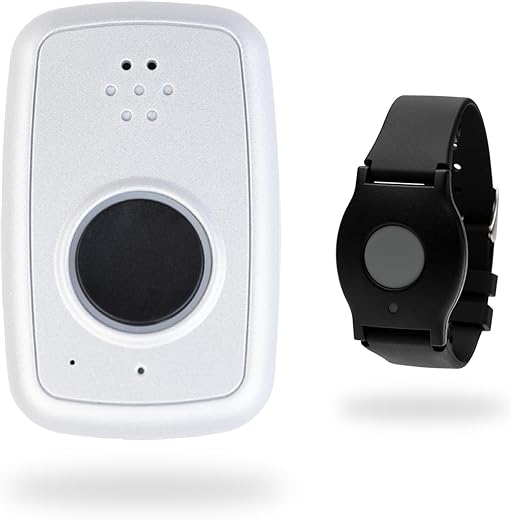
Long story short: I bought an ADT On-The-Go Mobile GPS Medical Alert Wristband for my dad and a TP-Link camera for the living room. The wristband saved us once (he tripped on a rug) — instant alert to my phone, lifesaver. BUT — and there’s always a but — the camera gave a bunch of false motion alerts at night (trees??) and I spent a week turning notifications off. 😅
Pros: wristband is unobtrusive, nice GPS tracking. Cons: camera sensitivity is a pain, and the ADT subscription pricing can be confusing.
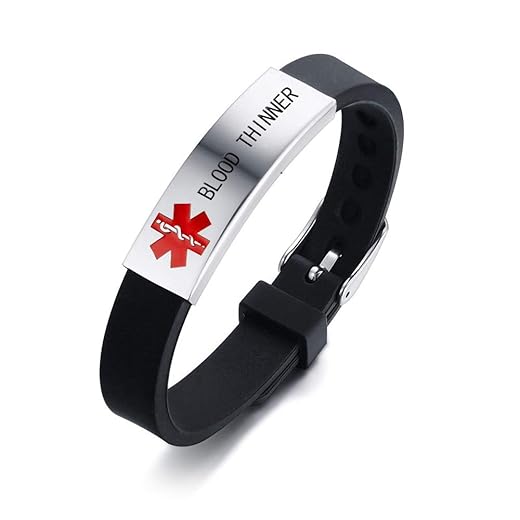
Tip: spend time in the “Reducing False Alarms” section — it’s actually gold. Also, get that Custom Engraved Medical ID Silicone Bracelet for peace of mind (and it looks less medical than you’d expect).
Totally agree on the engraved bracelet — simple but effective. Also consider positioning the camera away from windows/curtains to reduce false motion triggers.
Good point, Marcus. Wristbands are better for people who keep them on; pendants are often preferred by those who are used to necklaces. Consider habits first.
Marcus — it’s the On-The-Go wristband. I like it more than the bulky pendant for everyday wear, but a pendant might be better if they take watches off a lot.
Quick Q: which ADT wristband model? The On-The-Go or the pendant? I’m torn.
Thanks for sharing, Maya — appreciate the real-world experience. For the TP-Link false alerts, try adjusting detection zones and night sensitivity; also firmware updates sometimes improve behavior.
Ok, real talk — who knew pagers would make a comeback? 😂 The CallToU Wireless Caregiver Pager Two Buttons System looks oddly charming. I’m considering it for weekend visits where my in-laws refuse anything “fancy”. Anyone used the CallToU or the WiFi Caregiver Pager Life Alert System in a multi-floor house? How’s the range?
One more tip: test signal strength in all rooms before trusting it completely. That saved one of our readers from missing alerts in the basement.
We use CallToU in a 2-story place — door-to-door it worked fine, but we had to place a receiver upstairs. No biggie but plan placements ahead.
Ha — pagers are back in a modern form! CallToU systems vary, but most work well in single-family homes; walls and floors can reduce range though. Life Alert WiFi pagers rely on the home’s WiFi, so range is tied to router coverage. Consider adding WiFi extenders if you have dead zones.
My aunt’s Life Alert pager worked great because it’s tied to her WiFi and her phone — instant push notifications to the family group.
Also, check battery types — pagers with rechargeable batteries are convenient, but swappable batteries are easier for older users.
If they refuse “fancy”, go with a simple button like CallToU — less intimidating and easy to teach.
A few notes from my setup:
1) TP-Link Tapo C225 — great image quality (2K) and pan/tilt is handy, but encrypt your WiFi and use a strong password.
2) ADT Fall Detection GPS Medical Alert Pendant — comfortable and the fall detection seemed more conservative (fewer false alarms) than my smartwatch.
3) Integration tip: connect notifications to a family group chat or a pager so everyone gets alerts.
Privacy-wise, I turned off cloud storage on some cameras and kept local recording for sensitive areas. The “Choosing a Monitoring Service” part spelled out choices clearly and helped me decide. Thx for the guide!
If anyone’s unsure, check the camera’s manual or TP-Link support — they usually have step-by-step guides for local microSD setups.
Emily — in the Tapo app go to storage settings and pick microSD (if your camera supports it). You may need to format the card inside the app first.
Thanks for the practical setup details, Hannah. Local storage is a great compromise for privacy-conscious users. And yep — creating a family notification chain helps reduce single-point failures.
How do you set up local recording on the Tapo? Mine keeps insisting on cloud options.
Funny how a Custom Engraved Medical ID Silicone Bracelet can feel like a fashion statement AND a safety tool. Bought one for my mom — she actually liked choosing the font. #wins
Also cheap insurance compared to subscription devices. Keep receipts though if you want to exchange sizes.
Glad that worked out, Tom! Personalizing medical IDs can make them more acceptable to wear — small wins matter.
Haha same — mine chose neon pink. If it gets them to wear it, whatever the color, right?
Appreciated the evaluation criteria section — helped me compare ADT vs standalone devices. Small point: can someone explain how professional monitoring affects privacy? Does it mean a company listens to audio/video?
Good question, Carlos. Professional monitoring doesn’t automatically mean audio/video is streamed. Most monitoring centers receive alerts and location data or alarm signals. If a camera or two-way audio is part of the plan, read the service terms — many systems require explicit permission for live audio/video sharing.
Great roundup — I liked the way the article explained wearables vs ambient sensors.
Quick question: anyone here use the 4G GPS Fall Detection Smartwatch for Seniors? How long does the battery actually last with fall detection turned on? Also worried about false alarms when my mom gardening — the piece on reducing false alarms was helpful but any real-world tips?
Thanks, Laura — glad the comparison helped. For that 4G GPS watch, most users report 24–48 hours with normal use, less if constant GPS and fall monitoring are on. Try lowering sensitivity during high-movement activities and schedule charging times after known active periods (like gardening).
Also check if the watch has an emergency button — sometimes relying on that + passive detection reduces chaos from false positives.
I have that watch — with daily walks and meds reminders it lasts ~30 hrs. If you turn off continuous GPS it stretches to 2 days. For gardening I switch it to “activity mode” instead of full fall detection to cut false alerts.
Short and useful. I liked the privacy section — camera systems like the TP-Link Tapo C225 are tempting but I’m paranoid about data security. Anyone have a good middle ground?
Nice article. For a parent with early dementia: would you recommend a camera system like the TP-Link C225 or a wearable like the ADT pendant? Which is less invasive but still reliable?
I went with a wearable + motion sensors. The wearable alerted caregivers and the motion sensors covered common areas without cameras in bedrooms.
Great question, Jon. For early dementia, wearables (ADT pendant or 4G smartwatch) are less invasive and give immediate personal alerts. Cameras help with room monitoring but raise privacy concerns and can be unsettling for some. A hybrid — wearable + a single ambient sensor — is often a good compromise.