Can one router keep 30+ smart devices from arguing? Meet the Wi‑Fi 6 models that referee the chaos.
Smart homes are getting crowded — a dozen devices used to be impressive. Now your phone, TV, thermostat, cameras and a fleet of smart bulbs all want bandwidth at the same time. That’s a lot of tiny internet addicts.
Imagine a video call while a camera uploads cloud footage and a light hub updates firmware. Buffering, dropped packets, and annoyed family members follow. The right Wi‑Fi 6 setup cuts the fuss and keeps EVERY device talking smoothly.
If you’re still wiring up your first smart home, our smart home setup guide for beginners walks you through planning rooms and devices before you pick a router. You can also browse all our routers & mesh Wi-Fi guides if you want to compare more models and mesh systems.
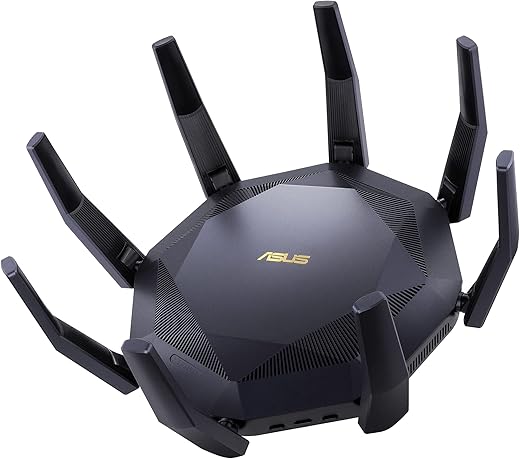
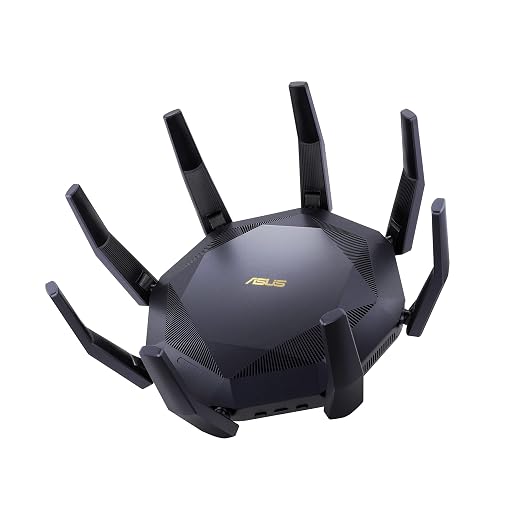
A high‑end Wi‑Fi 6 router that adds dual 10G ports and strong multi‑device wireless throughput, making it ideal for homes with 10G backbones, NAS and power users. It pairs excellent wired performance with robust firmware for advanced networking needs.
Dual 10G (SFP+ and 10GBase‑T) ports for high‑speed LAN/WAN use
Twelve‑stream design and strong CPU for heavy concurrent traffic
AiMesh and subscription‑free security give flexible expansion and protection
Excellent for professionals with NAS, media servers and 10G clients
Cons
Higher cost and overkill for modest home needs
Large footprint and some firmware quirks reported by advanced users
Overview
The RT‑AX89X is ASUS’s premium AX6000 router that targets users who need more than wireless speed — it provides 10G connectivity, abundant LAN ports and a firmware feature set aimed at prosumers and small business users. If your home includes a 10G NAS, high‑bitrate 4K/8K media or heavy file transfers, this router is designed to keep everything moving smoothly.
Standout capabilities
Dual 10G ports (SFP+ and RJ‑45 10GBase‑T) for direct connections to servers, NAS or high‑speed workstations
12‑stream architecture, powerful processing and AiProtection for secure, low‑latency operation across many clients
AiMesh compatibility to extend coverage without sacrificing functionality
Practical benefits and use cases
Content creators and home labs will see dramatic reductions in large file transfer times when using the 10G links. Gamers and streamers benefit from the router’s strong CPU and traffic management, which keeps latency low even under heavy simultaneous use.
Limitations and advice
The price and capabilities are more than most households need; ensure your home network has 10G or high‑throughput requirements before investing. Also, some advanced users have reported firmware oddities in niche configurations — keep firmware current and consult ASUS support for complex setups.
Editor's Choice
2
ASUS RT‑AX88U Pro AX6000 Router
Feature‑rich router for power users
8.8/10
EXPERT SCORE
A polished Wi‑Fi 6 router that combines a strong feature set and useful extras like dual 2.5G ports, AiProtection security and AiMesh compatibility. It fits well where long term flexibility, advanced QoS and robust parental/security tools matter.
Dual 2.5G ports and robust wired/wan port flexibility
Extensive firmware features (AiProtection, Adaptive QoS, VPN)
Strong 4x4 Wi‑Fi 6 performance with RangeBoost Plus coverage
AiMesh support makes it easy to expand into a resilient mesh
Cons
Premium price compared with basic AX6000 models
Some users report occasional firmware or stability issues
Overview
The RT‑AX88U Pro is ASUS’s mature take on a powerful dual‑band Wi‑Fi 6 home router aimed at enthusiasts and small offices. It blends a high‑performance radio design with a rich firmware ecosystem that gives flexible control over traffic, security and mesh expansion.
Notable strengths
160 MHz channel support and 1024‑QAM for faster single‑client throughput
Dual 2.5G ports that can be used for high‑speed WAN, LAN aggregation or prioritized traffic
AiProtection Pro (Trend Micro) and Instant Guard VPN for travel‑ready secure access
Who benefits and how it behaves in daily life
Gamers and streamers will appreciate low latency and the ability to prioritize devices via Adaptive QoS. Small offices and creators who run local servers or NAS will find the 2.5G connectivity and strong CPU useful for fast transfers.
The router also supports AiMesh, so you can add compatible ASUS nodes for wider, manageable whole‑home coverage without giving up advanced features.
Caveats and practical tips
Expect to spend time in the web UI if you want to get the most out of it — power users will love that, casual buyers may find it more complex than plug‑and‑play systems. Keep firmware up to date when troubleshooting odd behavior and verify support resources if you use custom VPN or firewall rules.
Pros
Eight Gigabit LAN ports plus 2.5Gb WAN for flexible wired networks
Solid Wi‑Fi 6 performance with OFDMA and MU‑MIMO for many clients
Powerful 1.8 GHz quad‑core CPU reduces latency under heavy load
OneMesh support and lifetime HomeCare security features included
Cons
Bulky design and fixed antennas may be less discreet
Advanced features can be buried in the web UI and mobile app
Overview
The Archer AX6000 is a performance‑focused dual‑band Wi‑Fi 6 router designed for busy homes that need to keep many smart devices and wired systems online simultaneously. It emphasizes capacity (8‑stream AX6000), offering a mix of high wireless throughput, a powerful CPU and a broad set of ports for wired devices and NAS connections.
Key features and what they do
1024‑QAM and OFDMA/MU‑MIMO for improved multi‑device throughput
4804 Mbps on 5 GHz and 1148 Mbps on 2.4 GHz (theoretical AX6000 class)
1 × 2.5 Gbps WAN, 8 × Gigabit LAN, USB‑A and USB‑C for local storage or printers
Real‑world benefits and practical use
Excellent for families with many phones, Chromecasts/TVs and gaming consoles: OFDMA and MU‑MIMO let several devices stream or game concurrently with fewer hiccups. Users with mixed wired/wireless homes will appreciate the 8 LAN ports — fewer extra switches required.
Useful in small offices or tech‑heavy smart homes where a robust CPU helps keep VPNs, QoS and security features active without bogging the router down.
Limitations and final notes
The unit is not the newest high‑end model in terms of raw features (no 6 GHz band), and real‑world speeds depend on client support and environment. Power users who need 10 Gb backhaul or Wi‑Fi 6E will look elsewhere.
The mobile app handles simple tasks well, but the full web interface is needed for advanced configuration (VLANs, custom routing). For many households this mix of price, ports and performance makes it one of the best practical options for multiple smart devices.
Must‑Have
4
NETGEAR Nighthawk RAX80 AX6000 Router
Straightforward high‑performance home router
8.3/10
EXPERT SCORE
A dependable Nighthawk with strong Wi‑Fi 6 speeds and broad compatibility for cable, fiber and DSL environments. It’s a good fit for households that want fast wireless and straightforward app management without diving deep into advanced settings.
Good Wi‑Fi 6 throughput and 160 MHz support for compatible clients
Easy setup and management via the Nighthawk app
USB ports and ReadyShare for local storage sharing
Netgear Armor security suite available for device protection
Cons
Some units have reported firmware or stability problems in user reports
Limited advanced configuration compared with enthusiast routers
Overview
The Nighthawk RAX80 is Netgear’s mainstream Wi‑Fi 6 AX6000 offering aimed at consumers who want fast wireless speeds and a simple management experience. It packs a quad‑core processor and features aimed at streaming, gaming and multi‑device homes.
What to expect in features
AX6000 class speeds with OFDMA, MU‑MIMO and Beamforming for improved device density
2 × USB 3.0 ports for networked storage and 5 × Gigabit Ethernet ports for wired devices
App‑driven setup and optional Netgear Armor security subscription
Practical performance and use cases
Works well in homes with many streaming devices and smart home gadgets — users typically notice smoother simultaneous streams and reduced buffering compared to older routers. The Nighthawk app provides easy diagnostics, speed tests and parental control basics for daily management.
Limitations and tips
Some owners have experienced firmware‑related failures or device instability; if you buy this model, keep an eye on firmware releases and register for support channels. For advanced networking features (complex VLANs, advanced VPNs) an enthusiast router may be a better match.
Best Value
5
TP‑Link Deco X60 AX3000 3‑Pack Mesh
Best budget mesh for whole‑home coverage
8.2/10
EXPERT SCORE
A cost‑effective Wi‑Fi 6 mesh kit that delivers solid coverage, easy management and improved device capacity throughout a large home. It’s a practical pick when you want a simple, reliable mesh system rather than a single high‑power router.
Simple, fast mesh setup and auto‑optimizing roaming
Good coverage from a 3‑pack (up to several thousand sq. ft.)
Wi‑Fi 6 efficiency (OFDMA, MU‑MIMO) for many simultaneous devices
Excellent price‑to‑performance ratio for whole‑home mesh
Cons
App‑centric management limits advanced tweaking for power users
Seamless roaming can be imperfect with some voice‑call handoffs
Overview
The Deco X60 3‑pack is a straightforward Wi‑Fi 6 mesh system designed for homeowners who prioritize coverage and ease of use. TP‑Link focuses on automated functions: the system self‑manages connections between nodes and gives a single SSID for roaming, making it accessible to users who don’t want to tinker with advanced settings.
What it offers
AX3000 combined throughput across nodes, OFDMA and MU‑MIMO for better device density
Support for wired backhaul if you run Ethernet between nodes for improved performance
An intuitive mobile app with basic parental controls, guest networks and device monitoring
How it behaves in everyday setups
Ideal for multi‑room houses, apartments with many smart devices and users that move through the home while on calls or streaming. The mesh provides consistent coverage where a single router might struggle, and wired backhaul (if available) yields near‑router speeds for each node.
Limitations and practical tips
The app‑based experience limits advanced network customizations — power users will miss granular QoS, advanced VPN setups and deep packet controls. Also, a few users report occasional hiccups with roaming during Wi‑Fi calls; if you rely on perfect handoffs for continuous voice calls, test placement and firmware updates to improve handover behavior.
6
Linksys MR9600 Wi‑Fi 6 Mesh Router (Renewed)
Simple mesh‑capable Wi‑Fi 6 router
7.5/10
EXPERT SCORE
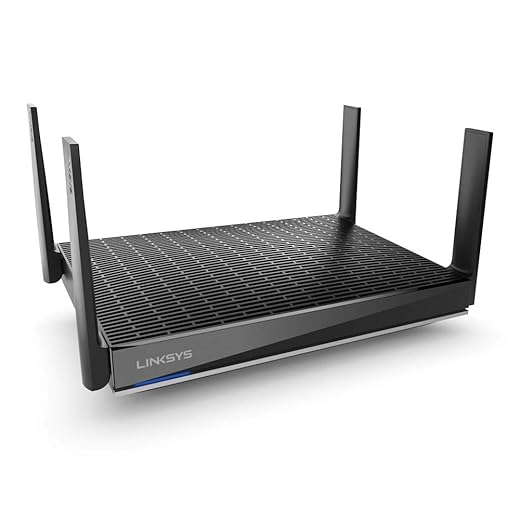
A consumer‑focused Wi‑Fi 6 router with mesh capabilities that’s convenient for covering larger homes when combined with Linksys Velop nodes. As a renewed unit it can be a budget way to get AX performance but buyers should check for warranty/return protections.
Mesh capable and easy to expand with Linksys Velop nodes
Covers large homes and supports 40+ devices
User‑friendly app makes setup and parental controls straightforward
Cons
Renewed condition may mean shorter warranty or variable longevity
Not as feature‑rich as higher‑end enthusiast routers
Overview
The Linksys MR9600 is a dual‑band Wi‑Fi 6 router built to be mesh‑friendly and easy to operate. In its renewed form it represents a lower‑cost route to AX speeds and expanded coverage when paired with additional Linksys nodes.
Features that matter
Dual‑band AX performance and mesh support for whole‑home roaming
Designed to handle 40+ connected devices with up to 3,000 sq. ft. coverage per node
Built‑in parental controls and simple QoS through the Linksys app
Practical considerations
For families who want a mostly hands‑off, easy setup, the MR9600 paired with more Velop nodes gives a cohesive mesh system and consistent SSID roaming. It’s a good choice if you want to extend coverage without managing complex firmware settings.
Caveats
As a renewed product, inspect seller ratings and return policies — refurbished units can vary in remaining life and support. If you need deep routing features (advanced VPNs, many VLANs, or heavy custom rules), an enthusiast router will be better suited.
Final Thoughts
Top recommendation — ASUS RT‑AX89X Dual 10G AX6000 Router: Best for high‑bandwidth, mixed wired/wireless smart homes. Pick this if you run a 10G backbone, host a NAS, stream multiple 4K feeds, or need ultra‑low latency for gaming and large transfers. Strengths: dual 10G ports, strong multi‑device throughput, advanced firmware and routing features.
Best mesh for many distributed devices — TP‑Link Deco X60 AX3000 3‑Pack Mesh: Best for wide coverage and lots of small smart gadgets. Choose this when devices are spread across multiple rooms or floors and you want simple setup and reliable whole‑home capacity. Strengths: affordable Wi‑Fi 6 mesh, easy management, consistent device handling across the house.
Quick alternate: If you want a single powerful router with lots of LAN ports and extra features, the TP‑Link Archer AX6000 is a practical choice for many wired devices and steady wireless load. If you’re a power user who values flexibility and security tools, the ASUS RT‑AX88U Pro is a strong runner‑up.
Abdul Basit is a tech writer and publisher who runs a small network of sites focused on software, smart home devices, and online deals. He writes every blog post himself, checking real offers and explaining everything in simple language so everyday users can spot genuine discounts, avoid fake coupon codes, and save money without wasting time.
Anyone tried the TP-Link Deco X60 3-pack renewed option? I want whole-home mesh on a budget, but I’m skittish about renewed items. Are there usually warranty/return catches with renewed units sold on Amazon?
I got a renewed Deco X60 and it’s been flawless for 9 months. Came in a generic box but worked like new. Just make sure there’s at least a 90-day return window.
Renewed units can be a great value, but always check the seller’s return policy and whether TP-Link’s warranty still applies. Some Amazon Renewed listings include limited warranties — read the product page carefully.
I bought the NETGEAR Nighthawk RAX80 last month because my ISP promised ‘up to 6Gbps’ (lol) and I wanted something easy to manage.
Pros: Setup with the app was painless, and coverage in my 2,000 sq ft house is solid. Speeds to my laptop are great.
Cons: The app defaults feel a little ‘dumbed down’ if you want advanced tweaks. Also the unit runs a bit warm.
If you want a no-fuss high-performance box, it’s a fine pick. If you like fiddling with advanced settings, maybe look elsewhere.
Running warm is normal for busy Wi‑Fi 6 hardware. Just give it good ventilation — don’t hide it in a cabinet.
Thanks — I moved it off the shelf into a more open spot and the temps dropped a bit. Also, yes the ‘up to’ ISPs say that a lot 😂
Agree. I had one and ended up flashing an alternate config (not a custom firmware — just disabled some features) to get better visibility into client bandwidth. For most folks though, plugin-and-go is perfect.
Does it support guest network isolation well? I run small garden workshops and need a segregated SSID.
That matches our findings — great for users who prefer app-based setup. If you want more granular control, consider ASUS or more advanced mesh setups.
Quick gamer question: between the ASUS RT-AX89X and the RT-AX88U PRO, which would you pick for lowest latency and stable ping? I see the AX89X has a ‘gaming port’ and the AX88U PRO has Adaptive QoS. I’m not running a pro esports rig, just competitive Call of Duty nights.
I use AX88U PRO and prioritize my gaming PC in QoS — ping is stable and I never noticed a disadvantage vs higher-end models. Don’t forget to enable wired connection for your main rig whenever possible.
Awesome advice — ty! I’ll probably go AX88U PRO to keep things simple while still getting QoS features. 👍
For gaming the difference is subtle. The RT-AX89X offers more raw throughput and the dedicated gaming port can reduce hops for a directly connected console/PC. The RT-AX88U PRO’s Adaptive QoS is easier for prioritizing traffic. If you want plug-and-play low latency for one device, AX89X is slightly better; for overall network fairness, AX88U PRO is great.
Also check if your ISP modem/router combo does any double NATing — that can wreck latency more than the choice between those two ASUS models.
One more tip: enable game mode on the router and make sure background devices (cloud backups, large downloads) are scheduled away from your gaming sessions.
I’m leaning toward the ASUS RT-AX88U PRO because of the parental controls and dual 2.5G port. My kids stream a ton and I want decent QoS without babysitting the network 24/7.
Does anyone find the AiProtection/lifetime security actually useful? I usually trust built-in router features but want something that won’t require monthly subscriptions.
If you want more granular control (like app-level blocking), you might still need a separate solution. But for simple uptime and device blocking the AX88U rocks.
I use the AX88U PRO for my home and the parental controls are decent for scheduling and basic web filters. Not perfect for determined teens, but good for younger kids.
AiProtection on the AX88U PRO is one of the more usable vendor security suites — it’s basic, but it blocks known malicious sites and offers device-level controls. For most families it’s enough without extra subscriptions.
Been using the ASUS RT-AX89X for a few weeks now and honestly — wow. I have a small NAS and a 10G switch in my home lab, so those dual 10G ports are actually useful for me.
Wi‑Fi performance is rock solid with a dozen devices streaming/working at once. Setup was a bit more involved than consumer gear but the extra options (VPN, Instant Guard) are nice to have.
If you have a wired backbone or plan to add a NAS, this is worth the splurge. If not, you might be overpaying.
One tip: update firmware right away; it fixed a weird stability quirk I had.
Nice — jealous of your 10G setup 😅 I’m still on gigabit but planning upgrades. Did you use AiMesh at all or run it as a standalone router?
Thanks for the real-world feedback, Emily. Good call on the firmware — we noticed in testing that ASUS pushes updates fairly regularly. What NAS model are you pairing with the RT-AX89X?
Short version: if you live in an apartment, get a single powerful router (AX6000 class) and tweak channels. If you have a big house with multiple floors, a mesh system like the Deco X60 will save you headaches.
Long version:
– Mesh pros: consistent coverage, easy setup, handoff between nodes is good for calls/Zoom.
– Mesh cons: slightly lower peak speeds per device vs a big single router, and you need to trust the mesh controller/app.
– Single-router pros: more raw power and better for wired backbones; cons: placement matters a ton and you might still get dead spots.
I switched from a single Nighthawk to a 3-pack Deco and my kids’ video calls stopped dropping. But I did sacrifice a bit of top-end speed. Tradeoffs.
Great summary, Laura. We recommend considering wired backhaul for mesh if you want both coverage and high device speeds — that combines the best of both worlds.
Exactly. My Deco nodes are wired and it’s been buttery smooth ever since.
Agree — wired backhaul with mesh nodes makes a huge difference. If you can run Ethernet, do it.
Also worth mentioning: some mesh kits are Wi‑Fi 6 but only AX3000 per node (like the Deco X60) — good for many devices but not for those chasing 4K/8K streaming to multiple devices at once.
Considering the TP-Link Archer AX6000 because I need a lot of LAN ports for smart home hubs and a few wired cameras.
Does anyone run into firmware issues or weird NAT behaviors with this model? TP-Link used to be hit-or-miss in my experience.
Also: is the CPU strong enough to handle lots of simultaneous streams + some QoS rules?
Thanks all — good to hear. I’ll update firmware right away if I pull the trigger. 🙂
One minor nit: the web UI can feel cluttered. But performance wise it’s been reliable for my multi-camera setup.
The Archer AX6000 has a 1.8GHz quad-core CPU — in our tests it handled many simultaneous streams well. TP-Link’s firmware has improved; still, check for the latest firmware after unboxing. If you use complex custom routing it can be less flexible than ASUS, but for most users it’s solid.
I had no NAT problems on mine. The QoS works fine for prioritizing a couple of devices, but if you need very advanced traffic shaping, look at the ASUS line instead.
Thinking about the Linksys MR9600 (renewed) to pair with a couple of Velop nodes later. Anyone used renewed Linksys gear and had issues with updates or compatibility?
I like the idea of mesh-capable hardware that I can expand, but the rating seems a bit lower than others — is that mainly because it’s renewed in the roundup or because of performance concerns?
I used an MR9600 with Velop nodes — worked fine, but make sure firmware versions match when adding nodes. Linksys app updates can be sometimes slow to rollout for renewed models.
Good to know — thanks. I mainly want reliability and easy expansion, not crazy throughput.
The MR9600 itself is a decent consumer router with mesh features; its lower score in the roundup is mostly about its position vs. higher-end models and the fact that renewed units require checking warranty. Performance is fine for typical households, just not as feature-packed as the ASUS top picks.






Anyone tried the TP-Link Deco X60 3-pack renewed option? I want whole-home mesh on a budget, but I’m skittish about renewed items. Are there usually warranty/return catches with renewed units sold on Amazon?
I got a renewed Deco X60 and it’s been flawless for 9 months. Came in a generic box but worked like new. Just make sure there’s at least a 90-day return window.
Renewed units can be a great value, but always check the seller’s return policy and whether TP-Link’s warranty still applies. Some Amazon Renewed listings include limited warranties — read the product page carefully.
I bought the NETGEAR Nighthawk RAX80 last month because my ISP promised ‘up to 6Gbps’ (lol) and I wanted something easy to manage.
Pros: Setup with the app was painless, and coverage in my 2,000 sq ft house is solid. Speeds to my laptop are great.
Cons: The app defaults feel a little ‘dumbed down’ if you want advanced tweaks. Also the unit runs a bit warm.
If you want a no-fuss high-performance box, it’s a fine pick. If you like fiddling with advanced settings, maybe look elsewhere.
Running warm is normal for busy Wi‑Fi 6 hardware. Just give it good ventilation — don’t hide it in a cabinet.
Thanks — I moved it off the shelf into a more open spot and the temps dropped a bit. Also, yes the ‘up to’ ISPs say that a lot 😂
Agree. I had one and ended up flashing an alternate config (not a custom firmware — just disabled some features) to get better visibility into client bandwidth. For most folks though, plugin-and-go is perfect.
Does it support guest network isolation well? I run small garden workshops and need a segregated SSID.
That matches our findings — great for users who prefer app-based setup. If you want more granular control, consider ASUS or more advanced mesh setups.
Quick gamer question: between the ASUS RT-AX89X and the RT-AX88U PRO, which would you pick for lowest latency and stable ping? I see the AX89X has a ‘gaming port’ and the AX88U PRO has Adaptive QoS. I’m not running a pro esports rig, just competitive Call of Duty nights.
I use AX88U PRO and prioritize my gaming PC in QoS — ping is stable and I never noticed a disadvantage vs higher-end models. Don’t forget to enable wired connection for your main rig whenever possible.
Awesome advice — ty! I’ll probably go AX88U PRO to keep things simple while still getting QoS features. 👍
For gaming the difference is subtle. The RT-AX89X offers more raw throughput and the dedicated gaming port can reduce hops for a directly connected console/PC. The RT-AX88U PRO’s Adaptive QoS is easier for prioritizing traffic. If you want plug-and-play low latency for one device, AX89X is slightly better; for overall network fairness, AX88U PRO is great.
Also check if your ISP modem/router combo does any double NATing — that can wreck latency more than the choice between those two ASUS models.
One more tip: enable game mode on the router and make sure background devices (cloud backups, large downloads) are scheduled away from your gaming sessions.
I’m leaning toward the ASUS RT-AX88U PRO because of the parental controls and dual 2.5G port. My kids stream a ton and I want decent QoS without babysitting the network 24/7.
Does anyone find the AiProtection/lifetime security actually useful? I usually trust built-in router features but want something that won’t require monthly subscriptions.
If you want more granular control (like app-level blocking), you might still need a separate solution. But for simple uptime and device blocking the AX88U rocks.
I use the AX88U PRO for my home and the parental controls are decent for scheduling and basic web filters. Not perfect for determined teens, but good for younger kids.
AiProtection on the AX88U PRO is one of the more usable vendor security suites — it’s basic, but it blocks known malicious sites and offers device-level controls. For most families it’s enough without extra subscriptions.
Been using the ASUS RT-AX89X for a few weeks now and honestly — wow. I have a small NAS and a 10G switch in my home lab, so those dual 10G ports are actually useful for me.
Wi‑Fi performance is rock solid with a dozen devices streaming/working at once. Setup was a bit more involved than consumer gear but the extra options (VPN, Instant Guard) are nice to have.
If you have a wired backbone or plan to add a NAS, this is worth the splurge. If not, you might be overpaying.
One tip: update firmware right away; it fixed a weird stability quirk I had.
Nice — jealous of your 10G setup 😅 I’m still on gigabit but planning upgrades. Did you use AiMesh at all or run it as a standalone router?
Thanks for the real-world feedback, Emily. Good call on the firmware — we noticed in testing that ASUS pushes updates fairly regularly. What NAS model are you pairing with the RT-AX89X?
Short version: if you live in an apartment, get a single powerful router (AX6000 class) and tweak channels. If you have a big house with multiple floors, a mesh system like the Deco X60 will save you headaches.
Long version:
– Mesh pros: consistent coverage, easy setup, handoff between nodes is good for calls/Zoom.
– Mesh cons: slightly lower peak speeds per device vs a big single router, and you need to trust the mesh controller/app.
– Single-router pros: more raw power and better for wired backbones; cons: placement matters a ton and you might still get dead spots.
I switched from a single Nighthawk to a 3-pack Deco and my kids’ video calls stopped dropping. But I did sacrifice a bit of top-end speed. Tradeoffs.
Great summary, Laura. We recommend considering wired backhaul for mesh if you want both coverage and high device speeds — that combines the best of both worlds.
Exactly. My Deco nodes are wired and it’s been buttery smooth ever since.
Agree — wired backhaul with mesh nodes makes a huge difference. If you can run Ethernet, do it.
Also worth mentioning: some mesh kits are Wi‑Fi 6 but only AX3000 per node (like the Deco X60) — good for many devices but not for those chasing 4K/8K streaming to multiple devices at once.
Considering the TP-Link Archer AX6000 because I need a lot of LAN ports for smart home hubs and a few wired cameras.
Does anyone run into firmware issues or weird NAT behaviors with this model? TP-Link used to be hit-or-miss in my experience.
Also: is the CPU strong enough to handle lots of simultaneous streams + some QoS rules?
Thanks all — good to hear. I’ll update firmware right away if I pull the trigger. 🙂
One minor nit: the web UI can feel cluttered. But performance wise it’s been reliable for my multi-camera setup.
The Archer AX6000 has a 1.8GHz quad-core CPU — in our tests it handled many simultaneous streams well. TP-Link’s firmware has improved; still, check for the latest firmware after unboxing. If you use complex custom routing it can be less flexible than ASUS, but for most users it’s solid.
I had no NAT problems on mine. The QoS works fine for prioritizing a couple of devices, but if you need very advanced traffic shaping, look at the ASUS line instead.
Thinking about the Linksys MR9600 (renewed) to pair with a couple of Velop nodes later. Anyone used renewed Linksys gear and had issues with updates or compatibility?
I like the idea of mesh-capable hardware that I can expand, but the rating seems a bit lower than others — is that mainly because it’s renewed in the roundup or because of performance concerns?
I used an MR9600 with Velop nodes — worked fine, but make sure firmware versions match when adding nodes. Linksys app updates can be sometimes slow to rollout for renewed models.
Good to know — thanks. I mainly want reliability and easy expansion, not crazy throughput.
The MR9600 itself is a decent consumer router with mesh features; its lower score in the roundup is mostly about its position vs. higher-end models and the fact that renewed units require checking warranty. Performance is fine for typical households, just not as feature-packed as the ASUS top picks.