

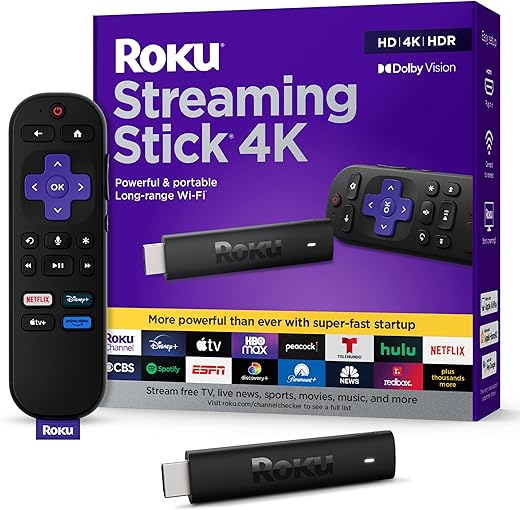
Can a $30 stick make your decade-old TV feel brand new? Let’s see which one wins the rescue mission.
Your old TV can still shine. You don’t need a new set to watch crisp shows, stream movies, or control smart lights from the couch. Short setup. Less clutter. Big payoff.
Roku, Fire TV, and Chromecast all promise a quick upgrade. Roku is strong on picture and range. Fire TV ties into Alexa and Amazon services. Chromecast is great if you prefer casting from your phone. This guide helps you match those strengths to older TVs without the fluff.
Top Picks


Roku Streaming Stick 4K Dolby Vision
Offers top-tier 4K streaming with Dolby Vision and long-range Wi‑Fi in a compact package, making it ideal for rooms farther from your router or for users who want the best picture without a big box. The responsive interface and thoughtful features make it easy to recommend.
Overview
The Roku Streaming Stick 4K is Roku’s leading compact streamer for people who prioritize picture quality and reliable connectivity. It brings Dolby Vision and HDR10+ support together with a long‑range Wi‑Fi receiver, which helps keep streams smooth in rooms farthest from your router.
Key technical strengths
Why it matters for older TVs
Older TVs often struggle with sluggish built‑in streaming platforms; this stick revitalizes those sets with a modern UI and superior codec support. Users report marked improvements in responsiveness and image clarity, and the long‑range Wi‑Fi reduces the need for extra networking gear in many homes.
Limitations and tips
This model sits at the premium end of the stick lineup, so it carries a slightly higher cost than entry-level devices. If you rely on a universal IR remote or have very constrained budget needs, other models may fit better. For those chasing the best value-to-performance ratio on older TVs that deserve excellent picture and stable streaming, the Streaming Stick 4K is our top recommendation.
Amazon Fire TV Stick 4K Plus AI Search
Blends powerful 4K streaming, Wi‑Fi 6 support, and AI-powered search with deep Alexa integration. It’s especially handy for households using Amazon services or for users who want smart‑home controls from their TV remote.
Overview
The Fire TV Stick 4K Plus is Amazon’s feature-packed 4K stick that targets users who want tight Alexa integration, strong wireless performance with Wi‑Fi 6, and support for advanced video and audio formats. It’s built for people who shop, stream, and control smart home devices through the Amazon ecosystem.
Standout capabilities
How it performs on older TVs
For older sets, this stick can act as a true smart hub — improving app responsiveness and unlocking modern codecs your TV might not support natively. Users moving from flaky built‑in smart platforms often find Netflix and other services run much smoother after installing a Fire stick.
Considerations and tips
The Fire OS home screen pushes Amazon content more prominently than some competitors; if you prefer a more neutral UX, expect to customize the interface or rely on the app grid. A small number of users report occasional device lag or remote reconnection issues, especially after long idle periods — keeping the device updated and ensuring a strong Wi‑Fi signal usually mitigates those problems.
Roku Streaming Stick Plus 2025 4K
A compact 4K stick that pairs strong picture quality with a portable design that hides behind your TV. It offers reliable streaming, voice control, and convenient mobile features that make it a top pick for most rooms.
Overview
The Roku Streaming Stick Plus 2025 is designed for users who want a clean look and solid performance without cables dangling from the TV. Its stick form factor plugs directly into the HDMI port and can draw power from the TV itself, keeping the installation tidy in living rooms, bedrooms, or while traveling.
Notable features
Real-world benefits
Because it gets power from the TV and tucks behind the screen, this model is great for wall‑mounted sets or multi‑TV households where you want a consistent Roku experience in every room. The device resumes quickly, offers a clean home screen with customizable app order, and includes access to hundreds of free live channels — useful for cord‑cutters and casual viewers alike.
Practical considerations
If you rely on an IR-based universal remote, the RF-only remote can be a drawback since it won’t receive commands through the TV chassis. Also, while the stick is powerful for most viewers, users who want the absolute fastest interface or Dolby Vision may prefer a higher‑end stick with enhanced Wi‑Fi or Dolby features. For most older TVs and users seeking portability, this is an excellent middle ground.
Roku Express 4K+ Simple 4K Streaming
A compact, no-frills way to get reliable 4K and HDR streaming on older TVs without spending much. It balances ease of use, broad app support, and a familiar Roku interface for less technical users.
Overview
The Express 4K+ is Roku's value-oriented 4K/HDR player aimed at people who want to modernize an older TV without replacing hardware or learning a complex interface. It ships with a straightforward voice remote that can power and control TV volume, supports major streaming services, and includes a premium HDMI cable so you can get started right away.
Key features and what they mean
Benefits in everyday use
For users who primarily want dependable streaming with minimal setup friction, this device hits the mark. Plug it into an HDMI port, connect to Wi‑Fi, and use the familiar Roku home screen to find apps like Netflix, Disney+, Prime Video, and many ad-supported channels. The included remote reduces remote clutter by also controlling basic TV functions.
Limitations and practical tips
While the Express 4K+ is a strong value, it isn’t the fastest Roku model and may show limitations in environments with heavy Wi‑Fi congestion or in households that need advanced HDR or Dolby features. If your router is older or located far from the TV, consider adding a Wi‑Fi extender or choosing a stick with long‑range Wi‑Fi for more consistent performance. Overall, it’s an excellent choice for cost-conscious buyers and for upgrading older HDTVs quickly.
Amazon Fire TV Stick HD Easy Streaming
An affordable, straightforward way to add streaming to HD or 1080p TVs and to cut cable or legacy box dependence. It’s easy to set up and user-friendly, though it lacks 4K features and advanced networking capabilities.
Overview
The Fire TV Stick HD is Amazon’s budget streaming stick that targets HD TVs and users who want a simple, familiar streaming experience. It provides the essentials — major streaming apps, Alexa voice control, and smart‑home integration — at a price point that’s hard to beat.
Key features
Practical benefits for older TVs
If you have an older HDTV that doesn’t support modern apps or has a sluggish built‑in platform, this stick is an inexpensive fix. It’s also a great gift for parents or relatives who aren’t tech‑savvy: straightforward setup, preset app buttons on the remote, and intuitive navigation make it approachable.
Limitations and recommendations
Because it’s designed for HD rather than 4K, it won’t help users who want the highest possible image quality. A few users report devices needing replacement after a year or so — that varies, but it’s something to consider if you expect very long device longevity. Overall, for straightforward HD streaming on a budget, it remains a dependable bestseller.
Final Thoughts
Top pick: Roku Streaming Stick 4K Dolby Vision — Best overall for older TVs that need real picture upgrades and reliable signal. Why: Dolby Vision and strong long-range Wi‑Fi give sharper HDR-like images on 4K sets and keep streams smooth in rooms far from the router. Ideal if your TV supports 4K (or you plan to upgrade soon) or the streaming device sits across the house from your router.
Runner-up: Amazon Fire TV Stick 4K Plus AI Search — Best if you live in the Amazon ecosystem or want built-in Alexa and smart‑home control. Why: Wi‑Fi 6 support, powerful 4K streaming, and deep Alexa integration make it the choice for Prime subscribers and households that use Alexa routines. Ideal if you want voice-first control and tight Amazon service integration.
Quick note: If your TV is only 1080p or you need the cheapest reliable option, consider the Amazon Fire TV Stick HD for simple HD streaming or the Roku Express 4K+ for a budget-friendly 4K experience.

I switched from Chromecast to Roku Streaming Stick Plus 2025 and haven’t looked back.
The Roku remote is just more reliable for quick navigation and voice.
Chromecast felt more like a second‑class controller sometimes.
Thanks for sharing your switch experience, Nora. We found Roku’s physical remote and interface a plus for many users who don’t like casting-only workflows.
Short and sweet: bought Fire TV Stick 4K Plus because of Wi‑Fi 6 and Alexa. Love the search, hate the ads. Would buy again though.
A few quick notes from someone who bought three different sticks for different rooms:
1) Fire TV Stick HD — cheapest, perfect for casual rooms and older HD TVs.
2) Roku Streaming Stick Plus 2025 — great all-rounder, hides behind TV and reliable UI.
3) Roku Streaming Stick 4K — best picture, use it where you watch movies.
Also: if you have an Echo ecosystem, Fire TV 4K Plus is fun for voice commands. But the ad-filled home screen can be a little much lol 😂
Roku remotes are generally reliable and have good range especially on the Streaming Stick 4K (long-range Wi‑Fi helps too). Fire remotes work well but some models rely more on line-of-sight for TV power functions.
Roku’s long-range Wi‑Fi helped in my garage setup. Remote range was fine through drywall.
Ad complaint is real. I mute and use a custom home screen on some devices to avoid it… but takes work.
Thanks for the breakdown, Henry. That’s basically my exact plan for house zones. How’s the Roku remote range compared to Fire?
The streaming experience also depends on your router placement. I moved my router one floor up and saw immediate improvements on all sticks.
Interesting comparison. I’m torn between Fire TV Stick HD (budget) and Roku Express 4K+ for an older HD TV. Does anyone feel the Roku UI is less pushy with ads than Fire?
One small PSA from me: if you’re buying for older folks, get the Roku Express 4K+ or the Roku Streaming Stick Plus 2025 and take a minute to reorganize the home screen and remove channels they won’t need.
I set up mine with big icons for Netflix/YouTube/Prime and turned off autoplay previews — made it way less confusing for my aunt.
Also label the remote with a tiny sticker for ‘Power’ — trust me on this 😂
Labeling the remote is genius. I also increase the text size in accessibility settings for my parents — big help.
Great tips, Marcus. Simplifying the home screen and disabling autoplay previews are two of the best accessibility tweaks for less tech-savvy users.
Curious if anyone tried using these sticks with really old TVs that only have composite inputs (the yellow/red/white)?
I remember adapters exist but some introduce lag. I’m trying to help my dad who has an ancient 720p-only LCD.
Would the Fire TV Stick HD be a better match for low-res TVs, or should I get a Roku and an HDMI-to-composite converter?
I used an adapter once, the motion looked off for sports. If you can swing a cheap 1080p TV for $100–150 it’s worth it.
Fire TV Stick HD will output at HD, but the converter will be the bottleneck. Buy from a place with easy returns.
HDMI-to-composite adapters do exist but can add latency and degrade image quality. If the TV only supports composite, consider a small TV upgrade if possible — even a cheap 1080p set will be a much better experience. If not, try a reputable powered HDMI-to-AV converter (not a passive cable) and test return policy before committing.
Thanks for the budget pick — I picked up the Roku Express 4K+ to replace a dying set-top box on an old living-room TV.
It was cheap, and honestly the HDR/4K upscaling made older content look nicer than I expected.
No crazy features, just works. Recommended for non-techy family members.
Totally — my mom loves the Express 4K+. Setup took like 10 minutes and she actually uses apps now. 😂
Glad to hear it worked out, Sofia. We often recommend the Express 4K+ for that exact use-case — simple and effective.
Great roundup — thanks! I bought the Roku Streaming Stick 4K last month to use on a hand-me-down TV in the garage.
Picture quality is way better than I expected and the long-range Wi‑Fi really helped (router’s on the other side of the house).
Setup was simple and the voice remote actually works reliably.
Only gripe: a couple of apps took a while to log me back in after a firmware update.
Anyone else seen that hiccup or is it just me?
Same here. I set mine to manual updates for a bit to avoid random re-logins, but that’s a tradeoff for security/patches.
Glad it helped, Liam — some apps do force re-auth after major Roku updates. Usually a once-or-twice thing; signing back in resolves it. If it persists, try removing and re-adding the channel.
If it’s a recurring issue check your Roku account permissions and any two-factor prompts. Little things like that can block the app auth.
Yep saw that after a big update last month. Annoying but fixed after re-login. Also make sure the stick isn’t overheating behind the TV — that can make it act flaky.
I have to say: Fire TV Stick 4K Plus is insanely good if you’re deep into Amazon.
Voice search with Alexa finds things fast and the Wi‑Fi 6+performance is legit — fewer buffering moments.
That said, the UI absolutely wants you to buy Prime stuff, so if you hate that, Roku’s cleaner.
Also: Chromecast wasn’t in the product list here, but for older TVs Chromecast with Google TV can be a slick middle ground.
Anyone tried both Fire 4K Plus and the Roku 4K sticks back-to-back?
Exactly — router capability matters. We noted the Wi‑Fi 6 advantage in the Fire 4K Plus review, but only users with compatible routers will see the benefit.
I prefer Roku for grandparents — simpler. Alexa integration is cool but confusing for older folks who don’t use voice assistants.
The Wi‑Fi 6 thing makes sense only if your router supports it. Mine didn’t and I saw no difference between Fire 4K Plus and the Roku stick.
Good point about Chromecast — we focused on devices commonly used with older TVs here, but Google TV devices are valid alternatives. Between Fire 4K Plus and Roku sticks: Fire wins for Amazon ecosystem; Roku wins for neutral UI and channel breadth.
Tried both. Roku felt snappier for navigation and had fewer ads pushed in the home screen. Fire was slightly faster at streaming 4K content from Prime Video though.