

Small space, big comfort — which smart thermostat won’t start a thermostat war in your apartment?
Tired of wrestling over the thermostat? Someone always wants it warmer, someone always wants it colder. A smart thermostat can end the negotiation and actually save you money.
If you are building your first connected setup, our smart home setup guide for beginners shows how thermostats, sensors, and Wi-Fi all fit together in a small home.
Pick a model with room sensors, simple setup, and good app control. Less fuss. More comfort. Fewer passive-aggressive sticky notes on the wall.
Top Picks for Small Homes




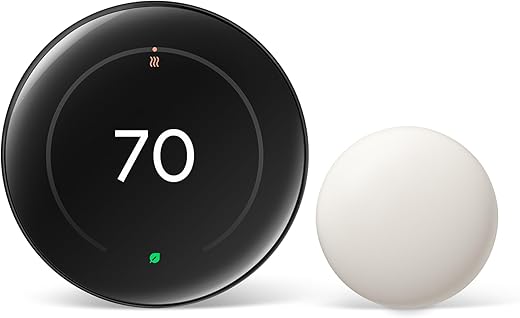
Nest Learning Thermostat with Sensor
Learns household patterns to automatically optimize comfort and reduce energy use, with strong integration across smart-home platforms. The included remote temperature sensor helps manage hot and cold spots in small homes and apartments reliably.
Why this thermostat stands out
The Nest Learning Thermostat (4th gen) is built to reduce energy waste while keeping living spaces comfortable with minimal ongoing effort. It learns temperature preferences, factors in outdoor conditions, and can pause heating or cooling when it detects a natural temperature advantage — useful in sunlit apartments or small homes that heat quickly.
Key features and what they mean for small homes
Real‑world benefits and practical notes
For renters and owners of small homes, the sensor and the learning features mean fewer manual adjustments and better-targeted comfort for frequently used rooms (like bedrooms or living rooms). Installation is straightforward in most 24V systems and the unit includes a large trim plate to cover imperfect wall patches often left by older thermostats.
Limitations and setup tips
A few things to watch: the price is premium compared with basic smart thermostats, and feature availability (and full compatibility) is strongest in the U.S. If you’re sensitive about data and cloud services, be aware the thermostat works tightly with Google Home services. For small apartments without a C-wire, use the online compatibility checker before buying to confirm whether the optional installation accessories are needed.
ecobee Smart Thermostat Premium Package
Combines room sensors, air-quality monitoring, and built‑in voice assistant features to offer a full-featured home comfort hub. It’s particularly strong at balancing comfort across rooms and providing advanced notifications for air quality and safety events.
What makes this model stand out
The ecobee Smart Thermostat Premium is designed as more than a thermostat — it's a small home-monitoring hub. It bundles a SmartSensor to prioritize occupied rooms, a built-in air quality monitor, and voice assistant capabilities, delivering a holistic approach to comfort and indoor air awareness that suits tech-forward small homes and apartments.
Feature highlights and benefits
Real-world use and setup guidance
In daily use, the Premium model excels at evening out temperature differences across rooms and alerting occupants about air-quality events. For renters or small-home owners who value both comfort and safety, this unit offers practical benefits like geofencing, break‑in alerts (with subscription), and open‑window detection when paired with additional sensors.
Things to consider before buying
It’s one of the pricier units in this roundup because of extra sensors and premium hardware. While many users can DIY the install, complex HVAC configurations or multi-stage systems may benefit from professional setup. Also, some of the security and advanced monitoring features require subscription services to unlock their full potential.
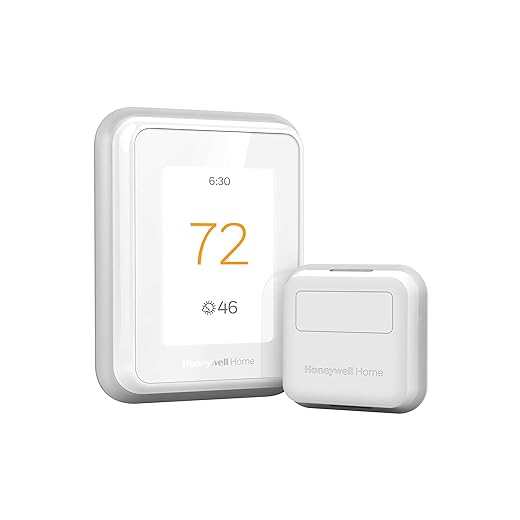
Honeywell Home T9 with Sensor
Balances multiple-room comfort effectively by using Smart Room Sensors to prioritize occupied spaces and reduce hot/cold spots. It’s an approachable upgrade for small homes and apartments that want better zoned comfort without a full HVAC overhaul.
Why choose the T9 for small homes
The Honeywell Home T9 focuses on practical, sensor-driven comfort: place a Smart Room Sensor where you spend the most time and the thermostat will bias conditioning to that area. For small homes and apartments with pronounced hot or cold spots, that targeted control can noticeably increase comfort without extra ductwork or zoning hardware.
Key features and usability
Real-world setup and tips
Installation is typically straightforward for standard 24VAC systems, and Honeywell includes a power adapter for homes without a reliable C‑wire. The sensors have strong range performance in typical homes, and the ability to average multiple sensor readings lets you balance comfort across bedrooms and living spaces.
Limitations and practical advice
The T9 is not suitable for electric baseboard heating (120–240V) and can require checking for regional compatibility; some international buyers report restrictions. If you expect to need advanced air‑quality monitoring or integrated security features, pair the T9 with additional devices or consider a higher‑end hub-centric thermostat.
ecobee Smart Thermostat Essential
Delivers strong core smart‑thermostat features—touchscreen control, ecobee app access, and compatibility with major voice assistants—at a mid-range price. A solid choice for those who want reliable performance without premium extras.
Positioning and target users
The ecobee Smart Thermostat Essential aims to deliver the most useful smart thermostat features without the higher price tag of the Premium tier. It targets users who want app control, ecosystem compatibility, and optional sensor expansion to improve comfort in small homes and apartments.
Core features and practical benefits
Practical considerations
This thermostat is a dependable mid-range option: it provides the essentials plus the ability to extend capabilities through optional sensors. For renters or owners who want to avoid subscriptions and complicated setups, it’s an excellent middle ground. If your home lacks a C‑wire, the Power Extender Kit is available to get stable power without running new wiring.
Limitations
Expect fewer built-in monitoring and air‑quality features than higher‑end ecobee models. If you want integrated air quality sensing, built‑in voice assistants, or advanced security integrations, upgrade to the Premium model instead.
Google Nest Thermostat (Budget Smart)
A compact, affordable smart thermostat that delivers core features—remote control, basic scheduling, and ENERGY STAR efficiency—without the bells and whistles. It’s a great pick for small homes or apartments on a budget who want smart control without a large upfront cost.
Who this model is for
The Google Nest Thermostat is aimed at shoppers who want an entry-level smart thermostat that still provides meaningful energy savings and remote control. It’s compact, inexpensive, and designed for straightforward installation in typical 24V residential systems, making it attractive for renters and small-home owners replacing basic programmable units.
What it offers (and how you use it)
Practical insights and real‑world usage
In practice, this thermostat covers the most commonly needed features: scheduling, remote adjustments, and energy-saving tips. It’s well suited to apartments or small homes that don’t need complex multi-stage HVAC control or advanced zoning. Installation is typically quick, but double-check wiring if you have older or nonstandard equipment.
Tradeoffs to consider
If you want learning‑based scheduling, multiple room sensors, or a large decorative display, the budget Nest will feel limited. Also, certain setups—like heat-only systems or some zone controllers—may still require a C-wire or a power accessory even though the device is designed to work without one in many homes.
Amazon Smart Thermostat (Alexa Ready)
Offers solid smart thermostat functionality at a bargain price for customers invested in Alexa or Ring ecosystems. It provides app-guided installation and handy automations, though it depends on a stable setup and occasionally needs a C-wire for reliable operation.
Who should consider this thermostat
The Amazon Smart Thermostat is an attractive option for budget-conscious buyers who already use Alexa or Ring devices. It focuses on the essentials—remote control, schedule automation, and integration with Amazon services—at a fraction of the cost of higher-end units, making it ideal for small homes and apartment dwellers looking to save immediately.
Key capabilities and how they perform
Real‑world strengths and common issues
For many users, the biggest appeal is the price and ecosystem convenience: the thermostat works seamlessly with Alexa routines and can use Echo devices for presence-based automations. However, several users report the device performs best when a true C‑wire is present; otherwise, occasional reconnection or delayed-start problems can appear after power loss.
Practical tips and limitations
If you have the ability to provide a C‑wire or install a compatible power accessory, the Amazon unit becomes a reliable, low-cost solution. If your HVAC system is multi-stage or you're looking for advanced zoning and sensor options, a higher-end thermostat may be more appropriate.
Final Thoughts
For most small homes and apartments: choose the Nest Learning Thermostat with Sensor. Strengths: excellent adaptive ENERGY SAVINGS, intuitive learning algorithms, and a remote temperature sensor to tame hot and cold spots. Ideal use case: renters or owners who want hands-off comfort, clear energy reports, and tight integration with Google Home — place the included sensor in a bedroom or living area to keep the space feeling even.
If you want a full-featured comfort hub instead: go with the ecobee Smart Thermostat Premium Package. Strengths: multiple room sensors, built-in voice assistant, and air-quality monitoring plus safety alerts. Ideal use case: slightly larger small homes or apartments with multiple activity zones where you want balanced temperature control, proactive air-quality alerts, and a thermostat that can act as a voice-enabled smart speaker.
Quick setup tips: confirm your system has or can support a C-wire before buying, and put sensors in the rooms you use most (living room and main bedroom) for the best results.
To push bills even lower, you can pair a smart thermostat with targeted control using our picks for best smart plugs with energy monitoring and best home energy monitors for smart homes.
More Smart Home Guides
Want to dial in the rest of your setup? These guides can help:
- Smart Home Setup Guide for Beginners
- Best Mesh Wi-Fi Systems for Smart Homes
- Best Smart Plugs With Energy Monitoring
- Best Home Energy Monitors for Smart Homes
- Best Smart Door and Window Sensor Kits for Home Security
Want more options before you decide? Explore our full Smart Thermostats category for additional models, comparisons, and setup tips.

Nice roundup! I’m torn between ecobee Smart Thermostat Essential and the Google Nest Thermostat (the budget Snow one). My priorities: easy setup, decent app, and low upfront cost. I don’t need advanced sensors — I mostly want reliable scheduling and occasional remote control.
Also, are there any known issues with the Nest Snow version not supporting some HVAC systems? I have a simple forced-air setup.
If your system is a standard forced-air setup, both the ecobee Essential and Google Nest (Snow) should work. The Nest Snow is the cheaper, simpler pick and great if you want core features; ecobee Essential gives more app features and slightly better compatibility notes in some cases. Check the compatibility checker on each product page before buying to be safe.
I used the Nest Snow in a forced-air place and it worked fine. Just verify wiring (C-wire) and HVAC compatibility via the online tools. If in doubt, ecobee tends to list compatibility more clearly.
Thinking between the ecobee Smart Thermostat Premium and the Google Nest (4th gen). The ecobee’s air quality monitoring sounds useful — do those alerts ever feel like overkill? Also, does the Premium’s built-in voice assistant mean you can leave your Echo/Google Home off?
I live in a one-bedroom, so balancing rooms is important, but I don’t want something that nags me constantly.
Good question. The ecobee Premium’s air-quality alerts are customizable, so they won’t nag you if you turn them down. The built-in mic/assistant can handle basic voice commands independently, but many users still keep a dedicated speaker for better audio and broader smart-home control.
I use ecobee Premium in a small flat — AQ alerts helped once when my neighbor burned dinner and the app told me to ventilate. Not annoying now that I set thresholds. Voice assistant on the thermostat is handy, but I still use my Echo for music and routines.
I actually installed the Nest Learning Thermostat (4th gen) last month and the learning feature is kinda spooky — in a good way. It picked up our weird schedule (late-night tv binges, lol) and adjusted temps accordingly. The included Nest Temperature Sensor made a noticeable difference in the small bedroom that used to be a heat trap.
A couple things though:
– If you’re in an older apartment without a C-wire, check the wiring first — I had to ask my landlord to approve running one.
– The app is slick but had one update that briefly dropped remote control for a day.
Anyone else have experience with long-term reliability? Also curious how it stacks up against ecobee for folks worried about air quality monitoring. 🙂
I had a similar experience — Nest learned my odd sleep schedule too. For the C-wire I used a cheap adapter for a few months before landlord agreed to run one. Works fine now. AQ monitoring on ecobee is really handy if you have pets or live near a busy street.
Long-term: my Nest has been rock-solid for 2 years. Minor app hiccups but firmware updates fixed them. If you want automatic energy savings without fiddling, Nest is great.
Thanks for sharing, Maya — great real-world report. For older apartments without a C-wire, many people use a power extender kit or have an electrician add a C-wire; Nest sometimes works without it but behavior can be hit-or-miss. On ecobee vs Nest: ecobee’s sensors and AQ monitoring are stronger for multi-room comfort and indoor air alerts, while Nest excels at learning household patterns.
I’m leaning toward the Honeywell Home T9 because of the Smart Room Sensor idea. My living room is always colder than the bedroom, and I like the idea of prioritizing occupied spaces rather than having the whole place heat up.
Question: do Honeywell sensors handle walls/doors being closed better than Nest’s single sensor approach? Also, battery life on those sensors — anyone measured months vs years?
One more tip: Many sensors use common CR2032 or AA batteries — inexpensive and easy to replace. If you want minimal maintenance, factor that into your choice.
I used two T9 sensors for a year — batteries lasted ~10-12 months with regular temp checks. They do better than a single thermostat in multi-room setups, especially when you only use one room at a time.
If your bedroom is already warm, sensors in the living room and hallway helped me avoid overheating the whole apartment. Just remember to swap batteries before winter.
Honeywell’s sensor-driven room control is effective for prioritizing occupied rooms. Sensors are small and typically handle closed doors fine, but placement matters — avoid putting them behind curtains or in very sheltered spots. Battery life is usually measured in months to a couple years depending on usage and model; check the sensor specs and user reports for real-world numbers.
Amazon Smart Thermostat: cheap, does the job, and made my landlord (and my wallet) happy. 😅
Installed it in under 20 minutes with the guided setup. BUT — heads up: it really does like a C-wire. The app suggested one and after a week of flaky behavior I had to add it.
Also comedic observation: I asked Alexa to ‘turn the heat down’ and my cat gave me the side-eye like I betrayed him. Pets are judging thermostats now.
Has anyone used the Amazon thermostat alongside Ring cameras? Curious about ecosystem quirks.
Lol @ the cat. My dog judges my thermostat choices too. On the technical side, if you don’t want to run a C-wire, a wiring relay or pro install helped me stabilize mine.
FWIW the Amazon thermostat is fine for most apartments, but if you want sensors for multiple rooms, consider ecobee or Honeywell instead.
Glad to hear the Amazon unit worked for you — it’s often the best budget pick. It integrates well with Alexa and Ring for basic automations, though deeper, cross-device routines can be clunkier than native Google or Amazon ecosystems. The C-wire requirement is common; the app’s wiring guide is helpful but a tech or landlord help makes it smoother.
Yep, I run mine with Ring and haven’t had issues. You can set simple Alexa routines to change temp when a Ring motion event happens, but latency can be a little slow sometimes.
Small tip: if landlord resists wiring, ask about a professional short-term solution (power extenders). Saved me from 3 false ‘thermostat offline’ messages.