

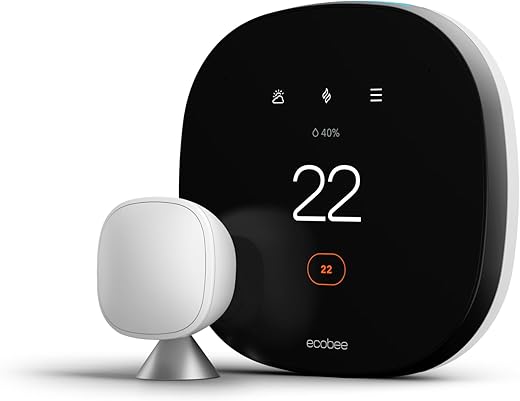
Small space, big comfort — which smart thermostat keeps your apartment cozy (and your energy bill calm)?
You can stop arguing over the thermostat. Imagine walking into your apartment and it’s already the right temperature. No more cold mornings or sweating through movie night.
Smart thermostats save energy and simplify life. They fit small homes and apartments, from renters who need easy installs to owners who want multiroom comfort. Pick the one that matches your needs — sensors, voice control, or a friendly price.
Top Picks
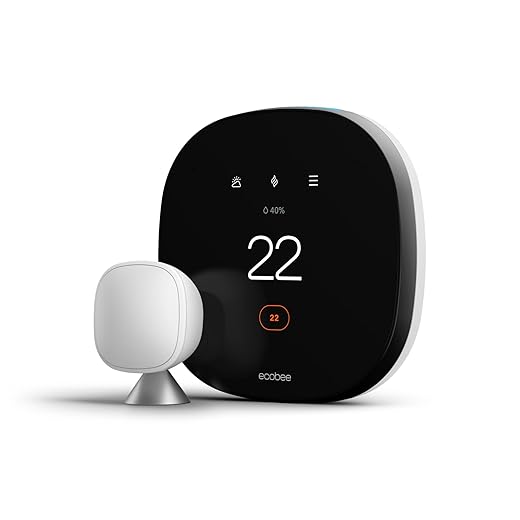


ecobee Smart Thermostat with Voice Control
A feature-rich thermostat with built‑in voice assistant and included remote sensor to prioritize comfort in occupied rooms. It strikes a strong balance between automation, integrations, and energy savings for small homes and apartments.
Performance and purpose
The ecobee Smart Thermostat with Voice Control is designed for users who want precise comfort and extensive smart home capability. It includes one room sensor to detect occupancy and temperature, enabling the system to heat or cool the spaces you actually use rather than only the thermostat location.
Standout features
Ecobee’s algorithms and multi‑sensor approach deliver measurable comfort improvements and reported energy savings. The app and web dashboards provide detailed energy reports and configurable schedules, which make fine‑tuning straightforward for users who want control.
Practical considerations
This is a top choice for small homes and apartments where uneven heating/cooling is common because the included sensor helps balance rooms. The unit is more expensive than basic models, but the sensor‑driven comfort and rich integrations make it a strong value over time for many households.
Installation and user tips
Honeywell Home T9 — Smart Room Sensor Ready
A strong choice if you plan to prioritize comfort in specific rooms via additional sensors. It combines reliable Honeywell HVAC know‑how with adaptive scheduling and useful alerts for maintenance and filters.
What it does best
The Honeywell Home T9 is built around multi‑room comfort: pair it with optional Smart Room Sensors to tell the thermostat where people are and what rooms need conditioning. That makes it a good choice for small homes and apartments with rooms that heat or cool unevenly.
Features that matter
Physically, the T9 provides a straightforward touchscreen that’s easy for guests to use. Its compatibility with many HVAC system types and the inclusion of a power adapter in the box reduce installation headaches for many home setups.
Caveats and setup guidance
Some buyers have reported occasional app or connectivity annoyances and the requirement for a C‑wire in certain systems, so check compatibility before buying. Overall reliability from users is good, and many appreciate the direct Honeywell lineage and the ease of replacing older Honeywell thermostats with the T9.
Practical recommendations
Google Nest Thermostat — Budget Smart Control
A compact, smartphone-first smart thermostat that gives solid energy-saving features without the premium price. It’s easy to install for most DIYers and integrates well with Google Home and Matter ecosystems.
Overview
The Nest Thermostat offers a pared-down, cost-conscious take on smart home temperature control. It’s designed to be approachable for first-time smart thermostat buyers while still delivering energy-savings features such as Auto‑Away, scheduling through the Google Home app, and HVAC system alerts.
Key features and benefits
The unit is compact and intentionally app-centric — most configuration and scheduling is handled in the mobile app rather than via an elaborate on‑device interface. That keeps the physical design clean and makes day‑to‑day adjustments convenient for people who already use their phone for smart home control.
Who it’s best for and limitations
This thermostat is a strong pick for renters or owners of small homes and apartments who want smart control and energy reporting without a high upfront cost. Users should note that while the Nest is designed to work without a C‑wire in many cases, specific heating/cooling setups (heat‑only, some heat pumps, or zone controllers) may still need a C‑wire or a power accessory. If you prefer extensive on‑device controls or top-tier third‑party integrations, a higher‑end model may be a better fit.
Practical tips from users
ecobee Smart Thermostat Essential — Value
A trimmed-down ecobee that keeps the company’s smart scheduling and app experience at a lower price point. It’s a great option if you want reliable remote control without paying for every extra sensor or hub feature.
Purpose and positioning
The ecobee Smart Thermostat Essential brings many of ecobee’s core smart thermostat capabilities to a more budget‑conscious audience. It focuses on reliable scheduling, app control, and energy features without the added extras that push the price up on flagship models.
What you get
For many apartment dwellers and small homes, this model delivers the practical advantages of ecobee (clear UI, good reporting) without the need to buy included sensors. If you later decide you need room‑specific control, additional SmartSensors can be added.
Limitations and tips
This Essential model does not include the SmartSensor, so it won’t automatically balance temperatures between rooms out of the box. It also lacks some of the premium integrations and the built‑in voice features of higher models. That said, it’s an excellent entry‑point for buyers who want dependable smart control and a strong app for a modest price.
Practical advice
Nest Thermostat E — Frosted Display Simplicity
A design-forward option with straightforward controls and solid energy-saving features. It blends into decor with a frosted display and offers Alexa and Google voice control for hands-free adjustments.
Design and purpose
The Nest Thermostat E brings the familiar Nest feature set into a more discreet package with a frosted face that hides when idle. It’s meant for users who want the smart features of a Nest but with a low-profile look that doesn’t draw attention on a living room or hallway wall.
Highlights and what you get
The E supports remote temperature sensors (sold separately) and provides Energy History showing approximate savings. Installation is usually straightforward and compatible with a wide range of systems, though an occasional need for a C‑wire can occur depending on your HVAC hardware.
Benefits and trade-offs
Its strengths are appearance and a simplified user experience — ideal for small homes and apartments where aesthetics matter. Trade‑offs include a plastic build that some users feel is less durable than pricier models, and a few reported customer service or long‑term reliability complaints in isolated cases.
Practical user advice
Honeywell Home T5 — Simple Smart Scheduling
A user‑friendly 7‑day programmable thermostat with geofencing and ENERGY STAR credentials. It offers a balance of simplicity and smart features for renters and small homes who want dependable scheduling and remote control.
Core purpose
The Honeywell Home T5 is aimed at buyers who want a dependable, no‑nonsense smart thermostat with solid scheduling and location‑based controls. Its 7‑day programming and geofencing let you automate temperature changes based on routines or your phone’s location.
Key capabilities
Many users find the T5’s straightforward scheduling and clear display ideal for apartments and small homes. It’s especially attractive when replacing older Honeywell models because the physical swap is often quick and easy, and the styling is discrete and modern.
Known limitations and tips
Some reviewers reported challenges with smart scheduling logic (adaptive recovery) and occasional issues that required disabling certain features to get expected behavior. Additionally, if your system lacks a C‑wire, the T5 may not be a fit without a power adapter. Despite these caveats, it remains a popular, practical choice for users who want reliable control without a steep learning curve.
Practical setup notes
Amazon Smart Thermostat — Alexa Integration
A low-cost smart thermostat that gives great value for Alexa households and often qualifies for utility rebates. It uses established Honeywell technology but is designed around the Alexa ecosystem.
Who this is for
The Amazon Smart Thermostat targets buyers who want a no‑frills, Alexa‑first smart thermostat at a budget price. Backed by Honeywell Home technology, it’s an economical way to upgrade a traditional thermostat and access smart routines, voice control, and Alexa automations.
Core features
Because it’s a value‑focused product, the Amazon Smart Thermostat pares back some advanced features found on higher‑end models. Nevertheless, it supports common smart thermostat functions like scheduling, away modes, and an energy dashboard in the Alexa app.
Limitations and setup notes
Expect to need a C‑wire in many installations — multiple reviewers emphasized that requirement. There are also occasional reports of network reconnection issues after power loss and a few firmware‑related bugs. For a tight budget or multiple thermostats in a small home, the cost savings can outweigh these downsides, especially if you already use Alexa devices throughout the home.
Practical tips
Final Thoughts
Top pick: ecobee Smart Thermostat with Voice Control — Best overall for small homes and apartments. It includes a remote sensor to prioritize the rooms you actually use, has a built-in voice assistant, and offers robust automation and integrations. Choose this if you want consistent comfort across rooms, hands-free control, and strong energy-saving features.
Best budget pick: Google Nest Thermostat — Budget Smart Control. It’s compact, easy to install, and smartphone-first. It delivers solid energy-saving tools and works seamlessly with Google Home (and Matter). Choose this if you’re a renter, on a tight budget, or want the simplest, most user-friendly smart setup.
Quick note: if you want an ecobee experience without the premium extras, the ecobee Smart Thermostat Essential is a sensible value alternative. If your home is Alexa-centric, the Amazon Smart Thermostat is an affordable, voice-focused option.

Installed the Google Nest Thermostat (the budget one) last month — super easy DIY install, took me about 20 minutes. My heating bills already feel a bit lower.
One tiny issue: the display brightness is subtle, sometimes hard to read from across the room. But honestly for the price it’s great. typos happen but I still love it 😅
Good to hear it was an easy install, Priya. The Nest’s display is intentionally understated — you can tweak the brightness in settings, or enable the ambient display only when someone is nearby to save energy.
Agree on the install — Nest is super DIY friendly. If the display bothers you, try adding a small wall sconce nearby for reading at night. Looks nicer than a bright thermostat!
The Google Nest Thermostat E looks so much nicer on the wall than my old clunky unit. The frosted display is subtle and blends into our decor. Does anyone know how well the Nest E will play with Matter devices? I’m slowly swapping my smart plugs to Matter-certified gear.
If Matter is a dealbreaker, I’d verify before buying. In my experience Google has been fairly good at rolling out updates, but older hardware sometimes misses features.
Nest devices are moving toward Matter support where Google has enabled it, but it depends on the exact model and firmware. The Nest Thermostat E may get better interoperability over time via Google Home updates, but double-check the latest Google release notes for Matter compatibility.
I finally installed the ecobee Smart Thermostat with Voice Control last weekend and so far I’m impressed. The included remote sensor really made a difference — our bedroom stays warmer in the morning without blasting the whole house.
My only question: has anyone noticed any quirks when using both Alexa and Google Home devices together? I mostly use Alexa, but I like that it supports Siri too.
Nice! I loved how the remote sensor helped our upstairs not overheat. Pro tip: place the sensor where people actually sleep/use the room — not above a vent. 🙂
Glad it worked out, Sarah — the ecobee does handle multiple assistants pretty well. I’d recommend setting a primary assistant in the app to avoid duplicated voice triggers. If you use Alexa for routines, keep those in Alexa and leave the ecobee automations in its app.
I run ecobee with Alexa and a single Google Mini. No real conflicts so far, but I did have to re-authorize integrations after a firmware update once. Worth checking the app after updates.
I’ve got the Honeywell Home RTH8800 (T5) in my small condo — geofencing is actually useful, and the 7-day scheduling is handy for odd work hours. One gripe: it did require a C-wire, so I had to call an HVAC guy (worth it). Funny thing: thermostat menus still make me feel like I’m launching a NASA shuttle 😂
Anyone else think modern thermostats still overcomplicate simple temp changes?
You’re not alone, Karen — many find the smart features overwhelming at first. The T5/RTH8800 is a good balance because you can stick to simple schedules and only enable geofencing or alerts when you’re ready. HVAC pros can usually tidy up a C-wire install quickly.
If it helps, many apps have a ‘simple mode’ or you can pin a favorite temp on the home screen. Less menu diving that way.
That NASA comment made my day. 😂 I turn voice control on and forget the app exists most days.
Ha, agreed about the menus. I keep it on auto-schedule and only tweak when seasons change. Less is more!
Has anyone tried the Amazon Smart Thermostat? I’m tempted by the low price and the idea of rebate eligibility, but ugh — C-wire required on my old building and I don’t want to deal with drilling or calling a pro.
Also, is it really that Alexa-centric? I’m not an Alexa-only household and don’t want to feel locked in. 😬
If you hate messing with wiring, the Nest Thermostat (the budget Nest) can sometimes run without a C-wire depending on your system, but it’s not guaranteed. I ended up paying an electrician once and it was worth it for the peace of mind.
Some landlords won’t allow rewiring — check with them first. If rebates are the main driver, the Amazon unit is a good cheap option but yeah, kinda leans into Alexa features.
The Amazon Smart Thermostat is very Alexa-forward but still supports basic Alexa/Google integration depending on your setup. It does typically require a C-wire. If your unit lacks one, you can use a C-wire adapter or have a pro install a common wire — inconvenient, but once it’s done you get reliable power.
Thinking about the Honeywell Home T9 for my 2-bedroom apartment because of the multi-room sensors. Does anyone know how long the sensor batteries last in real world use? Are they easy to replace?
Also worth noting: the T9 is great if you want zone-specific comfort. But if you’re expecting instant response to a closed-door room, the sensor placement matters a ton.
Honeywell’s T9 sensors generally use AAA or coin batteries depending on model; in most reports they last 1–2 years with normal polling. They’re user-replaceable — you just pop open the sensor housing. If you want longer life, check sensor polling frequency in the app and set it less aggressively.
Battery life varies with temperature and how often the sensor wakes up. Mine lasted 14 months with heavy use.
I have 3 T9 sensors and swapped batteries after about 18 months. No fuss — just a tiny screwdriver. The sensors are pretty accurate; they do lag a bit if you move them around a lot though.
Short version: if you want the smartest features and the remote-sensor comfort, go ecobee Smart Thermostat with Voice Control. If you want the same app-ish experience but cheaper, the ecobee Smart Thermostat Essential looks like the sweet spot.
Long version:
– Full ecobee: built-in voice assistant, better room prioritization, more integrations. Great for small homes where one room being comfortable matters.
– Essential: keeps the core scheduling and app control, cheaper, fewer frills. Good for renters or tight budgets.
I weighed the two for weeks — ended up with the Essential in our rental and the full ecobee at home. No regrets, but choose based on whether you need sensors and voice locally.
Are the sensors compatible across ecobee models? Like could you buy the Essential now and add remote sensors later if needed?
Nice breakdown, Mark. The Essential is indeed a strong value pick for people who want ecobee’s app/scheduling without the premium. One tip: check for rebates — ecobee models often qualify for utility incentives.
They are compatible, David — ecobee sensors work with both the full and Essential models, though some advanced features might be limited on the cheaper unit.
This is exactly what I needed to hear. I was torn between the two and wasn’t sure if the built-in voice assistant was worth the extra cash.
Correct, Karen — base functionality works, but double-check specific feature support (like voice assistant-triggered sensor commands) if that’s a must-have.