

Which plug pays for itself first — the fancy Matter one or the bargain-basement champ?
Your wall socket just became your new accountant. Plug something in and it will tell you how much it costs to run.
Tuning out energy waste is EASY when the data is in front of you. If you ever want whole-panel tracking, our best home energy monitors for smart homes guide covers full-system meters; these smart plugs zoom in on individual devices and make saving kind of fun.
Top Picks



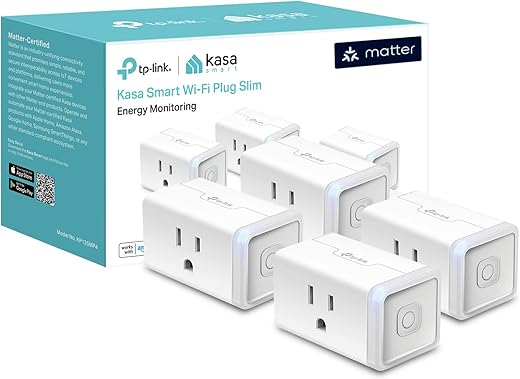
Kasa Matter Smart Plug — Compact Energy Monitor
Excellent cross-platform compatibility with Matter makes setup and long-term integration straightforward. Reliable energy monitoring and a compact, UL-rated design make it a strong choice for most smart-home owners.
Purpose and overview
The Kasa Matter Smart Plug KP125M is designed for people who want a future-proof smart outlet with energy monitoring and wide platform compatibility. It targets households that want to track consumption and fold plugs into larger Matter ecosystems (Apple Home, Alexa, Google Home, SmartThings) without vendor lock-in. Rated for 15A/1800W and UL flame-retardant, it balances safety with convenience.
Key features and benefits
These features let you monitor how much a lamp, heater, or charger costs during a month, build automations across brands, and keep two outlets usable in a standard duplex receptacle. Example: set a schedule that powers an EV wall charger only during off-peak hours and log the energy consumed each session to estimate costs.
Practical insights and limitations
The plug’s Matter support means it will keep working with other Matter devices on the same local network even if the internet is down, but it requires a 2.4 GHz Wi‑Fi connection (no Thread). While most reviewers praised the plug’s reliability and ease of setup, a small number mentioned occasional app differences between Kasa and platform-native interfaces. If you rely exclusively on cloud-free workflows, confirm your specific hub and firmware behavior during setup.
Who should buy it
If you want a compact, safety-certified Matter smart plug with solid energy tracking and minimal fuss — and you use 2.4 GHz Wi‑Fi — this plug is a strong, practical choice. For heavy loads beyond 1800W or mesh/Thread-only setups, consider alternatives that support those specific needs.
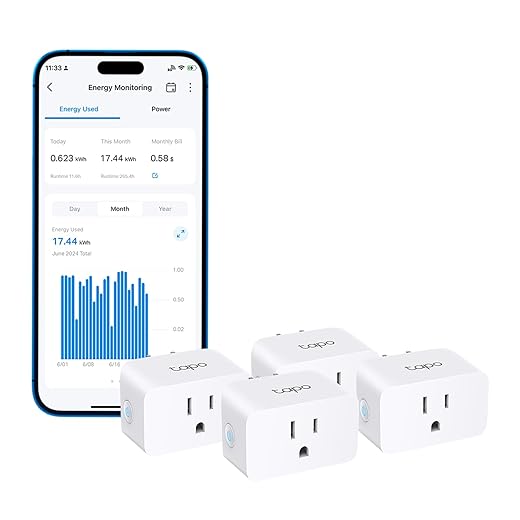
TP-Link Tapo P115 — Affordable Energy Monitor
A cost-effective option that still offers clear energy statistics and scheduling features. Easy setup and SmartThings/Alexa compatibility make it a practical choice for buyers who want monitoring without a big price tag.
Overview and intended use
The TP-Link Tapo P115 is a budget-friendly Wi‑Fi smart plug that adds energy monitoring and scheduling to everyday devices. It targets users who want practical consumption insight (daily/monthly/yearly) and reliable voice/app control without a high price. The pack value is a major selling point for whole-house rollout on lamps, chargers, and small appliances.
Features and user benefits
Use cases include scheduling an espresso machine during off-peak rates, or letting the plug automatically cut power to a phone charger after a set charge window to reduce vampire draw. Reviewers highlighted using the rate-entry feature to calculate monthly costs and automate EV or device charging during cheaper hours.
Practical points and trade-offs
The P115 is very compelling on price and features, but the body can be slightly large for some recessed outdoor or tight wall-box outlets — measure before buying if you have limited clearance. Response times can vary slightly depending on network and distance from the router. As with most on this list, it works on 2.4 GHz Wi‑Fi only and lacks Thread.
Who should pick it
Buy this if you want energy monitoring and scheduling across several devices without spending a lot. It’s an especially good fit for renters or users deploying many plugs for seasonal lights, chargers, or small appliances where insight and simple automation provide real savings.
Meross Matter Smart Plug with Energy Meter
Strong privacy posture with Matter-over-Wi‑Fi and no mandatory cloud registration. Good energy tracking and HomeKit compatibility make it attractive for HomeKit-first users, though some networks may need mDNS tweaks.
Purpose and short summary
This Meross Matter Smart Plug focuses on giving users a privacy-forward Matter device that also supplies energy monitoring. It’s aimed at users who prefer to minimize cloud dependencies while still getting the convenience of HomeKit, Alexa, and Google Assistant integrations. The plug supports 15A/1800W loads and has built-in protections to reduce risk of overheating or overloads.
Standout features
The energy meter is particularly handy for seeing how much devices cost to run (e.g., monitor a space heater for a week to calculate expense) and the overheat alerts add a safety layer for unattended loads.
Limitations and deployment tips
While the Meross plug emphasizes privacy and local control, a subset of users reported HomeKit connection dropouts related to multicast DNS or router settings. If you have a managed network (UniFi, custom VLANs), allow mDNS or adjust discovery settings to avoid issues. The plug operates over 2.4 GHz Wi‑Fi and requires modern mobile OS versions for full Matter setup.
Who it’s best for
Choose this plug if you want Matter’s interoperability plus strong local-privacy behavior and detailed energy reporting. Network-savvy users and HomeKit households will get the most value; casual users should be aware of possible router configuration steps for flawless HomeKit presence.
Etekcity Smart Plug with VeSync Monitoring
A mature, dependable smart plug with long-term user satisfaction and a straightforward VeSync app. Good scheduling and energy monitoring for everyday appliances, though it has a lower amperage rating than others.
What it does and who it’s for
Etekcity’s smart plug is a well-established entry in the affordable smart-plug market that adds remote control, scheduling, and energy monitoring to ordinary outlets. It’s aimed at users who want an easy-to-use solution backed by a familiar app (VeSync) and broad voice-assistant compatibility (Alexa, Google, IFTTT). The product has a long history of reliable performance in consumer homes.
Main features and everyday benefits
Typical uses include automating lights while away, creating charging schedules for devices, and using the energy logs to see which appliances have a vampire draw. Users often praise its simplicity and the fact that it typically “just works” once configured.
Limitations and recommendations
The most important limitation is the lower current rating (8A/960W) — avoid plugging in space heaters or other high-draw devices. Some long-term users noted that network/router hardware can affect stability; if you have intermittent drops, check router capacity and firmware. Also expect a noticeable relay click when the plug switches — audible confirmation some like and others find intrusive.
Final thoughts
If you want a no-frills, battle-tested smart plug for lighting, chargers, and low-power appliances — and you appreciate simple schedules and remote control — this is a reliable, affordable choice. For high-current needs or the newest mesh/Thread integrations, pick a higher-rated or Matter/Thread-capable model instead.
Final Thoughts
Best overall: Kasa Matter Smart Plug — Compact Energy Monitor. Get this if you want the fewest headaches long-term. Its Matter compatibility and compact, UL-rated design mean it plays nicely with Apple Home, Google, Alexa, and future smart-home changes. Use it for your media center, desktop gear, or any place you want reliable, cross-platform energy tracking without a bulky plug.
Best budget pick: TP-Link Tapo P115 — Affordable Energy Monitor. Choose the Tapo P115 when you need to outfit a bunch of outlets on a budget. It gives clear energy stats and solid scheduling for lamps, fans, and everyday appliances. Quick setup and SmartThings/Alexa support make it perfect for room-by-room rollouts.
Pro tip: If privacy and HomeKit-first control matter more than cost, consider the Meross Matter Smart Plug — it’s the best pick for privacy-minded HomeKit users. And always check each plug’s amperage rating before using with heaters or heavy-duty appliances.
If you’re just starting to wire plugs into a bigger smart-home plan, our smart home setup guide for beginners can help you map rooms, pick a main ecosystem, and decide where energy-monitoring plugs will save the most.
More Smart Home Energy Guides
- Best Home Energy Monitors for Smart Homes
- Best Smart Door and Window Sensor Kits for Home Security
- Best Mesh Wi-Fi Systems for Smart Homes
- Smart Home Setup Guide for Beginners
Looking for even more plug-and-play options? Explore our Smart Plugs & Energy Monitors category for additional picks and setup tips.
FAQs
Consumer smart plugs give reliably useful numbers for spotting big energy draws and changes over time. They’re usually accurate enough for relative comparisons (which appliance is worse) and monthly cost estimates, but they aren’t lab-grade meters. Expect small variance on very low or highly variable loads.
Many modern smart plugs can detect low-watt standby draw, but sensitivity varies. If you want to catch sub-1W phantom loads, check the product’s minimum reporting resolution. For most households, these plugs will reveal the usual culprits (chargers, AV standby, routers).
It depends. Meross emphasizes Matter-over-Wi‑Fi and can avoid mandatory cloud sign-ups, which is good for privacy. Kasa and Tapo typically use cloud accounts for features, remote access, and firmware updates. If privacy is a priority, pick a Matter-capable plug that supports local control or look for explicit 'no cloud required' notes.
Check the plug’s amperage and watt rating first. Most smart plugs are fine for lamps, fans, TVs, coffee makers, and similar loads. Heavy-duty heaters and some air conditioners can exceed a standard plug’s rating — use a high-amperage or hardwired solution for those devices to avoid tripping breakers or damaging the plug.
Smart plugs report instantaneous power (watts) and cumulative energy (kWh). To estimate cost, multiply the kWh used by your electricity rate (e.g., 0.15 USD/kWh). Example: a 100W device running 10 hours uses 1 kWh (0.1 kW × 10 h = 1 kWh).
Leave the plug always powered, use its native app or Matter integration to log data, and check weekly or monthly summaries rather than obsessing over minute-by-minute changes. Export CSVs if the app allows it for spreadsheet tracking, and update firmware to keep measurements stable.
Run plugs on a separate IoT Wi‑Fi network or VLAN, use a strong Wi‑Fi password, keep firmware current, and disable unnecessary remote features if you don’t use them. That reduces the attack surface and keeps your energy data private.
Start with one Kasa Matter Smart Plug where cross-platform support matters (living room or home office). For bulk purchases to spot-waste in many rooms, buy several TP-Link Tapo P115 units — they’re inexpensive and effective for a whole-house survey.

Really liked the Kasa Matter plug recommendation — I’ve been wanting Matter support so all my devices play nice together. The compact design is a big plus for power strips.
Question: Has anyone experienced any quirks with the Kasa app energy graphs vs the actual electric bill? I want to make sure the monitoring is accurate before replacing a bunch of old plugs.
Thanks for the question, Sarah. In our testing Kasa’s energy figures tracked within a few percent of reference measurements for typical loads. Small fluctuations can happen with very low-power devices or with short duty cycles.
I have the KP125M and the numbers are pretty close for me. It’s not perfect to the last kWh, but it’s accurate enough to spot big energy hogs.
Also FYI: if you use a smart strip with multiple devices it can skew averages. The Kasa plug itself is solid though.
Long post because I tested all four over a month and have some real-world notes:
1) Kasa KP125M – Best all-around: compact, accurate energy readings, Matter compatibility made my scenes simpler.
2) Tapo P115 – Best value: cheap, decent monitoring, good for lamps and seasonal stuff.
3) meross – Best for privacy: no forced cloud registration and HomeKit-friendly, but check router multicasting for discovery.
4) Etekcity – Best old-school reliability: cheap, long warranty, VeSync app is solid.
If you’re automating heavy loads (space heaters, AC), consider hardwired relays instead of smart plugs. Otherwise any of these will be fine depending on priorities (privacy vs price vs Matter).
Thanks for the comprehensive breakdown. Your point about relays for high-draw devices is well-taken and responsible advice for safety.
Great summary, Michael. That relay tip is important — so many people forget amperage limits.
Happy to help. Also note: firmware updates can change behavior, so keep devices updated.
Agree on relays — I wired a smart relay for my window AC and it’s much safer than a plug.
This is the kind of post I needed. Thanks!
Anyone tried mixing brands in the same Home/Matter setup? I worry about quirks when pairing Kasa, meross, and Tapo together.
Mixing brands is common and one advantage of Matter is cross-vendor interoperability. Just ensure each device is updated and that your controller (Home app, Alexa, etc.) supports Matter features you plan to use.
If you rely on vendor-specific cloud features, those may differ. But basic on/off/energy reporting usually works fine across brands.
I mix Kasa and meross and it’s fine. Matter is literally designed for that — the trick is consistent firmware and stable Wi‑Fi.
I’m a HomeKit user and privacy-conscious, so the meross Matter plug looks tempting. The fact it doesn’t force cloud registration is huge to me.
Has anyone run them on larger networks? The review mentioned mDNS tweaks — that sounds like potential router headaches. Would appreciate setup tips!
Same here. If you’re not comfortable fiddling with router settings, ask your ISP for help or check router docs. It’s not hard, just a checkbox usually.
I added meross to my HomeKit setup. Had to enable mDNS/IGMP snooping on my mesh router for discovery, but once done they were stable. If your router hides multicast by default, that’s the tweak they’re talking about.
Also, meross’ lack of forced cloud is a relief. My only nit is occasional UI lag in the app but that’s not HomeKit-related.
Thanks everyone — that helps. I’ll check my router settings tonight. 👍
Good points. For users on consumer mesh systems, enabling Bonjour/mDNS or using a router mode that supports multicast will usually resolve discovery issues with Matter-over-Wi‑Fi devices like meross.
I ended up buying the Tapo P115 4-pack for my holiday lights last year and it was brilliant. Cheap, easy to schedule, and energy tracking helped me see how much the strings actually cost to run (spoiler: less than I feared).
Only gripe: the app sometimes needs reopening to refresh live power data.
Nice use-case. Apps that cache data can behave that way; Tapo tends to update every few seconds but reopening forces a fresh poll.
Thanks — that sold me. Low cost + energy insights = perfect for seasonal stuff.
Haha holiday lights are the best use-case. I timed mine and found I could cut nightly run time by 30% without anyone noticing. Saved cash and annoyed no one 😅
Quick technical Q: all these plugs say 2.4G Wi‑Fi only. Is that still a big limitation? My router prefers 5GHz — should I create a separate 2.4GHz SSID?
It’s common. If your router auto-bands devices, you may need to enable a dedicated 2.4GHz network or allow band-steering to connect on 2.4. Segmenting IoT on a separate SSID/VLAN is a good security practice.
Most smart plugs still use 2.4GHz for range and compatibility. You can set up a guest SSID on 2.4GHz or enable 2.4/5GHz mixed mode. I just put IoT devices on a separate network for security.
If you’re lazy like me, change network name to include “2.4” so devices always connect to that. 😅
I appreciate the energy monitoring angle. For curious readers: even small savings add up — turning off a 10W device for 8 hours daily saves a measurable amount monthly.
Not every smart plug needs to be the fanciest; pick based on where you want insights vs where you want cheap automation. Also, watch for fake reviews on Amazon — check the verified purchases and recent firmware notes.
Good reminder on reviews. I always filter to last 6 months to catch firmware regressions or improvements.
Also worth noting: some plugs only report energy via vendor cloud; if privacy matters, pick ones that support local reporting or HomeKit.
Solid advice. Energy monitoring helps prioritize which loads to automate — start with the biggest offenders and then optimize with scheduling.
Anyone compared Kasa KP125M vs meross for HomeKit? I want Matter compatibility AND HomeKit. The Kasa says ‘Works with Apple Home’ — is that through Matter or HomeKit bridge?
Kasa uses Matter for Apple Home compatibility on the KP125M, so you get cross-platform benefits. meross advertises HomeKit support and Matter — both are viable for HomeKit-first users, but meross emphasizes privacy/no-cloud.
Kasa’s KP125M supports Matter, which is the bridge to HomeKit. meross also supports Matter plus native HomeKit in some SKUs. In practice both should show up in Home app once properly set up.
I’m on a tight budget — sounds like the Tapo P115 might be the smart buy. Anyone tested the energy monitoring accuracy on the Tapo? And does it work fine with SmartThings hub?
Yep, Tapo works with SmartThings via integration (had to add it in the app). Monitoring is good for a budget device — you can see trends and set timers. Not as detailed as some pricier options but solid for the price.
The Tapo P115 earned our ‘best budget’ badge because it gives reliable trend data and schedules without breaking the bank. If you need sub-kWh precision for research, consider a dedicated energy meter, but for household use it’s fine.