

Keys are history — which smart lock earns a permanent spot on your door?
Stop fishing for keys in the dark. You juggle bags, coffee, and a phone. Unlocking shouldn’t be another circus act.
Smart locks add convenience and better security. They also save you from awkward porch-delivery dramas. Short setup, less hassle, more peace of mind. For more entry ideas, browse our smart locks & door sensors guides when you plan your next front-door upgrade.
Top Picks




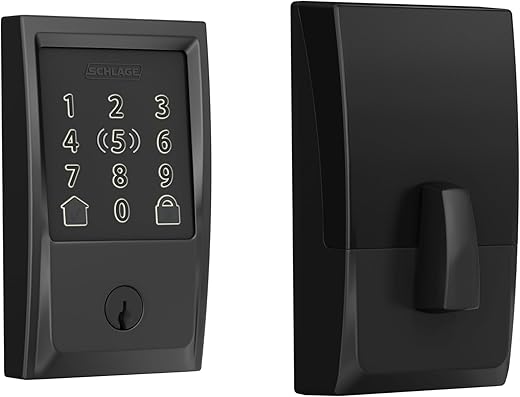
Schlage Encode Plus Wi‑Fi Deadbolt
Combines robust physical security with modern smart features like HomeKey tap unlock and Thread/Matter connectivity. Excellent build quality, extensive code management, and strong encryption make it a high‑confidence choice for front doors.
Why this is an editor’s pick
The Encode Plus targets buyers who want a fully integrated, high‑security smart deadbolt with the broadest ecosystem support — especially Apple users. Its certification for security and durability and native HomeKit/Matter friendliness set it apart from many competitors.
Core strengths and everyday use
Professionals and families will appreciate the ability to manage up to 100 codes and see a history of lock activity. The touchscreen exterior is fingerprint resistant and the internal mechanics feel solid — a lock that both looks and behaves like a premium security product.
Practical limitations and advice
If you prioritize native HomeKit integration, secure encryption, and a proven mechanical platform, this lock is among the best choices for an always‑on, smart front door solution.
Schlage Encode Wi‑Fi Deadbolt (Century)
Strong combination of simple installation, reliable Wi‑Fi connectivity, and easy code management makes it a popular choice for homeowners and short‑term rental hosts. Built‑in alarm features and high durability ratings add extra reassurance.
Who should consider this lock
The Encode Wi‑Fi deadbolt is aimed at users who want a standalone smart deadbolt with reliable cloud features and wide compatibility. It’s especially attractive to hosts and property managers because of the Airbnb integration and robust access code management.
Key features and what you'll notice day to day
Installation is typically straightforward with a screwdriver; the lock fits standard door thicknesses and backsets. Expect to spend a little time aligning the strike plate and testing the auto‑lock timing so the bolt engages smoothly — a common minor tweak during retrofit installs.
Practical limitations
For hosts and homeowners wanting a mature, widely used Wi‑Fi deadbolt with strong security credentials, this is a dependable choice that balances features, reliability, and ecosystem support.
Schlage Encode Wi‑Fi Deadbolt (Satin Nickel)
Same core Encode functionality in a satin nickel finish for a more traditional look. Provides robust code management and remote access while carrying Schlage’s warranties for mechanical and finish longevity.
Product positioning and finish
This satin nickel Encode model brings the same Schlage Encode feature set into a finish and trim that fits more classic or traditional door hardware. It’s ideal for buyers who want modern smart lock functionality without changing their interior design style.
What you get in daily use
Users praise the finish and fit on a variety of doors; the installation process mirrors other Encode variants. Schlage’s warranties (limited lifetime mechanical and finish plus a separate electronics warranty) give added confidence for long‑term use in a home or rental.
Practical considerations
If you value a premium look with full Encode capabilities and warranty backing, this satin nickel variant is an attractive, feature‑complete option.
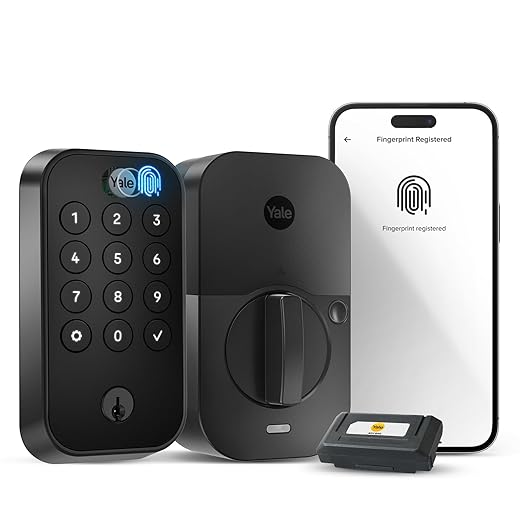
Yale Assure Lock 2 Touch Deadbolt
Adds biometric convenience with a reliable fingerprint scanner alongside keypad and Wi‑Fi remote access. Helpful for families and busy households where fast, secure entry without keys is a priority.
What makes this model different
The Yale Assure Lock 2 Touch combines a fingerprint sensor with a Wi‑Fi‑connected keypad and optional keyed entry. That makes it a versatile choice for households that want biometric convenience plus traditional backup options for peace of mind.
Everyday use and standout features
Families and busy homeowners will appreciate the multiple access methods: you can use a fingerprint for a fast one‑tap entry, program temporary codes for guests, or fall back to a physical key if needed. This flexibility helps cover use cases from kids coming home from school to cleaners or service people needing scheduled access.
Practical tips and limitations
In short, the 2 Touch model is a good mid‑range option when you want biometric convenience without losing the option to use keys or codes — a practical balance of modern features and traditional redundancy.
August Wi‑Fi Retrofit Smart Deadbolt
Compact retrofit design makes upgrading a deadbolt simple and keeps your existing exterior hardware intact. Reliable Wi‑Fi and DoorSense features enable useful automation like auto‑lock/unlock and guest access without changing your curb appeal.
What it does and who it’s for
The August Wi-Fi retrofit smart deadbolt is designed to convert an existing single-cylinder deadbolt into a connected lock without replacing the outside hardware. That makes it an excellent choice for renters, people who want to maintain the look of their front door, or anyone who prefers retaining a physical key backup. If you also want to track when doors or windows actually open, pair it with smart door and window sensor kits for full entry alerts.
Key features and day‑to‑day benefits
Users appreciate that installation is quick (often under 15 minutes) and that the interior module is compact. The app supports sharing one‑time, scheduled, or permanent access codes, which is handy for contractors, cleaners, or short‑term guests. Because the unit attaches to the inside of the door, the outside appearance remains the same — an important practical point if aesthetics or landlord rules matter.
Limitations and practical notes
Practical tip: when fitting the adapter to your existing thumbturn, take care to align the notches exactly as directed during calibration — several users report that incorrect adapter orientation causes intermittent syncing issues. Overall, this lock is a strong retrofit option when you value appearance and simple install over replacing the full exterior lockset.
Yale Assure SL Keyless Touchscreen Lock
Slim, keyless design with touchscreen keypad and Wi‑Fi connectivity makes it a great choice for users who prefer a minimal exterior profile. Includes DoorSense and auto‑relock features, plus the convenience of remote app control with the included bridge.
Design intent and primary use
The Yale Assure SL delivers a slim, modern, keyless deadbolt with a touchscreen keypad. It removes the external cylinder in favor of a clean face and relies on app codes, fingerprint modules, or proximity unlocking for entry — a great fit for homes where aesthetics and a key‑free experience are priorities.
Feature highlights and everyday advantages
Installers and DIYers will find the mechanical installation straightforward, but aligning the latch and strike plate can require attention for smooth operation. Included DoorSense is valuable for preventing false auto‑lock events when the door isn't fully closed. The Yale Access app provides code provisioning and timed access for guests.
Limitations and setup tips
Overall, the Assure SL is an elegant, modern smart lock that prioritizes a low‑profile exterior and keyless convenience. It’s especially suitable for apartment dwellers and homeowners seeking a sleek appearance with robust app features.
August Silver Wi‑Fi Retrofit Deadbolt
Offers the same retrofit convenience and built‑in Wi‑Fi as its black sibling at a slightly lower price point. Good option for users who want smart lock features without swapping exterior hardware or buying a hub.
Overview and purpose
This silver finish model is the same fourth‑generation retrofit smart lock offering from August, designed to modernize an existing deadbolt quickly. It’s aimed at homeowners and renters who want remote access, shared keys, and hands‑free convenience without changing the outside appearance of the door.
Highlights and practical benefits
The unit is compact and mounts inside the door over your current thumbturn. Users like that the exterior continues to accept a physical key — useful for landlords, guest access, or as an emergency fallback. Integration with Alexa, Google Assistant and Apple HomeKit means it slots into most smart home ecosystems.
Limits and real‑world considerations
If you’re looking for a cost‑conscious way to add remote access and guest management to a door without replacing the outer hardware, this model delivers solid value with straightforward setup for users in supported regions.
Final Thoughts
If you want biometric entry for a busy household, consider the Yale Assure Lock 2 Touch as a strong secondary option — fingerprint + keypad makes hands-free entry fast and secure.

Thinking about the August retrofit for a rented apartment — really like the idea of not changing the exterior hardware. Anyone tried the 4th gen (Matte Black) with a metal door? Worried about fit and signal.
August is designed to work with most existing deadbolts; the interior retrofit piece mounts where your thumbturn is. Metal doors can slightly reduce Wi‑Fi range, so if you get intermittent connectivity consider placing the August Connect bridge or improving the router placement.
I used the Matte Black August on a metal apartment door last year. Fit was fine. Wi‑Fi was weak at first until I moved my router a little closer — then it was rock solid. 👍
Installed the August (Silver) in my rental property last month and guests love it. The best part is I didn’t have to change the outside hardware so the curb appeal stayed intact.
Pros: quick install, Wi‑Fi works with no hub, Guest codes are easy to set.
Cons: the app UI could be more intuitive. Also once had one guest confused when auto‑lock kicked in while they were still outside 😅
Also consider pre-setting temporary codes for your guests in the app — makes check-in seamless and reduces confusion.
Mei — what lock version exactly? I have the black one and the app is fine but some guests struggled too. I now leave a short note in the welcome message about waiting for the ‘unlocked’ beep before closing the door.
I use the August too and found putting a small sticker on the inside to remind people to check the app helps guests who aren’t tech savvy.
Carlos — mine was the AUG-SL05-M01-S01 (silver). Great tip about the welcome message — I’ll add that to the listing.
Thanks for sharing, Mei — glad the retrofit approach worked well. For the auto‑lock issue, you can tweak the auto‑lock delay or use DoorSense automations to reduce false locks while guests are exiting.
The Yale Assure Lock 2 Touch with fingerprint scanner looks great on paper, but I worry about reliability. We have two kids and sticky fingers are a thing. Does the fingerprint reader actually work consistently? Also, is there a keyed backup if fingerprints fail?
Good questions — the YRD410-F model includes a keyed option (the Black Suede keyed version in the list). Fingerprint scanners can be hit-or-miss depending on cleanliness and placement; many parents find it convenient but still program several PIN codes as a backup.
We have the Yale Assure 2 Touch and it’s mostly reliable. I re-register my kids’ prints a couple times a year. The keypad backup is a lifesaver — set a simple code for them.
Thanks — re-registering periodically makes sense. I’ll keep the keyed option as a fallback. Might add a sillier code for the kids so they remember 😂
Also worth noting: the Yale’s fingerprint module is faster when fingerprints are enrolled properly (covering the whole sensor). If you run into issues, try re-enrolling with different angles.
As an Airbnb host I’ve been using the Schlage Encode (matte black, not the Plus) for about a year. Creating guest codes is super straightforward and the built‑in alarm features make me feel safer when I can’t be on site.
A few lessons learned:
1) Always set codes to expire the day guests check out.
2) Leave a tiny printed guide for non‑tech guests — they still call sometimes.
3) Keep replacement batteries handy in the cleaning closet.
Overall it’s been a reliable lock and much better than cutting keys every time.
I use the Schlage app — it’s simple and I can see lock activity. Thinking of trying an integration soon but haven’t needed it yet.
Renee — I usually paste the code into the Airbnb message thread and also put it in the welcome email. Redundancy helps. 🙂
Great practical tips, Natalie. Guest code expiry and spare batteries are excellent hosting best practices. Do you use the Schlage app or a third‑party property manager integration?
Natalie — did you ever have issues with guests not getting the codes? I worry about text messages getting lost.
Huge fan of the Schlage Encode Plus — I installed it on my front door last month and the HomeKey tap unlock with my Apple Watch is unbelievably convenient.
The build feels solid (definitely heavier than cheap knockoffs) and the Thread/Matter compatibility seems future-proof. A couple notes:
– Setup took maybe 20–30 minutes.
– The app gives great code control for guests.
If you care about HomeKit and on-device security, this one is a top pick in my book.
Thanks for the detailed hands-on, Sarah — glad HomeKey is working well for you. If anyone needs a quick install walkthrough for the Encode Plus, I can drop some tips.
Nice — wondering if the Encode Plus will replace my old Schlage deadbolt. Sarah, did you have to change your door strike plate or was it truly a direct swap?
Marcus — it was a direct swap for me. The only tweak I made was tightening the screws and checking the latch alignment. No new holes needed.
I like the look of the Satin Nickel Schlage Encode but live in a humid climate. Anyone have experience with finish durability (Matte Black vs Satin Nickel)? Also, does the Yale Black Suede hold up outside?
I’ve had the Satin Nickel Encode for 2 years near the beach with only minor patina on the doorknob (not the lock itself). Wipe it down every few months and you’ll be fine.
Satin Nickel tends to show fewer fingerprints and can be more forgiving with salt air than some painted finishes. The Matte Black Schlage is durable but over many years could show wear depending on exposure. Yale’s Black Suede finish is designed to be resilient outdoors, but if you’re on a coast, regular checks and cleaning help extend finish life.
So let me get this straight — I can have a deadbolt that talks to Alexa, my Apple Watch, and possibly my toaster someday via Matter, yet still forget my PIN and be locked out because my Wi‑Fi ghosts me? Classic modern first-world problems 😂
Which of these locks has the best offline fallback?
Most have a local keypad or keyed backup — Schlage (Encode and Encode Plus) both have touchscreen/key options and physical keys on some models. August keeps your existing exterior hardware so the key remains. Wi‑Fi outages are annoying but you usually can still use a PIN or the physical key.
Exactly — look for models with local PIN/key fallback. Schlage Encode (both finishes) and the Yale Assure SL (touchscreen) offer reliable local entry methods; August keeps your external key, which is helpful for renters.
Quick question for those who installed multiple models: how’s the battery life on the Schlage Encode vs the August and Yale? And do any of them have noticeable tamper/alarm notifications?
Schlage Encode models typically have solid battery life (several months) depending on usage; the Encode Plus uses similar power but added features might slightly change drain. August claims months of battery life as well. Schlage also has built‑in alarm features (alarms for forced entry etc.) which are louder than most. Yale models often include tamper notifications via the app when paired with their Wi‑Fi module.
Good to know — loud alarms are a plus. Thanks!
My Schlage Encode lasted ~9 months before batteries died with heavy daily use. The alarm is pretty loud and will definitely wake you up if something’s off.