


Tiny magnets, BIG peace of mind — which kit will catch the midnight door creak?
Your doors already know more than you do.
Imagine a window opening at 2 a.m. and you hearing nothing. Smart sensors make that small event impossible to ignore. They’re tiny, fast, and often very affordable.
Want something that just works? Or a system that can grow as you add rooms? Options range from NO-FEE DIY kits to pro-monitored bundles. These sensors give simple, real security without a tech headache and pair perfectly with smart locks for front doors and apartments as part of a broader smart home security starter setup.
Our Top Picks




Wyze Home Security Core Kit
A very compelling starter kit that bundles a hub, keypad, motion, and entry sensors with a short professional monitoring trial. It strikes a strong balance between features, expandability, and low ongoing costs for monitoring.
What the kit includes and who it’s for
This Wyze Core Kit provides a small but complete starter security setup with a Sense hub, keypad, motion sensor, and two entry sensors. It’s designed for DIY users who want professional-style monitoring without the high monthly fees commonly associated with traditional monitoring services.
Standout features and benefits
Users appreciate the low cost of entry for professional monitoring and the strong ecosystem tie-ins (cameras, leak sensors). For small homes, apartments, or budget-conscious shoppers the kit delivers surprisingly capable functionality.
Caveats and real-world usage
Practical tip: run the system in test mode while you position sensors and tweak sensitivity — this prevents accidental emergency dispatches while you refine placement and rules.
Ring Alarm 5-Piece Starter Kit
A balanced, expandable starter system with a base station, keypad, contact sensor, motion detector, and range extender. It’s especially attractive for users who want cellular backup and easy expansion within the Ring ecosystem.
Why consider this kit
The Ring Alarm 5-piece kit is aimed at users who want a reliable, brand-backed system that can scale over time. It includes the essentials to protect a small home, apartment, or condo and gives a clear upgrade path with additional Ring devices and services.
Benefits and real-world performance
Owners like the flexibility and the ecosystem: you can start with the 5-piece kit and add window sensors, outdoor sensors, or cameras later. The included range extender helps ensure coverage across larger floorplans.
Limitations and practical advice
Practical tip: place the base station centrally and test the cellular backup once installed so you know how the system behaves if the internet or power fails.
Aqara Zigbee Door & Window Sensor 3-Pack
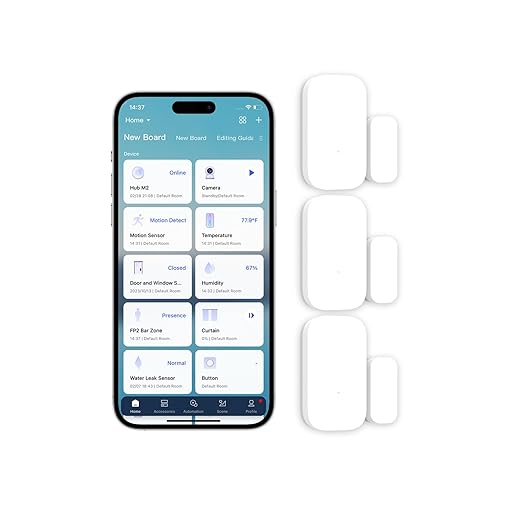
Compact Zigbee contact sensors that integrate well with Aqara Hub and Apple HomeKit. They’re excellent for discreet installations and automations, though they require an Aqara hub for full functionality.
Design and intended use
These Aqara Zigbee sensors are designed to be low-profile contact sensors for doors, windows, drawers, and cabinets. The set of three is aimed at users invested in the Aqara ecosystem or those who want HomeKit compatibility while keeping sensors hidden and unobtrusive.
Features and integration benefits
Reviewers often highlight the tiny size as a major plus — they disappear on trim and don’t disrupt aesthetics. When paired properly they’re reliable and report quickly to automations (e.g., turning on hall lights when a door opens).
Limitations and practical notes
Practical tip: if you run a larger Zigbee mesh, place repeaters (smart plugs or bulbs) at intermediate points to ensure stable connectivity for sensors on outer floors or distant doors.
SimpliSafe Entry Sensor Pack (4)
Well-built entry sensors with proven long battery life and easy pairing that integrate seamlessly into a SimpliSafe system. They’re a dependable pick for homeowners who want low-maintenance door/window monitoring.
Overview
These SimpliSafe entry sensors are compact contact sensors sold in a 4-pack and intended for use with the SimpliSafe Gen 3 home security system. They monitor doors, windows, cabinets, and other openings and can trigger chimes, alerts, or full alarms depending on your system state.
Key features and user benefits
Owners frequently praise the long battery life and the ease of pairing. The ability to set a sensor to send discreet notifications (secret alerts) without a full alarm is useful for monitoring private spaces, deliveries, or high-traffic doors.
Limitations and practical advice
Practical tip: keep a small label or consistent naming scheme in the app for each sensor (e.g., "Back Door" vs "Patio French") — users find this makes notifications and troubleshooting much faster.
Ring Contact Sensor 6-Pack (2nd Gen)
Slim, reliable contact sensors that expand a Ring Alarm installation without breaking the bank. They offer straightforward installation and multi-year battery life, but require a Ring Alarm Base Station to function.
What it does
These contact sensors are designed to monitor doors and windows and report open/close events back to a Ring Alarm base station. They are the 2nd-generation, smaller form-factor sensors intended to fit in more locations than previous Ring sensors.
Key features and benefits
The small size and simple install make them ideal for homeowners who already use Ring and want a low-cost way to add coverage to multiple entry points. Users appreciate how unobtrusive they are once mounted and how quickly they pair with the Ring ecosystem.
Limitations and practical notes
Practical tip: place sensors on the jamb and magnet on the door with minimal gap for the most reliable detection. If you need sensors to work without a Ring hub, look for Zigbee/Z‑Wave or Wi‑Fi alternatives; otherwise these are an economical and compatible choice for expanding a Ring system.
tolviviov 15-Piece WiFi Alarm Kit
A generous 15-piece kit that offers app control, a loud siren, and no monthly fees — good for users wanting immediate coverage across many entry points. Build quality and app polish are mixed, so expect some DIY troubleshooting.
Who this kit is for
This 15-piece tolviviov kit targets homeowners who want many sensors out of the box and who prefer a no-subscription model. It includes a base station, keypad, motion detector, ten door/window sensors, and remote controls — enough to cover most small to medium homes immediately.
Key benefits and practical use
Customers generally praise the value and the completeness of the package — getting ten contact sensors alone would cover many doors and windows. The inclusion of labels and a window sticker was noted as a thoughtful addition by some owners.
Limitations and real-world caveats
Practical tip: spend extra time learning the app menus and labeling each sensor during setup. If you see odd behavior, contact support and document serial numbers — the included two-year warranty and video setup guides can be helpful for troubleshooting.
Final Thoughts
Quick alternatives: if you need HomeKit support and super-discreet sensors, the Aqara Zigbee 3-Pack is a strong option; if you want long battery life and low maintenance for a SimpliSafe setup, the SimpliSafe Entry Sensor Pack (4) is dependable. For a stronger first line of defense, combine these contact sensors with a solid smart lock on the main door and reliable mesh Wi-Fi for smart homes.
More Smart Home Security Guides
Want to build out the rest of your security setup? Try these next:

tolviviov’s 15-piece kit looks like the “security starter kit for people who hate leaving a door unmonitored” lol.
Seriously though, anyone actually used the tolviviov kit? I’m tempted by the no monthly fee angle, but worried the app and build quality might be meh as the roundup suggests. Also, does the siren wake the entire street?
I installed a similar budget 15-piece kit last year. App was a little clunky but the sensors worked. The siren is obnoxious in a good way — woke me up during a false alarm at 2am 😅 Be ready to tweak sensitivity and placement.
The tolviviov kit is attractive for whole-home coverage without monthly fees, but expect some DIY setup and occasional app quirks. The included siren is loud — it will definitely draw attention (which can be good), but it may not be as polished as higher-end systems.
Love that you included the Aqara Zigbee sensors — I’m a HomeKit user and those tiny sensors are perfect for hiding on windows.
Quick question: the roundup mentions they require an Aqara Hub. If I already have a Zigbee hub (not Aqara), will these work? Also, do they trigger automations reliably for morning/away routines?
Thanks — would like to know if it’s worth adding three more to my setup.
Good tip from Liam. If you want to avoid hub purchase, check if your existing smart home bridge supports Zigbee devices broadly; otherwise the Aqara Hub is relatively inexpensive and gives full HomeKit support.
Perfect — I’ll test one with my current hub and if it acts up I’ll grab the Aqara hub. Thanks everyone!
FYI some people have had success flashing or using Zigbee2MQTT with Aqara sensors, but it’s not plug-and-play for most users. Depends on how much tinkering you want to do.
I’ve got them on an Aqara hub and they are super reliable for automations — lights on when a door opens in the morning, thermostat changes, etc. Battery life is great too. If you’re already invested in a different Zigbee hub, test one sensor first before buying a pack.
Aqara sensors typically work best with an Aqara Hub because of firmware and pairing compatibility. Some third-party Zigbee hubs can pair them, but features (and reliability) vary. For HomeKit users, the Aqara Hub is the simplest path. They do trigger automations reliably when paired correctly — many reviewers praise their responsiveness for morning and away routines.
Ring Alarm Contact Sensor 6-Pack seems like a good budget way to cover all the doors, but the ‘approx. 3-year battery life’ — is that realistic if you get a few notifications a day? Also, are the slim sensors easy to hide on older windows with thick frames?
I replaced two from the 6-pack after about 2 years because of frequent door use. If you have doors that open all day, expect shorter life. For windows used rarely, they’re great and very unobtrusive.
Three years is an estimate under typical usage; heavy notifications or frequent open/close cycles can shorten that. The slim design is generally pretty hideable, but with very thick frames you might need to place them slightly inset or use double-sided tape creatively.
I’ve been deciding between Ring and SimpliSafe for months. The roundup says Ring is best for easy expansion and backup, and SimpliSafe has reliable long battery life.
What’s more important for a small townhouse: “cellular backup” (Ring) or battery longevity and simplicity (SimpliSafe)? I’m not very techy and want something that ‘just works’ with minimal fiddling.
That’s a reasonable plan. Just keep in mind cross-brand compatibility is limited — adding a Ring sensor to a SimpliSafe base station won’t work. If you want to mix ecosystems, look into third-party hubs or HomeKit-compatible gear depending on your priorities.
Thanks — that helps. I’m leaning SimpliSafe for ease, but I might add a cheap Ring sensor later if I get paranoid about outages.
I have Ring with the cellular backup and it’s been awesome during a couple of outages — the system stayed up. But SimpliSafe is definitely easier for non-tech folks. Trade-offs, pick what scares you least 😂
For a small townhouse where you want minimal fuss: SimpliSafe’s strength is a straightforward setup and reliable sensors with long battery life. Ring’s cellular backup is a big plus if you’re worried about power/internet outages and want uninterrupted monitoring. If you value set-and-forget, SimpliSafe is slightly friendlier; if you want extra redundancy, go Ring.
I bought the SimpliSafe Entry Sensor (Pack of 4) last month and so far: super reliable, easy install, no drama. Battery icon still full. 👍
Couple of notes:
– They paired in under 5 minutes.
– No silly extras, just do the job.
– My only question: can SimpliSafe sensors be used with other hubs (I might want a more integrated smart home later)?
Also, small typo in the article where it said “tolviviov” (I had to look twice lol) — but overall great roundup!
Yep — SimpliSafe is great if you want reliability and low-maintenance. For deep integrations, I switched to a HomeKit-native setup, but it’s a bigger upfront effort.
Glad they worked well for you! SimpliSafe sensors are designed for the SimpliSafe ecosystem, so they don’t natively pair with other hubs. If you want broad integration later, consider systems that support standard protocols (Zigbee/Z-Wave/HomeKit) or look into bridges, but that’s extra complexity.
Thanks for the heads up about the typo — fixed in the article. Appreciate the catch! 😊
Great roundup — thanks! I was leaning toward the Wyze Home Security Core Kit because of the 3-month professional monitoring trial and the price point.
A couple questions:
1) After the trial, can I still use the sensors locally without paying? Or does everything stop if I don’t subscribe?
2) Anyone tried mixing Wyze sensors with third-party sensors or is it best to stick to Wyze-only?
Appreciate any real-world experiences — I’m trying to avoid surprise fees later.
Good questions — you can still use the Wyze devices locally (arm/disarm, local alerts) without the paid monitoring subscription, but the 24/7 professional response requires the subscription after the trial. Mixing third-party sensors isn’t really supported; Wyze devices pair to their hub/protocol, so sticking to Wyze sensors or officially supported gear is the simplest route.
I’ve got the Wyze kit for 6 months now — no subscription. Local alerts work fine and the app is decent. Only gripe: I had to rebuy a few devices when I moved and they didn’t always migrate super smoothly. But no surprise fees so far 👍
You can also use Wyze cams without the hub for basic features, but the Core Kit sensors need their hub. If you want full alarm monitoring later, plan for the subscription cost in your budget.