

Because Alexa shouldn’t have to shout — which mesh keeps your smart bulbs and doorbell actually listening?
Buffering is the enemy of cozy nights in. You ask the smart speaker to dim the lights and — nothing. The camera lags. The doorbell delays. Frustrating, right?
Modern smart homes need more than a fast router — they need stable coverage and low latency. If you’re torn between a single upgrade and mesh, our Wi-Fi 6 routers guide for multiple smart devices shows when a standalone router is enough. This roundup focuses on the mesh systems that keep every room and device happy.
Top Picks


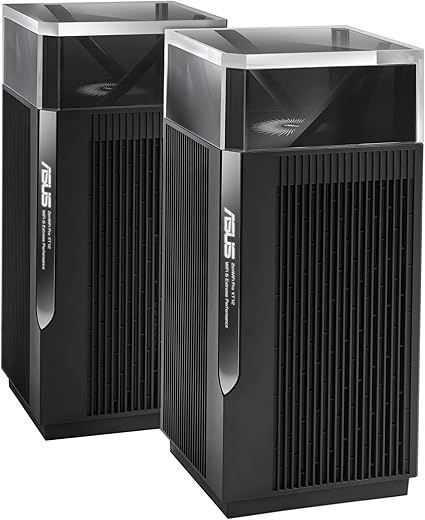
ASUS ZenWiFi Pro XT12 AX11000 Mesh
A high‑end tri‑band mesh engineered for maximum throughput and flexible wired/wireless backhaul. It’s ideal when you need multi‑gig performance across a large property and want robust built‑in security.
Overview
The ASUS ZenWiFi Pro XT12 is a pro‑level mesh designed to deliver maximum performance for demanding homes. It targets users who want multi‑gig speeds, an advanced feature set, and the flexibility of high‑speed wired backhaul between nodes.
Standout features
For homes with many gamers, 4K streamers, or large file transfers across the LAN, the XT12 keeps congestion low and latency manageable.
Practical advice and limitations
This is a system for people who need and will use the extra performance: if you have a 1 Gbps internet plan and a couple of streaming devices, the XT12 might be overkill. It also runs warmer and consumes more power than entry‑level mesh units, so plan placement with ventilation in mind. For prosumers or tech‑heavy households that want future capacity and robust wired options, the XT12 is one of the best performing mesh choices available.
Google Nest WiFi Pro 6E Mesh
A compact, polished mesh that balances performance, automation, and privacy-focused software. It delivers fast Wi‑Fi 6E speeds and reliable coverage for most modern smart homes while keeping setup and ongoing management simple.
Overview
Google's Nest WiFi Pro is designed to bring Wi‑Fi 6E speeds and simplified mesh networking to typical smart homes. It emphasizes ease of use and automated tuning: the system will prioritize traffic and run diagnostics to keep day‑to‑day connectivity smooth without much hands‑on maintenance.
Key features and what they mean for you
These points translate to noticeably better streaming, faster file transfers to Wi‑Fi 6E clients, and a more set‑and‑forget experience for families or non‑technical users.
Benefits in everyday use
The Nest WiFi Pro tends to excel where convenience matters: setup via the Google Home experience is fast, and the routers are unobtrusive in the living space. Examples include:
User reports often praise the system’s steady speeds and the attractive, compact design that avoids the industrial look of many routers.
Limitations and practical advice
While the 6 GHz band is a big advantage on paper, only devices that support Wi‑Fi 6E can use it; older phones and IoT devices will remain on 2.4/5 GHz. If you have many legacy devices or a complex, multi‑building property, you may need additional nodes or a different mesh with stronger backhaul options. For power users who want deep configuration (VLANs, advanced QoS), the Nest’s simplified controls can feel restrictive. In short: great for most smart homes that prioritize speed, simplicity, and integrated security, but less ideal for advanced network hobbyists.
Amazon eero Pro 6E Mesh System
A straightforward, polished mesh that focuses on painless setup and consistent day‑to‑day performance. The platform scales well for homes with many devices and supports 2.5 Gbps wired plans for faster backhaul.
Overview
The eero Pro 6E aims to make modern mesh networking approachable: fast tri‑band Wi‑Fi 6E, broad device capacity, and an app that guides you through installation in minutes. It’s a popular choice for users who want reliable coverage without the fuss of complex router configuration.
What it does well
The result is a mesh that “just works” for streaming, gaming, and smart devices across a typical house layout.
Real‑world benefits and examples
For families or small home offices, the eero Pro 6E keeps devices connected and responsive. You can plug wired devices into secondary nodes and expect near‑router performance; the app also gives clear device visibility and parental controls. A common user scenario: replacing an ISP‑provided router and gaining instant, consistent Wi‑Fi coverage across every room with minimal setup time.
Trade‑offs and considerations
If you want granular control (advanced VLANs, custom routing rules), eero’s minimal interface can be limiting. Additionally, some security and monitoring features are behind a subscription plan, which adds ongoing cost for households that want the full suite. For most buyers, though, the convenience and reliability make it an excellent middle ground between mesh ease and performance.
TP‑Link Deco XE75 WiFi 6E Mesh
A value‑oriented Wi‑Fi 6E mesh that unlocks 6 GHz capacity for compatible devices while keeping pricing accessible. It’s an especially good fit for busy homes with many devices and mixed client types.
Overview
The TP‑Link Deco XE75 brings Wi‑Fi 6E into the mainstream by combining the 6 GHz band with Deco’s easy setup and AI‑driven mesh behavior. It is positioned as a practical upgrade for households that want next‑generation capacity without the premium price tag.
Why it’s a good everyday pick
These translate to real benefits like smoother multi‑room 4K streaming and fewer dropped smart home connections under load.
Caveats and user tips
Not all legacy devices work perfectly with the strictest WPA3 settings, so you may need to create a secondary network or a guest SSID for older IoT gear. Also, some buyers note the physical power bricks and short cords can be inconvenient — plan placement accordingly. Overall, if you want modern 6E performance and a practical feature set for a typical smart home, the XE75 is one of the best value‑oriented options.
NETGEAR Orbi AX5200 Tri‑Band Mesh
A powerful tri‑band mesh built to cover large homes and support dozens of simultaneous devices. It pairs Netgear’s Orbi throughput with a security suite, making it a strong option where coverage and protection matter most.
Overview
NETGEAR’s Orbi RBK753P is built around the premise of high performance at scale. If you have a sprawling home, many streaming devices, and users who expect gigabit‑class performance in multiple rooms, Orbi’s tri‑band approach and strong radios deliver consistent throughput.
Key capabilities
These features are particularly helpful in mixed households—kids streaming, adults on video calls, and smart home cameras sending constant video feeds.
Practical considerations
In real homes, Orbi shines when coverage and wired connectivity are priorities: there are multiple gigabit ports for wired devices and consistent reach to outbuildings or challenging corners. However, users should be prepared for a somewhat more involved setup if the Orbi app fails in edge cases; Netgear’s support can help but some customers report longer support interactions. Overall, it’s a strong choice when performance and security are top priorities and budget is secondary.
ASUS ZenWiFi AX (XT8) Tri‑Band Mesh
A reliable Wi‑Fi 6 tri‑band mesh that blends strong coverage with lifetime network security and an approachable app. It’s a good fit for users who want a balance of performance and features without chasing bleeding‑edge specs.
Overview
The ASUS ZenWiFi AX (XT8) is a proven tri‑band Wi‑Fi 6 mesh system that prioritizes stable coverage and security. It’s positioned for homeowners who want broad, dependable coverage with vendor‑backed protections and the flexibility of AiMesh.
What stands out
These features make the XT8 a practical pick for users migrating from older dual‑band systems or for households that want solid security without a subscription.
Limitations and practical tips
The XT8 is not a Wi‑Fi 6E device, so it won’t provide the 6 GHz band advantages of newer mesh systems. That said, for homes without many 6E clients the XT8 still provides excellent real‑world performance. If you plan to future‑proof for 6E devices, consider a Wi‑Fi 6E or higher model; otherwise, XT8 remains a balanced and cost‑effective solution for steady whole‑home Wi‑Fi.
Linksys Atlas Pro 6 Dual‑Band Mesh
A cost‑conscious Wi‑Fi 6 dual‑band mesh that improves coverage and stability for smaller homes or apartments. It offers a straightforward, affordable route into mesh networking without a lot of bells and whistles.
Overview
The Linksys Atlas Pro 6 is aimed at buyers who want an inexpensive entry into mesh Wi‑Fi 6. It trades some top‑end performance features for simplicity and value, but still offers modern protocol support and respectable range for its class.
Practical strengths
For users moving from an ISP‑supplied single unit, the Atlas Pro 6 often represents a meaningful improvement in whole‑home coverage and reliability.
Where it falls short
If your home is very large, you want multi‑gig wired connections, or you run dozens of high‑bandwidth clients simultaneously, a tri‑band or Wi‑Fi 6E system will outpace the Atlas Pro 6. But for many households seeking a budget‑friendly mesh upgrade, it’s a sensible, no‑frills option.
Final Thoughts
Best overall for smart homes — Google Nest WiFi Pro 6E Mesh (9 out of 10)
Best for speed, wired backhaul and very large properties — ASUS ZenWiFi Pro XT12 AX11000 Mesh (9.3 out of 10)

I live in a 900 sq ft apartment, and the Linksys MX5503 Atlas Pro 6 (3 pack) feels like overkill? Or is it actually useful for apartment folks who have 10+ smart devices? I might be overthinking. 🤷♀️
Also, any weird app permissions? I hate apps that ask for EVERYTHING.
Thanks! I’ll try the MX5503 then — cheap insurance for future devices. Also first time I typed “wifi” without caps lol, old habits.
For an apartment, the Linksys MX5503 is a solid budget-friendly option and gives extra headroom for many connected devices. Check the app privacy settings — Linksys usually allows opt-outs for certain telemetry. If you want minimal fuss and smaller hardware, Google Nest or eero might feel more streamlined, though possibly pricier.
I used the MX5503 in a 2-bed apartment — it ran great and didn’t feel overkill. App asked for location/notifications but nothing crazy, I just denied unnecessary permissions.
I’m kind of torn between eero Pro 6E and Google Nest Pro. Eero promises easiest setup, Google promises privacy-focused software (lol) — anyone who switched between these two and regretted it? Also wondering about future firmware/backwards compatibility.
Both are strong picks. eero is very simple and stable; Google offers deeper smart-home integration and potentially more frequent feature updates. As for firmware/backwards compatibility, both vendors maintain broad support but always double-check for major changes after big software releases.
Thanks — decisions are hard 🙃. Might flip a coin or wait for a sale.
Switched from eero to Nest: I miss eero’s simplicity, but Nest’s integration with my Google Home stuff is nice. No major regrets either way.
Long post: I tried setting up a 3-pack eero Pro 6E last month and had one unit refuse to adopt. Spent 2 evenings on chat support and 3 factory resets later it worked. Setup is *supposed* to be painless but I had to earn it 😂.
Once it was up, performance was flawless — consistent 2.2 Gbps on a wired client and zero hiccups for 50+ devices.
If you’re not comfortable with occasional head-scratching, maybe stick to a local reseller with good returns.
Also, pro tip: disconnect older extenders/routers before onboarding new mesh nodes — they can cause adoption conflicts.
Lastly, don’t forget to change default admin creds and enable whatever security features you want early on.
One more quick note for readers: if adoption consistently fails, try a mobile hotspot to isolate your ISP modem/router as the culprit — sometimes the double-NAT or ISP equipment blocks the initial handshake.
Ugh, I had the same adoption issue with an eero node last year. A full power cycle and moving it closer to the main unit during setup fixed it for me.
Thanks for the detailed write-up, Robert — real-world troubleshooting stories like this help readers set expectations. Your tip about removing old extenders is gold.
Yep Marta — proximity during adoption was key for me too. Saved another evening later when I followed that trick.
Quick question — between Google Nest WiFi Pro 6E (3-pack) and eero Pro 6E, which one is easier for a non-techy person to manage? I have lots of smart bulbs and cameras.
Also curious about privacy differences.
Both are designed for ease of use. Google tends to integrate smoothly with Android/Chromecast devices and has straightforward parental controls; eero is probably the most ‘set it and forget it’ with a very simple app. For privacy: Google is transparent about data use but integrates with your Google account, so some people prefer eero if they want less linkage to a big ecosystem.
I used eero for a year — setup was literally 15 minutes. If you want less fiddling, go eero. If you use a lot of Nest devices, go Google.
Can someone explain the practical difference between XT8 and XT12 (ASUS)? I see both mention 2.5G ports and lifetime security. Is the XT12 worth the premium for a family that streams and occasionally games?
Short answer: XT12 is tri-band Wi-Fi 6 with higher throughput and better multi-gig performance; it’s geared toward users who need multi-gig speeds or plan heavy simultaneous use (many 4K streams, gaming, NAS access). XT8 is very capable but slightly less future-proof. If you want top-tier speeds and wired backhaul, XT12 is worth the premium.
If you’re not doing >1 Gbps internet or heavy NAS/Gaming at the same time, XT8 will probably be fine and save you cash.
Curious about the “lifetime internet security” mentioned for ASUS gear (XT12/XT8). Is that actually lifetime for the hardware or just a subscription bundled for a while? Could use clarity before buying.
ASUS typically bundles a lifetime license to their AiProtection powered by Trend Micro for the life of the product — meaning as long as the device receives official firmware support and you’re using that unit, the license remains. It’s different from time-limited trials some brands bundle; ASUS tends to advertise it as lifetime for the device.
I checked my XT8 and it says lifetime on the dashboard, so it’s not one of those 30/90 day trial labels.
Appreciate the confirmation — that’s actually a big selling point for me.
I bought the ASUS ZenWiFi Pro AX11000 (XT12) after reading a bunch of roundups and this article sealed the deal for me.
Setup was surprisingly straightforward.
Wired backhaul to my switch made a HUGE difference in latency for 2 gaming PCs.
Coverage really does feel like whole-house — I get solid signal in the backyard now.
Only caveat: the units are a bit bulky, but performance > aesthetics for me.
How many wired runs did you set up? I’m debating drilling through walls and trying to avoid it if possible.
Glad it worked out for you, John — thanks for the hands-on feedback. The XT12 does tend to shine with wired backhaul; for readers wondering about placement, putting the router in a central spot and using one of the 2.5G ports for backhaul generally gives the best results.
Totally agree about wired backhaul. I tried the XT12 wireless-only at first and saw lots of fluctuation. Switched to ethernet backhaul and it’s night and day.
I’m eyeing the Netgear Orbi (RBK753P) because my house is long and multi-floor. But dang, the price is steep and the firmware updates sometimes brick old devices in my experience.
Has anyone had reliability issues over time with Orbi? Or is it worth paying extra for coverage?
I’ve had Orbi for two years and it’s been rock-solid — zero bricking. But I also disabled auto-updates and test updates during off-hours, which helped.
Orbi is a solid pick for very large homes and many devices, as the roundup says. That said, Netgear’s firmware cadence can be hit-or-miss; if you rely on legacy IoT devices, check Netgear release notes before major updates. If budget allows and coverage is critical, it’s worth it; otherwise the TP-Link Deco XE75 is a good value alternative.
Thanks all — think I’ll try a single satellite first to see how it handles before committing to the full kit.
For what it’s worth, I swapped Orbi in favor of ASUS XT8 and haven’t looked back. YMMV.
TP-Link Deco XE75 here — best bang for most households IMO.
– 6GHz band is actually useful for my newer devices.
– Setup was quick and app is friendly.
– Coverage met the “7200 sq.ft” claim? probably not exactly, but it handled our 4-bed townhouse with no dead spots.
– If you’re on a tight budget but want 6E, this is a solid compromise.
– Pro tip: check client compatibility on the 6GHz band before upgrading all your devices.
Answering Hannah: TP-Link ecosystems generally interoperate, but some advanced features may require the same app account or firmware parity. If you rely on automation, test after setup.
Agree — got one for my parents and it fixed a lot of buffering on video calls. Price/performance is excellent here.
Great practical summary, Priya. The 6GHz band is only beneficial if your clients support it, so your tip about checking compatibility is spot on.
Yep Hannah — pretty seamless with Kasa stuff. Just keep the firmware updated and you’re good.
Does the Deco XE75 play nice with other TP-Link products? I have a Kasa smart plug setup already.