

Who ate the socks? Catch the culprit in 2K—and stop playing detective.
Pets are adorable — until they turn into tiny burglars. One missing sock or a toppled plant later, and we all want answers fast.
We want clear video, quick alerts, and something that respects privacy. The right indoor camera gives live view and activity summaries so you stop guessing and start knowing.
For a full smart-home plan, see our Smart Home Setup Guide for Beginners and We Tested 5 Camera, Lighting & Voice Assistant Kits.
Top Picks


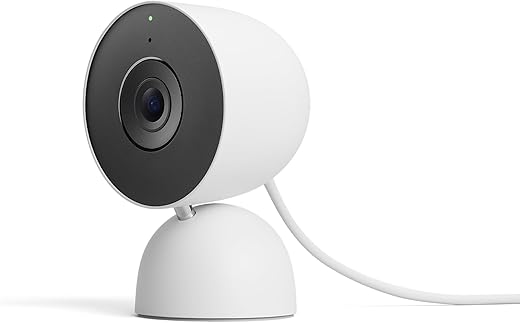
Google Nest Cam Indoor 3rd Gen
We value the 2K HDR sensor and Google’s Gemini-powered summaries for quickly understanding what happened in a clip — a real time-saver for busy pet owners. Many of the higher-level convenience and search features require a Google Home Premium subscription, so plan for that if you want the full experience.
Why it stands out for pet monitoring
We see the Nest Cam (3rd Gen) as a premium indoor option for pet owners who want both high image quality and helpful AI summaries. The 2K HDR feed produces sharp images with good color and contrast, which helps when you’re trying to identify a collar, toy, or small wound from a clip.
Everyday usefulness and integrations
The camera integrates tightly with Google Home, meaning smart displays and automations are straightforward. Two-way audio and crisp live view make it easy to call a pet or speak to a sitter. Strong encryption and account protections are also a plus for owners who care about data security.
Subscription and network considerations
If you want features like 30+ days of event history or Gemini-generated insights you should budget for the appropriate Google Home Premium plan after your trial ends. Also, achieving consistent 2K streams requires a reliable Wi‑Fi connection; on weaker networks the camera may revert to lower bitrates.
Practical tip: enable event previews and familiar-face detection only if you’ll use them — otherwise a Standard setup still provides strong live view and basic alerts without the subscription.
eufy Indoor Cam E220 2K Pan/Tilt
We like the on-device AI and local recording options that keep most intelligent processing off the cloud, which is great for privacy-conscious pet owners. The 2K sensor delivers sharper feeds for spotting small details, though a few firmware and support concerns have been reported by some users.
A privacy-focused option for pet monitoring
We see the eufy Indoor Cam E220 as a strong choice for pet monitoring when privacy matters. The camera's on-device AI decides what to record, which significantly reduces cloud dependency and false notifications when compared to many cloud-first cameras.
Features that make it useful for pets
The E220 tracks motion smoothly and offers a good mix of clarity and intelligence. For a cat that darts under furniture or a dog that roams through multiple rooms, the pan/tilt range and follow mode make continuous observation practical without multiple fixed cameras.
What to expect day-to-day
In everyday use we found the E220 generally reliable with great image quality for its price. If you plan to integrate with Apple HomeKit be aware of the 1080p limitation under HomeKit Secure Video. Also, while most buyers report long-term satisfaction, there are some reports of slower customer service response after firmware issues — we recommend keeping firmware up to date and checking the eufy support channels if you encounter odd behavior.
Practical tip: use the AI motion-filtering to create "pet-only" recording rules so you only get clips when your animal is active and not every passerby or light change.
Wyze Cam Pan v3 360° Coverage
We appreciate its 360° pan and color night vision that make it useful for monitoring pets in medium to large rooms. The motorized tracking and flexible local storage options deliver strong functionality for the price, with some trade-offs in long-range detail.
What we used it for and who it's best for
We view the Wyze Cam Pan v3 as the go-to budget pan/tilt camera for pet owners who need wide coverage without spending a lot. It's ideally suited for families who want to check on an active dog or cat that moves through a single larger room or multiple vantage points throughout the day.
Key features and daily benefits
We found the pan/tilt mechanics and motion tracking reliable for following roaming pets, and the two-way audio is handy for calming anxious animals or calling them away from trouble. The camera's IP65 rating also means it’s versatile for short-term outdoor placement if needed (with appropriate power protection).
Limitations and real-world notes
In our experience, image clarity at distance will not match higher-resolution models — if you need crisp detail on faraway objects, consider 2K+ cameras. The app's frequent upsell prompts and notification behavior can be intrusive; we recommend disabling unnecessary notifications during setup. Also, the camera uses 2.4 GHz Wi‑Fi only, which matters if your router combines bands.
Practical tip: set custom motion zones around pet activity areas (bed, water bowl) to reduce false alerts from hallway traffic. One user observed that motors move in small steps when controlled manually, but auto-tracking is smoother — something to keep in mind if you plan to pan frequently yourself.
Arlo Pro 4 Spotlight — 2K HDR
We value its 2K HDR sensor, wide 160° field of view, and spotlight-assisted color night vision — useful when pets roam across larger indoor-outdoor zones. The wireless, battery-powered design adds installation freedom, but advanced cloud features typically require a subscription.
Why we recommend it for larger rooms or property edges
When pets use both indoor and sheltered outdoor spaces, the Arlo Pro 4 shines because of its combination of higher-resolution video, wide-angle optics, and an integrated spotlight. That spotlight can capture color at night, which helps identify collars or small objects that standard IR night vision would render monochrome.
Practical features for pet monitoring
We appreciate the wire-free form factor when we want cameras above high shelves or pointing into yards without running power cables. Two-way audio is clear enough to call a pet or a sitter, and the app allows quick review of motion events when we’re away.
Drawbacks and what to watch for
If you expect long cloud retention, object classification, or advanced motion analytics you’ll likely need Arlo Secure — Arlo includes trial access but ongoing advanced features are behind the service. Also, in scenarios with constant activity (busy yards, high traffic), battery replacement or recharging is a maintenance factor.
Real-world tip: pair the Pro 4 with solar charging solutions outdoors or choose indoor ceiling locations with easy access to recharge batteries if you rely on frequent motion detection.
Arlo Essential 2nd Gen Spotlight Cam
We find this wired spotlight cam to be an easy-to-install indoor monitor that balances simple operation with useful features like a privacy shield and color night vision. It’s a practical pick for pet owners who prefer wired reliability over battery maintenance.
Who this camera suits
We recommend the Arlo Essential 2nd Gen for pet owners who want a reliable wired indoor camera with a physical privacy shield. The wired design eliminates battery swaps and keeps continuous power for uninterrupted monitoring while the privacy shield provides a clear way to disable the lens when needed.
Useful features for daily pet checks
The spotlight-enhanced night vision and wide field of view simplify watching pets in dim rooms or across broader indoor spaces. Two-way audio with noise cancellation lets us call pets away from trouble without creating a noisy feed we can’t understand.
Limitations to consider
Because it’s a more mainstream, entry-to-mid-level Arlo device, you won’t get the 2K clarity or the same battery freedom as Pro models. Also, for continuous multi-day cloud storage you’ll likely need a subscription, so plan whether local or cloud recording best fits your workflow.
Practical tip: mount the camera to cover a pet’s primary activity zone (bed or feeding area) and use motion sensitivity adjustments to avoid constant alerts from small daily movements.
Blink Mini Compact Indoor Camera Duo
We like the Blink Mini for straightforward, low-cost pet monitoring — it’s plug-in, easy to set up, and integrates with Alexa devices. Advanced features and extended storage require either a Blink subscription or a Sync Module for local saving, so it’s best for owners who want a simple, budget-friendly monitor.
A no-fuss camera for quick pet check-ins
We recommend the Blink Mini when you want a basic, reliable camera without a complicated setup. It’s plug-and-play: plug it in, connect to Wi‑Fi, and you can view live footage in minutes — ideal for owners who check on a pet between errands or during work breaks.
Where Blink Mini shines and where it doesn’t
The Blink Mini is perfect as a secondary camera or for owners who are content with occasional clips rather than long-term cloud history. Its low cost makes it easy to place several around a home and integrate with Echo Shows for hands-free viewing.
Storage and feature trade-offs
If you need multi-day clip storage without a subscription, plan to buy the Sync Module 2 for local saving. Otherwise, Blink’s subscription adds cloud clips and extended history. For sophisticated pet detection, object recognition, or AI summaries, consider higher-end models — Blink focuses on simplicity.
Practical tip: position a Blink Mini near a pet’s regular spot (bed, window perch) and pair it with an Echo Show to call your pet and watch their reaction in real time.
Final Thoughts
We recommend the Google Nest Cam Indoor 3rd Gen as our top pick. Its 2K HDR sensor and Google Gemini–powered summaries make it ideal for busy pet owners who want crisp footage and fast, searchable recaps; it saves time by turning hours of footage into a few useful highlights. (Be aware that many higher-level convenience and search features require a Google Home Premium subscription.)
If privacy and local control matter more, choose the eufy Indoor Cam E220 2K Pan/Tilt. Its on-device AI, local recording options, and pan/tilt coverage keep processing off the cloud while still delivering sharp 2K video — perfect for households that want strong detail and room-wide monitoring without relying on monthly cloud plans.
More Smart Home Guides
Want to expand your setup beyond pet cams?

Anyone tried integrating the eufy E220 with smart assistants? The product page mentions voice assistant support but I’m curious how well it works with routines. Also, does HomeBase3 handle multiple cameras well?
The integration works for basic commands but isn’t as deep as Google-native cams (like Nest). HomeBase3 is stable though, good local processing.
I have eufy + Google Assistant — you can ask for live view on Nest Hub which is neat. HomeBase3 handled my two cams fine, no lag issues.
Correct — eufy offers decent assistant support for viewing feeds and basic controls, but advanced cloud features are more limited compared to Google Nest. HomeBase3 is the recommended hub for multi-camera setups for on-device AI.
I lean toward the eufy E220 because of the local storage and on-device AI. Privacy was my main concern and having recordings stored locally on HomeBase felt much better than everything in the cloud.
That said, my unit did take a firmware update that messed with notifications for a week — eufy support fixed it but it was annoying.
Good point, David. Many users keep a secondary backup (like SD card export or periodic downloads) if they need long-term copies. eufy’s local AI is solid for distinguishing pets vs people, which helps reduce false alerts.
That’s my worry too. Local storage sounds great but I get nervous about relying on a single hub. Did you add a backup or cloud option?
Arlo Essential (2nd Gen wired) ended up being my pick because I hate swapping batteries. The privacy shield is a nice touch when guests come over.
It’s basic compared to the Pro 4 but stable and low-maintenance — good for people who want ‘set it and forget it.’
Wyze Cam Pan v3 is such a steal for the features — 360° pan, color night vision, and the price? Come on. 😅
One thing: the motor can be a little noisy when it hunts during the night. My dog gets curious and then barks. If you have noise-sensitive pets, keep that in mind.
I’ve found setting motion zones helps too — less pointless panning when the pet bed area is what matters.
Thanks for the tip about motor noise — mine sleeps right next to the camera so I was worried. Can you restrict pan motion to a schedule?
Yep, you can set patrol points or schedules so it doesn’t wander at 3am. That reduced the barking a lot.
Great advice here. Wyze’s scheduling and motion zone options are a big reason it’s our budget pick — you can limit movement and notifications to reduce disturbance.
LOL my cat sits in front of whichever camera I buy and becomes a celebrity 😹
I actually appreciate the Nest summaries though — they give a quick clip so I don’t have to scrub through hours of footage. Also kinda jealous of the Gemini stuff, sounds futuristic.
😂 genius tips. Trying bookshelf relocation tomorrow.
I had to move mine to a bookshelf and now the camera catches more of the room and less of my cat’s nostrils.
Ha — the ‘camera hog’ pet is a classic. If the cat blocks the view often, consider placing the camera higher or angled down; pan/tilt cameras like Wyze can also be set to patrol different points to avoid constant blockage.
Mine too! I end up with an entire folder of ‘Cat Stares Into Camera’ highlights 😂
You can also set activity zones so you still get alerts when the cat isn’t the reason (e.g., door opening).
Setting up cameras in a multi-pet home was a pain until I realized placement is everything:
1) Pan/tilt in the main room
2) Fixed wide-angle in hallways
3) Spot cam near food/water
Also, make sure FOV overlaps a bit so pets don’t disappear from all cams at once. I use a mix: Wyze for the main room, Arlo for door coverage, and Blink for quick check-ins.
Works pretty well now, but took a week of tweaking.
Great checklist — any tips for cable management for wired cams that still look tidy?
Command cord clips, running cables along baseboards and painting them the same color as the wall helped me too. For rented spaces, consider ceiling mounts and cable raceways that are removable.
Subscription fees are getting out of hand. Nest wants premium for summaries, Arlo wants cloud, Blink wants… something. Feels like you can’t buy a camera without being sold a monthly plan. Annoying.
I pay for one cloud plan to cover several cams — calculate the per-camera/month cost and it sometimes makes sense vs managing local backups.
Budget folks: Wyze and Blink are cheap upfront, but read the fine print on cloud clips. Sometimes adding an SD card or local backup solves the subscription issue.
Totally. That’s why I picked eufy — local storage + on-device AI meant no monthly bill for me (mostly).
Subscription fatigue is real. When recommending options we tried to include local-storage-friendly picks (eufy, Wyze with SD, Blink with Sync Module) for privacy- and budget-conscious owners.
I’m torn between Nest, Arlo, and Wyze for night vision performance. Which one actually gives the best low-light color/detail for indoor scenes?
For large rooms with pets roaming, Arlo’s wide FOV and spotlight-assisted night view helped me see color more often than my old 1080p camera.
Short answer: Nest and Arlo (Pro 4) typically lead in low-light color and detail thanks to their sensors and HDR. Wyze’s color night vision is very good for the price and great for general monitoring, but at long ranges the detail drops. Blink and Arlo Essential will do fine indoors but won’t match the HDR 2K detail.
Wyze gave me more than I expected at that price. 360 coverage for my living room and my dog actually respects the camera (for now).
Question: is 1080p (Wyze) noticeably worse than 2K for identifying small things like a chew toy pattern?
1080p will be fine for most everyday monitoring (movement, general look). If you need close-up detail to read small text or tiny patterns, 2K will be noticeably sharper. For pet monitoring, 1080p is usually adequate unless you want to zoom in a lot.
I bought the Google Nest Cam (2025) for my two cats and honestly the 2K HDR is a game-changer — I can actually tell which one knocked over the plant 😂
The Gemini summaries are super handy when I’m short on time, but yeah, the Premium subscription is annoying if you want full features. Still worth it for the image quality and integration with my Google Home.
Thanks for sharing, Rachel — love the plant culprit detective work! If you use Google Home Routines, the camera can also trigger other actions (lights on, etc.) when motion is detected — handy for pet-proofing.
How’s the night vision on it? My apartment is pretty dark at night and I need to see faces/paws clearly.
Agree on the 2K clarity — it helped me figure out which of my pups was opening the fridge. Just a heads-up: if you want continuous recording you’ll definitely need to factor in the subscription costs.
I grabbed the Arlo Pro 4 as a renewed 3-pack for monitoring my basement, living room, and back porch (pets run everywhere). Wireless setup was a breeze and the color night vision is surprisingly good.
Battery life is the variable here — if you have a busy house, expect to recharge more often than you’d hope.
How long did the batteries last for you with typical indoor use? I’m considering going wireless for flexibility but worried about recharge frequency.
Quick question — is Blink Mini okay for a small apartment? I just want something cheap to check on my cat during work hours. Do I need a subscription for basic stuff?
I use Blink in my studio — inexpensive and reliable for quick check-ins. If you want clips saved long-term, look into the Sync Module or the subscription plan.
Blink Mini is a good budget option for simple monitoring. You get motion alerts and live view without a subscription, but cloud clips/history require Blink subscription unless you add a Sync Module for local storage. For a single cat in an apartment, it’s often enough.