

Is your house secretly running up the bill? Time to catch it in the act.
Your home is a sneaky energy thief. You open the bill and wonder where the money went. Chargers, old appliances, and phantom loads add up fast. Catching them is oddly satisfying.
Energy monitors give clear, real-time numbers. They expose phantom loads, track solar export, and feed smart-home automations. If you also want plug-level insight, our best smart plugs with energy monitoring guide shows how to spot the worst offenders room by room.
Top Picks



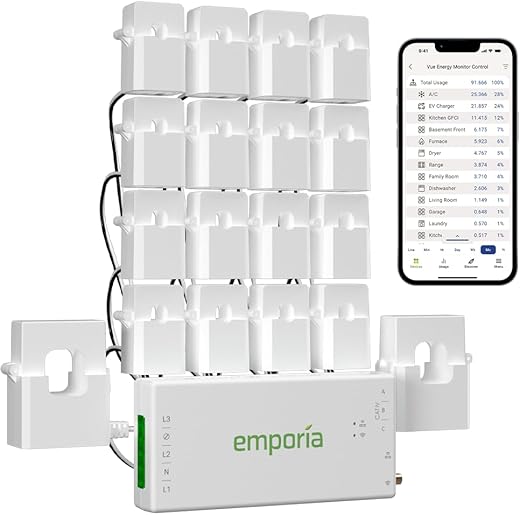
Emporia Vue 3 Whole-Home Energy Monitor
Combines whole-home visibility with up to 16 branch sensors for circuit-level insight at a competitive price. Cloud and app features support time-of-use, solar/net metering, and automated energy management.
Overview
The Emporia Vue 3 is a flexible, UL-listed energy monitor that balances whole-home metering and circuit-level visibility. It ships with multiple CT clamps and supports single-phase and split-phase setups, which makes it a strong choice for homeowners who want to see which circuits or appliances are driving bills.
Key features and benefits
In practice, the Vue 3 stands out for the number of included CTs and the breadth of software features. Users can monitor specific circuits (AC, hot water, EV charger) and configure alerts or automation based on usage windows. The accuracy and certification give installers and homeowners confidence compared with consumer-grade clamp meters.
Practical considerations and limitations
Who this is for
If you want granular circuit-level data without buying many separate monitors, the Emporia Vue 3 offers excellent value. It's well suited for solar owners, those managing large loads (EVs, hot water heaters), and anyone who wants to automate or monitor time-of-use pricing or pair it with smart plugs that track energy use or a smart thermostat for targeted savings.
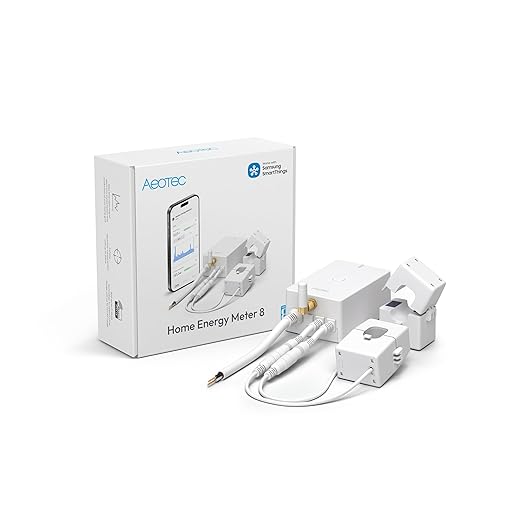
Aeotec Home Energy Meter 8 Z-Wave Long Range
Delivers reliable, low-latency energy and solar export readings that integrate directly into Z-Wave ecosystems. The long-range Z-Wave 800 connectivity and dual 200A clamps make it a strong choice for Home Assistant and SmartThings users.
Overview
Aeotec Home Energy Meter 8 (HEM8) is a Z-Wave energy meter designed for smart-home enthusiasts who want direct integration into their hub. It measures whole-home consumption and solar export with two 200A clamp sensors and reports over Z-Wave Long Range for extended connectivity.
Key features and benefits
For users already invested in a Z-Wave ecosystem, the HEM8 is straightforward: it becomes another device in your smart home and allows automations (shed loads when excess solar drops, trigger alerts on high consumption) without relying on separate cloud services. Its compact DIN-friendly footprint and accurate clamps are an advantage for both installers and hobbyists.
Practical considerations and limitations
Who this is for
Choose the Aeotec HEM8 if you want native Z-Wave energy data inside Home Assistant, SmartThings, or similar hubs and you plan to use that data for local automations or solar diversion. It’s particularly strong where mesh range and secure local communications are priorities.
Shelly Pro EM 50A Wi-Fi Energy Meter
A compact DIN-rail energy meter that pairs measurement with integrated contactor control for automated load switching. It’s a versatile choice for small businesses, PV systems, and power-control scenarios where local control and LAN connectivity matter.
Overview
Shelly Pro EM 50A is a DIN-rail energy meter that combines accurate measurement with an integrated potential-free contact for contactor control. It’s designed for builders and owners who want meter-based automation (switching loads at night, redirecting excess PV) without a large gateway requirement.
Key features and benefits
Shelly’s strength is pairing practical control with metering — you can detect excess PV generation and flip contactors to redirect power, or schedule shutdowns for non-essential circuits. The device’s DIN package keeps electrical cabinets tidy and integrates well with modern electrification projects.
Practical considerations and limitations
Who this is for
Pick the Shelly Pro EM 50A if you need compact DIN-rail metering combined with automatic load control — ideal for small businesses, home renewables, or anyone wanting local control without a dedicated hub.
Sense Energy Monitor Real-Time Home Monitoring
Provides clear, real-time visibility into whole-house usage and long-term trends to help change habits and lower bills. Device detection is useful when it works, but results vary by home and appliance type.
Overview
Sense is positioned as a whole-home energy insights device that focuses on real-time monitoring and behavioral savings. It installs inside your electrical panel and uses machine learning to detect and label individual device activity over time, helping you find always-on loads and unexpected usage patterns.
Key features and benefits
Sense is strong on giving homeowners an immediate, understandable view of how their home uses electricity — the meter-like live gauge and timeline make it easy to spot big loads and track changes after upgrades (LED bulbs, better insulation, etc.). Many users report meaningful reductions in standby or "always-on" loads simply by discovering them and changing behavior.
Practical considerations and limitations
Who this is for
Sense is best for homeowners who want a polished app, long-term behavioral insights, and automatic device detection as a starting point. If you want perfect circuit-level metering for every appliance from day one, you may prefer a monitor with branch CTs or per-circuit sensors, but Sense offers compelling whole-home insight and safety-certified in-panel hardware.
Eyedro WiFi/Ethernet Home Energy Monitor
Delivers reliable, near-real-time whole-house and net-metering data with wired or wireless connectivity and an accessible cloud dashboard. Installation is simple for anyone comfortable with panel CTs, and the web reports are practical for monitoring and bill estimation.
Overview
Eyedro offers a practical whole-home energy monitor that works over WiFi or wired Ethernet and provides live dashboards and historical reports via the MyEyedro cloud. It’s aimed at homeowners and small businesses who want clear, usable data without subscription fees.
Key features and benefits
Eyedro is valued for its simple setup and especially for the live responsiveness of its dashboard — many users note the needle or live meter updates within seconds when loads change. The platform’s reports make it straightforward to estimate bills, validate energy-saving changes, and identify phantom loads during nights or away periods.
Practical considerations and limitations
Who this is for
Choose Eyedro for a dependable, user-friendly whole-house meter with flexible connectivity and robust reporting that works out-of-the-box for most North American residential systems.
Efergy Elite 4.0 Wireless Energy Monitor
A straightforward wireless monitor aimed at DIY users who want instant, easy-to-read consumption information. It’s less granular than CT-equipped panel monitors but is approachable, portable, and useful for quick checks and habit changes.
Overview
Efergy Elite 4.0 is a consumer-friendly wireless energy monitor designed for homeowners who want simple, instant feedback on electricity usage. Its compact wireless display and easy clamp-on sensors make it an attractive option for DIYers who don’t want to open the main panel.
Key features and benefits
This monitor excels at turning energy awareness into actionable changes — for example, you can walk around the house and see the live display jump when a kettle or space heater turns on. That immediacy helps many users prioritize upgrades like replacing old heaters or unplugging phantom loads.
Practical considerations and limitations
Who this is for
If you want a low-friction way to measure whole-house usage and educate household members without hiring an electrician, the Efergy Elite 4.0 is a solid, approachable option.
Plug-In Watt Power Meter Basic Monitor
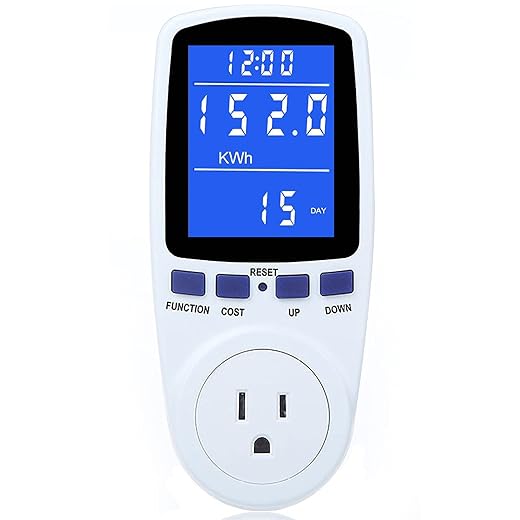
An inexpensive plug-in meter that shows watts, kWh, volts, amps, and cost estimates for a single appliance. Great for spot-checking devices but lacks whole-home visibility and advanced connectivity.
Overview
The plug-in watt power meter is a budget-friendly tool for measuring the energy use of individual appliances. It’s a small, portable device that plugs between the wall outlet and the appliance to show immediate power, energy, voltage, and cost information.
Key features and benefits
This meter shines when you want to answer questions like "How much power does my space heater draw?" or "What is the standby draw of my home theater?" It’s a practical, low-risk way to evaluate ROI for appliance replacements or to track a device’s real-world energy use over time.
Practical considerations and limitations
Who this is for
This is the right tool for renters, casual users, or anyone on a tight budget who needs to check appliance-level consumption without modifying the electrical panel.
Final Thoughts
Choose the Emporia Vue 3 Whole-Home Energy Monitor if you want the best balance of depth and price. Strengths: whole-home visibility plus up to 16 branch sensors for true circuit-level insight, solid app/cloud features, time-of-use and solar/net metering support, and built-in automation capabilities. Ideal use case: homeowners who want detailed circuit-by-circuit tracking and actionable data for bill savings and solar monitoring.
Pick the Aeotec Home Energy Meter 8 Z-Wave Long Range if your smart home runs on Z-Wave and you need tight hub integration. Strengths: native Z-Wave 800 long-range connectivity, low-latency energy and solar export readings, and dual 200A clamps for typical service panels. Ideal use case: users with Home Assistant, SmartThings, or other Z-Wave hubs who want responsive, hub-driven automations and direct device-level integration.
More Energy-Saving Smart Home Guides
Want more ways to track and cut your energy use? These guides can help:
- Best smart plugs with energy monitoring
- How to use smart plugs to reduce your energy bill
- Best smart thermostats for small homes and apartments
- Smart home setup guide for beginners
Want to track more than just whole-home usage? Browse our Smart Plugs & Energy Monitors category for more device-level monitoring options and practical guides.

I’m a lazy DIYer and the Upgraded Watt plug meter looks perfect for my coffee machine experiments lol. Plug it in, measure cost, be smug about saving $3/month ☕️
Anyone worried about safety or overload with these cheap plugs? I don’t want a scorch mark on my kitchen.
I used one for a year with a toaster and slow cooker without issues. Just check the build quality and look for overload protection — this one advertises it, which is good.
Those plug-in meters are fine for typical appliances but read the specs — they usually have max current/voltage ratings. Avoid use with high-draw devices beyond the rating (like large space heaters) and don’t leave them in unsupervised for long with heavy loads.
I’m considering the Shelly Pro EM for a small workshop — I like the DIN-rail form factor and the idea of contactor control so I can automatically shed loads during peak times.
But I’m NOT an electrician and the panel looks intimidating. A couple things I’m worried about:
1) Do I need to buy an extra contactor or is it built in?
2) Any non-terrible walkthroughs for wiring this into a subpanel? I can handle basic wiring but not dramatic sparks.
3) Will Alexa commands reliably trigger the contactor or is there latency?
Would appreciate real-world install tips or warnings. Thanks!
I installed a Shelly in a garage subpanel. You do usually need an external contactor depending on the current. The community forum has some step-by-step posts with photos that helped me avoid mistakes.
Shelly Pro EM pairs measurement with contactor control, but often you need an external contactor/contactor rated for your load — check the product manual for exact wiring. For safety, a licensed electrician is recommended unless you’re fully comfortable with mains wiring. Alexa control is usually responsive over LAN, but the contactor switching is best used for non-instantaneous loads (e.g., cycles), not millisecond-sensitive operations.
Also: take photos before you disconnect anything — it’ll make reassembly simpler and help the electrician if you end up calling one.
If latency worries you, test it with a dummy load first. LAN control is fast; cloud integrations can add a second or two.
Not an electrician either, but I paid a pro to do the final hookup. Saved me risk and they gave tips on mounting the DIN rail neatly. Worth the cost IMO.
Great roundup — I was leaning toward the Emporia Vue 3 after reading this. The circuit-level monitoring for the price seems unbeatable.
Quick question: Has anyone used the Vue 3 specifically for time-of-use billing and solar net metering? I have a small rooftop array and want accurate export numbers. Any tips on the app accuracy or weird setup quirks? 🙂
Glad it helped, Sarah — a few readers reported the Vue 3’s app handles time-of-use pretty well and the solar/net metering is solid if you place CTs correctly. Make sure firmware is up to date and double-check CT orientation.
I use the Vue 3 with solar. App numbers matched my inverter within a few percent. Biggest tip: label your CTs before installing — saved me a ton of head-scratching later.
Heads up: if your meter is on a weird panel (split bus), the installation can be trickier. I had to call an electrician. But once installed it’s been rock-solid.
Budget is my driver, so I’m torn between Emporia Vue 3 and Eyedro. Both seem reliable, but Emporia’s circuit-level CTs are tempting because I want to know which circuits are the wasteful ones.
That said, Eyedro’s web reports and “set it and forget it” vibe are appealing too. Anyone done a side-by-side for accuracy or long-term stability?
I had both at different times. Emporia helped me find the offending circuit (old fridge + space heater combo) which paid for itself in a year. Eyedro would’ve shown higher usage but not pointed to the exact circuit.
If circuit-level breakdown is important, Emporia is the better pick — it gives actionable per-branch data. Eyedro is simpler but whole-home focused. For long-term stability both are solid; Emporia just gives more granularity.
I went with the Eyedro for a no-fuss setup and its web reports are exactly what I needed for a household with a variable schedule. The net metering works well and the dashboard is straightforward.
A couple of pros: installation was simpler than I feared, the support answered my questions fast, and the reports helped me spot a phantom load. Con: not as flashy as some apps but it does the job reliably.
They do cloud by default, but you can export data and they have an API. Not fully local-only AFAIK, but pretty reasonable privacy compared to some others.
Eyedro’s UI is a bit old-school but the CSV export is great for custom spreadsheets. I automate bill comparisons with it.
Thanks for the firsthand insight, Laura. Reliability over bells-and-whistles is a big selling point for Eyedro.
How’s the cloud privacy? Some meters love sending everything to third-party servers. Did Eyedro have options for local-only data?
Anyone integrating the Aeotec Home Energy Meter 8 into Home Assistant or SmartThings? I’m curious about the Z-Wave range — the page says long range (Z-Wave 800) but my panel is in the basement and the hub is on the second floor.
Also, are the 200A clamps truly accurate for 2-phase setups?
Mark — in our tests the Aeotec performed well in 2-phase homes. If range is a worry, consider adding a Z-Wave repeater or a smart switch between the hub and the meter to strengthen mesh.
I have it on Home Assistant. Range was fine for me — Z-Wave mesh helps too if you have other Z-Wave devices. Clamps were accurate to within a few percent compared to my utility meter.
I bought a Sense Energy Monitor a year ago because I liked the idea of automatic device detection. The whole-home trend graphs are actually helpful for budgeting and behavior change, but the device IDs can be hit-or-miss.
Sometimes it correctly tags my dryer, other times it lumps it into “motor” or doesn’t spot it at all. It’s improved with firmware updates, but if you need perfect load recognition out of the box, it’s not guaranteed.
Still, seeing the daily baseline and spikes made me cut phantom loads — so money saved.
Question for others: any tricks to improve detection accuracy? I tried renaming devices and running the training mode for a week but results vary.
FYI: I had better luck after I moved the Sense unit slightly (installer said proximity to wires can affect signal). Might be placebo but worth trying.
Thanks for sharing your experience, Priya. Some users report that running high/unique-load cycles (e.g., turning on one large appliance at a time repeatedly) helps the ML to recognize signatures. Also, keep the firmware and app data sharing enabled so their models improve.
I’ve had mixed results too. If detection is mission-critical, circuit-level CTs (like Emporia) are more deterministic than signature-based detection.
Agreed — I found that unplugging portable devices and running only the big appliances for a few cycles helped Sense pick them up. It’s not perfect but it gets better over weeks.