

Which little dongle will turn your TV into a 4K powerhouse — and which one will just make popcorn?
4K should feel fast, not like buffering in HD forever. Small streaming sticks now pack serious speed, better Wi‑Fi, and true HDR that actually looks like a step up.
Pick one for raw power, clean simplicity, or tight Google/Smart‑Home integration. Short setup. Big picture. No nonsense.
If you’re upgrading your TV but still deciding which “voice” should run the room, read We Compare Top-Rated Voice Assistants: Black Friday. It shows which assistant actually keeps up in noisy, real homes.
Top Picks




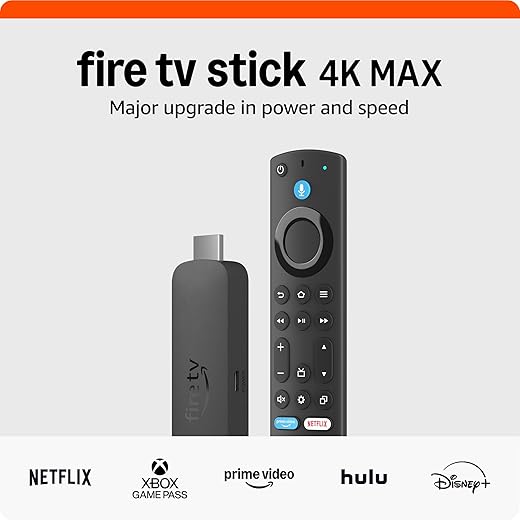
Fire TV Stick 4K Max with Wi‑Fi 6E
A top-tier stick that delivers noticeably faster app launches, more storage, and modern wireless performance with Wi‑Fi 6E support. It’s well suited for users who want responsive navigation, gaming/cloud streaming options, and strong media format support.
Overview
Amazon's Fire TV Stick 4K Max targets users who want one of the most responsive streaming experiences in a stick form factor. It pairs a faster processor with additional storage to keep app launches and navigation fluid, and Wi‑Fi 6E compatibility helps ensure stable, high-bandwidth streams—especially in busy home networks. The device is also attractive to casual gamers thanks to cloud gaming support via Xbox Game Pass and Luna.
Standout features and user benefits
The Fire TV Stick 4K Max is particularly appealing when you want more than just streaming: cloud gaming, quick switching between apps, and better future-proofing with modern Wi‑Fi standards all make a difference in day-to-day use. Reviewers often praise the responsiveness and the improved media playback quality compared with older sticks.
Trade-offs and practical notes
The Fire TV ecosystem is Amazon-first: the UI prioritizes Amazon Prime content and ad-supported promotions, which some users find intrusive. Additionally, if you rely on casting from phones using Google Cast or AirPlay 2, this stick doesn’t provide native support—workarounds exist via apps, but they’re not as seamless as native casting.
If you’re building an Alexa-first living room around Fire TV, also see How We Compare 5 Alexa and Google Assistant Deals. It helps you pick the right Echo speaker or display to park next to the TV.
Roku Streaming Stick 4K with Dolby Vision
A compact, reliable option that brings 4K, Dolby Vision, and a huge app catalog to any TV with minimal fuss. It balances picture quality, long-range Wi‑Fi, and a simple interface at an excellent price.
Overview
The Roku Streaming Stick 4K is designed to be an inexpensive, no-friction way to turn any HDTV into a modern streaming hub. It focuses on what most people need: a fast interface, broad app support, and solid picture quality with Dolby Vision and HDR10+. The stick's compact form factor keeps it out of the way, and Roku's platform provides hundreds of free channels alongside the major subscription services.
Key features and practical benefits
For most users this means an immediate, tangible upgrade over aging smart-TV platforms: apps load faster, navigation is snappier, and picture quality is noticeably better. Users in reviews frequently mention replacing sluggish built-in TV software and regaining consistent streaming performance.
Limitations and real-world notes
The Roku experience is intentionally simple, which is great for mainstream viewers but can feel limiting for power users who want deeper advanced settings or alternative casting options. The platform also surfaces free and ad-supported channels prominently—useful for some, distracting for others. Still, for the majority of households that want a reliable, affordable 4K streamer, this stick delivers the most important features with minimal setup fuss.
If you’re refreshing an older TV with Roku, pair it with cozy bias lighting from Our Top 7 Low-Light Smart Lights for Holiday Ambiance. Soft backlighting makes 4K movies easier on the eyes during long holiday binges.
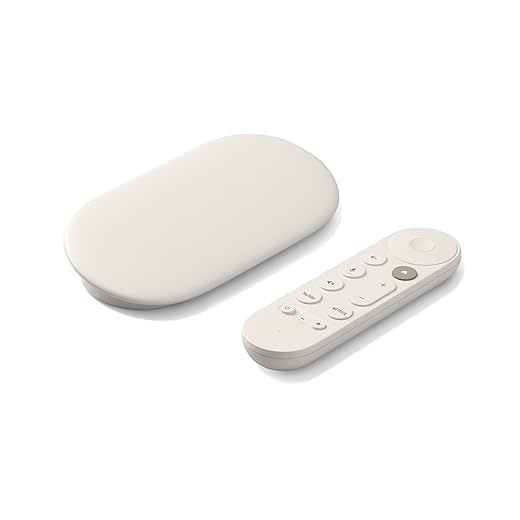
Google TV Streamer 4K with 32GB Storage
A polished streamer that excels at content aggregation, casting, and smart-home integration within the Google ecosystem. Its UI focuses on personalized recommendations and it offers generous storage and speedy navigation for heavier app users.
Overview
The Google TV Streamer 4K is designed for users who value a unified, searchable home screen and deep integration with Google services. With a faster processor and 32GB of storage, it handles multiple apps and customizations with ease, and the remote’s voice control and remote-finding features add convenience to everyday use. Casting from phones, tablets, and laptops is one of its standout strengths.
Why it stands out
Users who live in the Google ecosystem will appreciate how the streamer surfaces recommendations and how simple it is to add things to a watchlist from search or mobile devices. The included remote is ergonomic and includes useful hotkeys and a remote-finder feature that many review comments highlight as genuinely helpful.
Limitations and practical advice
This unit sits at a higher price point than basic sticks, and some advanced peripherals (like HDMI 2.1 cables for certain setups) are not included. If you primarily cast from devices, use many Google services, or want more built-in storage for apps, this streamer is an outstanding, future-ready choice; budget shoppers who only want basic 4K playback may prefer lower-cost sticks.
Going all-in on Google TV and Assistant? Check How We Chose 4 Smart Home Hubs: Cyber Monday 2025/26. It helps you decide if a hub under the TV is worth it for faster routines and tighter casting automation.
Fire TV Stick 4K (Newest Model) with Alexa
A well-rounded 4K stick that brings Alexa search, Wi‑Fi 6 connectivity, and Dolby HDR support at a competitive price. It’s a great all-around choice for families and Alexa smart-home users who want consistent streaming performance.
Overview
The newest Fire TV Stick 4K is Amazon’s mainstream 4K stick offering a solid mix of modern streaming capabilities and value. It includes Wi‑Fi 6 support for improved streaming stability, Dolby Vision and Dolby Atmos compatibility for enhanced picture and sound, and Alexa integration for voice control and smart-home interactions.
Features that matter in daily use
This model is an excellent fit for shoppers who want a trusted, feature-rich streaming stick without splurging on the highest-end option. It handles typical streaming duties quickly and pairs well with Alexa-centric smart-home setups.
Limitations and tips
If you frequently run many apps, prefer the absolute fastest app switching, or want extra storage for games and downloads, consider the Fire TV Stick 4K Max. Otherwise, the newest 4K model gives most households exactly what they need: crisp 4K playback, voice control, and dependable performance.
If you’re putting Fire TV 4K sticks in multiple rooms, use plugs from Our Top 7 Smart Plugs for Holiday Energy Savings Deals. They make it easy to kill standby power on TVs and soundbars between streaming sessions.
Roku Streaming Stick Plus 2025 with Bluetooth
A compact stick that adds Bluetooth headphone mode and dependable 4K HDR playback, making it ideal for bedrooms, travel, and shared spaces. It keeps Roku’s simple interface and long-range Wi‑Fi in a highly portable package.
Overview
The Roku Streaming Stick Plus (2025) builds on Roku’s familiar, user-friendly platform with a focus on portability and convenience. It offers 4K HDR streaming in a slender form that’s easy to move between TVs or pack for trips. Key additions like Bluetooth headphone mode make it especially useful in bedrooms or shared living spaces where private listening is desirable.
What you get and how it helps
The device is great for people who want a lightweight streamer that solves common problems—old TV OSes, frozen apps, or limited app availability—without a complex setup. Many users report dramatic improvements in app responsiveness and fewer freezing issues compared with aging TV platforms.
Limitations and practical considerations
While excellent for general streaming, the Plus model is not the most powerful stick on the market: it’s optimized for efficiency rather than peak performance. Its RF-based remote means it won’t work with some universal IR remotes, and power-hungry setups should use the included power adapter rather than relying on some TV USB ports.
Buying this as a travel or guest-room stick? Match it with budget add-ons from Our Top 6 Smart Home Gifts Under $50 for Black Friday. It’s an easy way to bundle a stick plus a small smart-home upgrade without going over budget.
Final Thoughts
Best overall power performer: Fire TV Stick 4K Max with Wi‑Fi 6E — Pick this if you want the fastest app launches, extra storage for more apps, and top wireless performance for gaming or cloud streaming. Strengths: Wi‑Fi 6E support, snappy navigation, broad media‑format support. Ideal for users who stream a lot, game casually, or want the most future‑proof stick.
Best simple upgrade for most people: Roku Streaming Stick 4K with Dolby Vision — Choose this if you want plug‑and‑play 4K/Dolby Vision, a huge app library, and a very easy interface. Strengths: excellent picture quality per dollar, long‑range Wi‑Fi, and rock‑solid simplicity. Ideal for users who want a clean experience and the best 4K upgrade with minimal fuss.
More Smart TV & Smart-Home Guides to Read Next
Want to round out your setup now that the streaming stick is sorted? These guides pair nicely with this one:
- We Compare Top-Rated Voice Assistants: Black Friday
- How We Compare 5 Alexa and Google Assistant Deals
- How We Chose 4 Smart Home Hubs: Cyber Monday 2025/26
- Our Top 7 Low-Light Smart Lights for Holiday Ambiance
- Our Top 7 Security Cameras With Cloud Discounts Now
- Govee RGBIC LED Strip Lights: Insane Multi-Color Drama
Want to compare even more options? Browse our full Smart TV & Streaming Devices category for all our latest picks and guides.

Love the promise of “free & live TV” in these listings. Reality check: yes you get free channels, but it’s usually ad‑supported and not the full cable experience. Still great for casual watchers, but don’t expect every network to be there. Also — those free channels are what made me discover some surprisingly good indie shows!
One tip: add the free channels you like to a favorites list so they don’t get buried in the feed.
That’s accurate — these free services are a mix of live/local feeds, ad-supported channels, and aggregated content. Great for discovery, but not a full replacement for premium bundles.
I grabbed the Amazon Fire TV Stick 4K Max last month and wow — app launches are noticeably faster. The Wi‑Fi 6E support made a difference on my mesh setup (less buffering during 4K Netflix). A couple of things:
1) the interface is snappy
2) storage is generous for sideloading apps
3) voice search with Alexa still gets goofy sometimes but overall thumbs up. 🙂
I have the Max too and yeah it gets warm during long 4K streaming sessions but nothing crazy. No fan so just warm casing.
Thanks for sharing your experience, Olivia! Good to hear Wi‑Fi 6E helped on your mesh. If you run into Alexa quirks, try re-training the voice profile; it sometimes improves recognition.
Nice — I was between the Max and the regular 4K. Did you notice any heating or fan noise? Heard some folks say the Max can run a bit warmer.
Roku Streaming Stick 4K seems like the safe bet for me. I’m not deep into Alexa or Google stuff and just want Dolby Vision + an easy UI. Anyone miss features by not going with Amazon or Google?
I switched from Amazon to Roku for my parents’ TV — zero training required and they love the interface. Dolby Vision looks great on their set.
Roku is a solid choice if simplicity and a wide app catalog are priorities. You might miss deep smart-home integrations and some advanced features like storage for sideloading, but for most users Roku covers the essentials very well.
Long post — hope it’s useful:
I’ve been using the Google TV Streamer 4K for a couple months. The 32 GB of storage is a real plus — I installed several streaming apps, a couple of game streaming clients, and still had room.
Casting from my phone is seamless and the recommendations are actually pretty decent (took a little while to tune). If you live with a lot of Google devices it’s a clear win.
Minor downsides: the interface can feel a little cluttered with recommendations, and some apps still default to their own home screens instead of Google aggregating everything.
Overall: great for ecosystem users and heavy app folks.
Do you find the Google integration intrusive at all? I worry about recommendations showing too much personal stuff on a shared TV.
Pro tip: use a guest profile for visitors — keeps the recs from getting weird 😂
Sofia — you can create multiple profiles which helps. Also tweak the activity and ad settings in your Google account to limit some personalization.
Thanks for the detailed rundown, Leah — the storage point is a good callout. The trade-off between recommendations and clutter is real; glad casting worked smoothly for you.
Why do I suddenly need a different remote for every stick? My coffee table is a remote graveyard. 😂
I bought a cheap universal remote and programmed it — life-changing. Also get one that supports voice if you can.
Totally feel you. Universal remotes or HDMI-CEC (so TV remote controls the stick) can simplify things — most sticks support HDMI-CEC but check your TV settings.
Technical note: Wi‑Fi 6 vs 6E — if your router supports 6E and you’re in a dense Wi‑Fi environment, the Fire TV Stick 4K Max’s 6E support can cut through interference and provide steadier 4K streams. But if your router is only Wi‑Fi 5/6, you won’t get the benefit. Also, many apartments still have congested 2.4 GHz bands, so make sure to configure your network (separate SSIDs for 2.4/5/6) and place the stick where it has a clear line to the router if possible.
Thanks for the tips. I’m not techy but ‘clear line to the router’ is something I can try!
Great breakdown, Ethan. People underestimate the impact of network configuration on streaming performance — a small change can make streaming sticks feel much snappier.
Quick q: do any of these sticks support ethernet adapters well? I hate relying on Wi‑Fi for the living room console.
Agree — I moved my router a few feet and saw a huge drop in buffering. Also consider powerline adapters if you can’t reposition the router.
Looking for a recommendation: small bedroom TV (32″) with spotty Wi‑Fi. We travel a bit and want something portable to bring along too. Which stick would you pick?
My priorities: reliability, simple setup, low price, occasional headphone mode would be a bonus.
If you can carry an Ethernet adapter for travel (some hotels have wired ports), any of the sticks will work better with a wired connection.
Also pack a USB power bank with an outlet — some hotel TVs won’t power a stick and it’s handy in a pinch.
For your needs I’d recommend the Roku Streaming Stick Plus 2025 — it’s portable, has Bluetooth headphone mode, and is reliable. If price is the top concern, the regular Amazon 4K stick is affordable but lacks built-in headphone routing unless your TV supports Bluetooth or you use a separate adapter.
Roku Plus is perfect for travel — small, works on hotel TVs, and headphone mode is clutch.
I’m considering the Fire TV Stick 4K Max mainly for cloud gaming. The article mentioned gaming/cloud streaming options — does anyone have real-world performance notes with Stadia/GeForce Now/etc? Latency is my main worry.
Also curious if the Google TV Streamer does any better with controllers and game streaming apps.
If gaming is a priority, consider a low-latency controller and keep the stick close to the router, or use a powerline/ethernet adapter.
Cloud gaming on sticks can work well if you have low-latency internet (25 ms or lower ideally) and a strong Wi‑Fi connection. The Fire TV Stick 4K Max’s extra performance helps with streaming clients, but a wired Ethernet connection (via adapter) will give the best latency. Google TV is also capable and has good controller support, but your home network and ISP are the biggest factors.
I run GeForce Now on a Fire stick with an Ethernet adapter — latency was fine and gameplay smooth. Without Ethernet, it was hit-or-miss depending on Wi‑Fi congestion.
Roku Streaming Stick Plus 2025 looks awesome for travel. Bluetooth headphone mode is exactly what I need for late-night flights/hotel rooms. Has anyone actually used the headphone mode with a TV that doesn’t have Bluetooth?
Yep, I used it in a hotel room with an older TV — worked perfectly with my earbuds.
The headphone mode routes audio directly from the stick to Bluetooth headphones, so the TV doesn’t need built-in Bluetooth. Great for private listening on non‑Bluetooth TVs.
I’m a bit wary of the Google TV Streamer and Fire devices from a privacy standpoint. Anyone who cares about that have tips? Like disabling certain voice features or limiting data sharing? Also, how does Roku do compared to the others for privacy?
Good question. Most devices let you disable voice assistants or limit personalization in settings. For Fire/Google, you can opt out of certain data sharing in your account settings. Roku tends to be simpler with fewer integrations, which some people prefer for privacy, but check their privacy pages and opt‑outs.
Also consider using a dedicated streaming profile or a secondary account that doesn’t link all your personal devices.
I turned off voice and personalized ads on my Google TV and it helped. Still collects basic telemetry but it’s reduced.
I’m torn between the Amazon Fire TV Stick 4K (newest model) and the 4K Max. The article’s verdict for the regular 4K being the best mix of features and affordability makes sense, but the Max’s speed is tempting. Any suggestions?
Context: mostly family use (Disney+, Prime), occasional cloud gaming, budget-conscious but want future-proofing.
If gaming is only occasional, the regular 4K should be fine. The Max shines if you do heavier multitasking or sideload apps.
Budget tip: watch for sales — the regular 4K often drops to a great price and can be paired with a game controller only when needed.
If cloud gaming/streaming speed matters and you want a bit more future-proofing, the Max is worth the premium. For pure family streaming and best value, the newest 4K model will cover almost everything and save money.
If you have a fast internet connection and want to reduce latency for cloud gaming, go Max. Otherwise the regular 4K is the smarter buy.
Also consider if you care about Wi‑Fi 6E specifically — that’s where the Max pulls ahead on future networks.