

Can a raw-power gaming router beat the smooth, whole-home coverage of a 6E mesh — and which one actually delivers faster real-world speeds, lower latency, and smarter features for your home?
Surprisingly, choosing the right router can transform your home network: the ASUS RT‑AX86U delivers standalone Wi‑Fi 6 speed and gamer‑focused features, while the Amazon eero Pro 6E 3‑pack favors wide, easy mesh coverage—compare speed, setup, features, and use cases today.
Performance Router

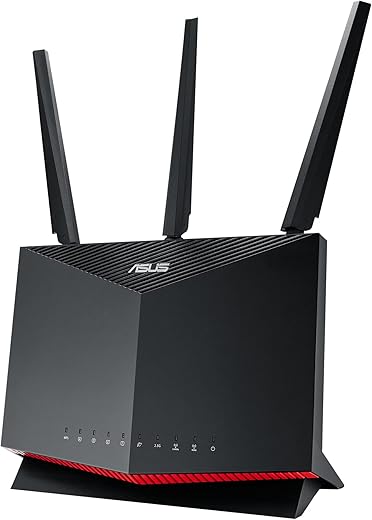
A feature-packed router that prioritizes speed, low latency and advanced controls, making it ideal for gamers and power users. It delivers robust wired and wireless performance and is expandable via AiMesh, though less plug-and-play than mesh systems.
Seamless Mesh

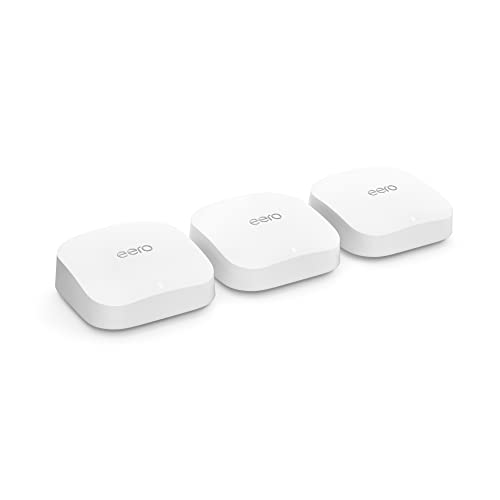
A user-friendly mesh system that prioritizes coverage, simplicity and Wi‑Fi 6E support for modern devices. It excels at whole‑home reliability and easy management but offers less advanced firmware features for power users.
ASUS AX86U
eero Pro6E
ASUS AX86U
eero Pro6E
ASUS AX86U
eero Pro6E
Performance & Hardware: Raw speed, ports, and wireless tech
Raw wireless specs and throughput — ASUS RT‑AX86U
The RT‑AX86U is an AX5700 dual‑band router (combined ~5700 Mbps: fast 5 GHz + 2.4 GHz lanes) with a true 2.5 Gbps LAN/WAN-capable port and support for WAN aggregation up to ~2 Gbps. Its beefy CPU, advanced QoS and Mobile Game Mode cut latency for single‑point gaming and power‑user routing tasks. As a single unit it delivers higher per‑client peak speeds than most consumer mesh nodes when placed centrally.


Tri‑band Wi‑Fi 6E and multi‑node throughput — eero Pro 6E (3‑pack)
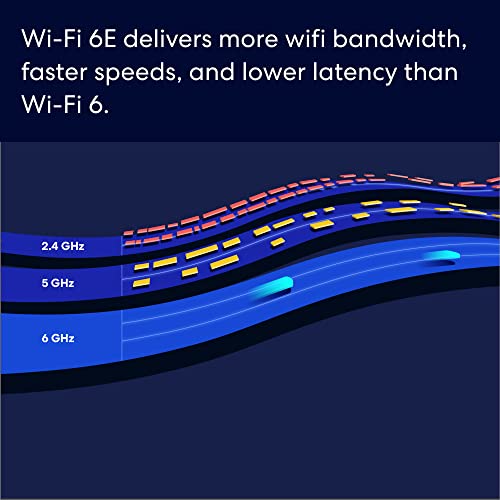
The eero Pro 6E adds a 6 GHz radio (Wi‑Fi 6E) to a tri‑band mesh, giving compatible devices lower latency and extra capacity. A 3‑pack maintains throughput across a house by distributing clients and using TrueMesh routing; eero advertises support for up to ~2.3–2.5 Gbps internet plans when nodes are wired or when radios aren’t congested.

Latency, concurrent devices, and backhaul
Both platforms use OFDMA and MU‑MIMO to handle many clients, but ASUS’s stronger CPU and gamer features favor the lowest latency for competitive gaming on wired/wireless single‑router setups. eero’s 6 GHz band and tri‑band design reduce contention in busy homes and preserve multi‑node throughput. Wireless backhaul can cut effective speeds unless you use wired backhaul or a dedicated band (which eero’s tri‑band/6 GHz can help provide).
Feature Comparison
Coverage, Scalability & Use Cases: Single router vs mesh network
When a single powerful router (ASUS) is ideal
A single ASUS RT‑AX86U works best when one central unit can reach most living spaces — typical small homes, apartments, or single‑floor layouts. It delivers higher per‑device peak throughput and lower latency for competitive gaming or a wired home office. You can expand range with AiMesh by adding ASUS nodes and use the 2.5 G port for fast wired links.


When a mesh system (eero 3‑pack) is superior
A 3‑pack eero Pro 6E covers large, multi‑floor homes or properties with many dead zones. Multiple nodes placed near use areas keep devices on strong local radios; the 6 GHz band helps reduce congestion for Wi‑Fi 6E clients. Mesh trades some raw peak speed (especially on wireless backhaul) for consistent coverage and simpler node placement.

Device counts, placement, expansion & household recommendations
Setup, Features, Security & Value: Apps, parental controls, and extras
Setup & daily use
ASUS offers a full-featured web UI plus the ASUS Router app. Expect granular controls (QoS, port forwarding, VLANs) and AiMesh expansion — ideal if you customize routing or prioritize gaming. eero is app‑first: guided, fast setup and automatic mesh management with minimal decisions required.
Security, VPN & updates
ASUS includes Instant Guard VPN and subscription‑free AiProtection (Trend Micro) for local network security and advanced firewall rules. eero pushes automatic firmware updates and central cloud management; core protection is free, but eero Secure adds malware/advanced filtering for a subscription.
Parental controls, guest networks & smart home
ASUS has advanced parental rules, per‑device scheduling and deep traffic controls without extra fees. eero provides easy-to-use profile-based controls in the app; advanced filtering is behind eero Secure. Both support guest networks and integrate with Alexa and common smart‑home ecosystems.
Portability, pricing & long‑term value
Long‑term, ASUS rewards tinkerers with firmware features and AiMesh flexibility; eero rewards households that prefer low maintenance and cloud improvements (some advanced features cost extra). Choose based on whether you want control and performance (ASUS) or simplicity and whole‑home coverage (eero).
Final Verdict: Which to choose?
eero Pro 6E is the practical winner for most homes — choose it for broad mesh coverage, simple management, and easy scaling. Pick the ASUS RT-AX86U when you need top performance, granular controls, and gaming features.
Pick: small homes/gamers — ASUS. Large homes/many devices — eero. Install now?

Short version: ASUS = nerd-powered performance. eero = ‘works out of the box’ vibes. I use ASUS for my gaming PC and eero for the rest of the house. Yes, technically you can do one or the other, but mixed setups are weirdly satisfying 😂
Bridging is what I would recommend if you want to keep ASUS features for wired devices and eero for wireless coverage.
Haha — mixed setups can work but watch for overlapping SSIDs and double NAT. If you go mixed, turning one into access point mode often helps.
I tried that too, Ava — ended up bridging the ASUS so eero handled WiFi. Felt like the best of both worlds.
Quick note: bridging disables some router features (firewall/port forwarding on the bridged unit), so pick which device keeps routing carefully.
Price-wise the eero 3-pack is a fair bit more upfront, but if you factor in time saved and fewer troubleshooting nights, it’s worth it for non-tech folks.
However, if you already have gig+ wired needs and love tweaking QoS for gaming, ASUS is the cheaper, more capable option in the long run.
Good point about value-of-time. The ASUS is cheaper for pure router power, but a whole-home mesh can reduce hassle and improve device handoffs.
Also remember eero Pro 6E supports more devices and 6E band — future-proofing if you plan to upgrade devices soon.
I went with the ASUS RT-AX86U for my small apartment and zero regrets. The 2.5G port actually made a difference when I hooked up my NAS and a wired PC for gaming. AiMesh compatibility is a nice bonus if I ever want to extend it without jumping to a whole mesh brand.
Pros: low latency for games, lots of settings, no subscription for security. Cons: it’s a bit nerdy to set up if you want advanced stuff.
Totally agree on the learning curve. Took me an evening to set up port forwarding the way I wanted, but results were worth it.
Do you notice any heat issues with the ASUS under heavy load? Mine gets a bit warm when Plex + gaming runs simultaneously.
Thanks for sharing, Maya — glad the 2.5G port helped. If you ever want to add nodes later, AiMesh tends to play nicely with other ASUS units.
I have a 3-level townhouse (~3,200 sq ft). Tried the eero Pro 6E 3-pack and it actually solved dead spots upstairs. Setup was ridiculously easy — app guided me through everything.
No fiddle, no flapping through advanced QoS settings, just stable Wi‑Fi across the house. If you want convenience and coverage over granular control, the eero is a solid pick.
Only caveat: if you’re a heavy gamer who wants every tweak, you might miss ASUS-level features.
Great practical example, John. The eero’s simplicity is precisely what many households need, especially for multi-floor coverage.
Did you use wired backhaul between any nodes? I’m debating whether to wire them or trust the mesh wireless backhaul.
I’ve got the eero Pro 6E in a 2,500 sq ft home and it’s been butter smooth. Setup took like 15 minutes. No weird disconnections and the 6E band is nice for my new laptop.
That said — if you’re a streamer/gamer who obsesses over ping and port forwarding, ASUS seems to be the go-to. Not gonna lie, I was tempted to switch just to play with the settings 😂
Small rant: some mesh systems hide advanced settings behind paywalls — thankfully eero’s base experience was solid for me. 👍
Which model laptop do you have? I wonder if the 6E gains are noticeable on consumer laptops yet.
Thanks for the real-world report, Sophia. The 6E band is indeed a benefit for newer devices. Agreed about paywalls — always frustrating.
They’re noticeable if you’re close to the router and have a 6E-capable card. Elsewhere, it’s just nice to have the extra spectrum.
FWIW some eero features are in subscription but basic performance shouldn’t need it. Good that yours runs fine without extra fees.
One extra tip: if you plan to use a lot of wired devices with eero, check for optional wired backhaul support and node placement — it can really stabilize throughput.