

No neutral? No problem — which smart switch survives apartment wiring and your landlord’s wrath?
Not every apartment comes with a neutral wire. That little missing conductor breaks a lot of smart-switch dreams.
You can still get dimming, schedules, and voice control without rewiring. Install the right no-neutral switch and your lights behave like magic — minus the electrician bill.
Top Picks


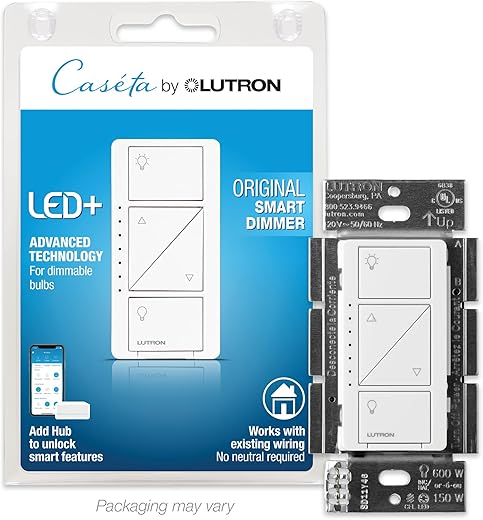
Lutron Caseta Smart Dimmer (Hub Required)
A highly reliable dimmer with smooth dimming, broad device compatibility, and mature integrations. Requires the Lutron Smart Bridge for full smart-home features but delivers rock-solid performance and excellent app/voice control.
Premium dimming with proven reliability
Lutron Caseta is widely regarded as the gold standard for smart lighting control. This original Caseta dimmer delivers smooth, flicker‑free dimming and works in single‑pole and 3‑way setups without a neutral wire. It’s designed to control grouped loads of bulbs and provides predictable, repeatable behavior that hobbyist and professional installers appreciate.
Key features
Where this switch shines is in dependable dimming performance and broad platform support. The bridge adds cost upfront but gives you a robust ecosystem and local control options that are less dependent on cloud reliability.
Real‑world considerations
If you want granular dimming (for example, setting scenes at precise percentages or smooth fade-outs), this unit performs much better than many bargain dimmers. It’s also easy to integrate into multi‑location setups using Pico remotes. The trade-offs are the additional expense of the bridge and ensuring bulb compatibility with the dimmer type and wattage limits.
Who should buy it
Installers and homeowners who prioritize long-term reliability, precise dimming behavior, and broad ecosystem compatibility. If you’re upgrading many switches, the Caseta platform is an excellent investment.
Leviton Decora No‑Neutral Smart Dimmer
Delivers full-range dimming and good load handling for retrofit situations without a neutral wire, and integrates with the My Leviton bridge for voice and scheduling. May need occasional configuration for high-load circuits and requires the bridge for app/voice features.
What the DN6HD offers
The Leviton DN6HD is a no‑neutral smart dimmer engineered to retrofit older homes while offering a wide dimming range and compatibility with multiple lighting technologies. When paired with Leviton’s MLWSB Wi‑Fi Bridge it becomes part of a comprehensive smart lighting system with remote access and voice control.
Standout features
Installers and DIYers appreciate the DN6HD for its robust load ratings (up to 300W LED/CFL or 600W incandescent/MLV) and flexible app settings that let you tune maximum brightness and fade behavior. If a particular circuit triggers device rebooting at full brightness (reported in some multi‑bulb installations), the app’s maximum brightness limiter is a practical workaround.
Limitations and installation notes
The dimmer requires the MLWSB bridge for cloud features and voice integrations; that bridge is an extra component and must be considered in overall cost planning. In circuits with many LED bulbs, you may need to limit maximum brightness to avoid overloading the dimmer. Box space should also be checked — while designed for retrofit, the unit still needs clearance for wiring.
Ideal users
Homeowners who want reliable dimming performance in no‑neutral situations and plan to integrate switches into a broader My Leviton smart home network. This dimmer balances performance and retrofit friendliness for most real‑world lighting circuits.
Leviton Decora No‑Neutral Smart Switch
A dependable no‑neutral option with a well‑designed Decora aesthetic and solid integration with the My Leviton bridge. Setup can be slightly fiddly at first but the switch is stable once paired and fits cleanly into Decora-style wall plates.
Overview and intended use
Leviton's DN15S Decora smart switch is aimed at homeowners who need a no‑neutral solution without sacrificing a modern Decora look. It requires Leviton’s MLWSB Wi‑Fi Bridge for cloud features and voice assistant integrations, but once paired it becomes a straightforward remote and scheduled control point for lighting.
Notable features
Installation and pairing are generally simple, though some users may need to delete and re-add devices after firmware updates. The Decora appearance and screw‑terminal/screwless options fit well into modern interiors, and the device supports robust electrical load ratings suitable for many household circuits.
Limitations and safety notes
There are isolated reports from installers about the device behavior in specific wiring scenarios; a careful check of grounding and local code is recommended. Also, the bridge is required for most smart features, so factor the added cost and a nearby plug for the bridge when planning a multi-switch installation.
Who should consider it
Homeowners who want a neat Decora-style, no‑neutral smart switch with reliable integration into the Leviton ecosystem. It’s a good middle ground between budget Wi‑Fi switches and premium platforms like Lutron Caseta.
GE Cync Paddle Smart Switch (No Neutral)
Offers a straightforward way to add smart control where a neutral wire isn't available and integrates with Alexa and Google without a hub. It occasionally suffers from app/firmware hiccups and can require the included bulb adapter for low-watt LED setups.
What this switch does
The GE Cync paddle-style on/off switch is designed for retrofit installs where a neutral wire isn't present. It converts a conventional toggle into a Wi‑Fi and Bluetooth connected switch so you can control lights via voice or the Cync app without adding a hub.
Key features and practical benefits
The switch supports schedules and scenes through the Cync app, and it integrates with Amazon Alexa and Google Assistant for voice control. Because it requires a minimum wattage and sometimes an adapter for low-power LED fixtures, the included bulb adapter is often necessary for reliable operation.
Limitations and real-world notes
Installation is generally straightforward but you should be mindful of a few practical details: some users report intermittent connectivity or app-related problems that may require occasional re-pairing; mesh Wi‑Fi band-steering (2.4/5 GHz) can cause issues, so ensure a stable 2.4 GHz connection during setup. The switch's load ratings are modest, so check compatibility with your fixture wattage and motor loads.
Who should consider this
If you need a no-neutral smart switch that works with major voice platforms and prefer to avoid running new wires, this is a sensible, budget-friendly choice. Expect to keep the bulb adapter handy for low-watt LED fixtures and to allow for occasional app maintenance if you rely heavily on cloud features.
MOES 2nd‑Gen No Neutral Smart Switch
Offers a low-cost way to add smart control without a neutral wire and avoids capacitors that can make noise. Setup may require patience (wait times after power-up) and stable 2.4 GHz Wi‑Fi; build quality is mixed across units.
Purpose and design
This second‑generation MOES single live‑wire switch is built specifically for installations where running a neutral is impractical. It uses a no‑capacitor design and claims to avoid the audible buzzing or interference some single‑wire switches produce while supporting low minimum wattage loads.
Key features and how they help
The unit supports a minimum 7W load, which helps prevent the faint glowing or flicker that sometimes appears with other no‑neutral switches and modern LEDs. Users should note a short initialization period after power is applied (a few minutes) before the switch becomes operable and the requirement for a 2.4 GHz Wi‑Fi SSID during setup.
Practical considerations
Expect variability in quality; while many users report successful long-term use, others experienced early failures. If your home uses mesh Wi‑Fi with band steering, you may need to create or force access to a 2.4 GHz network for reliable pairing. When installed correctly, this switch can solve the common retrofit problem without running new wires.
Recommended audience
DIYers and budget-focused buyers retrofitting older homes who are comfortable with potential troubleshooting and validating device reliability under warranty. If you prefer a guaranteed long-term outcome, consider stepping up to a more established brand.
MOES Dual Wi‑Fi Smart Light Switch
A cost-effective way to control two circuits from a single gang space with voice and app support. Reliability varies by unit and installation; some buyers report failures or short lifespans while others find it dependable.
Overview
This MOES double (2‑gang) Wi‑Fi switch is aimed at users who want to consolidate two light controls into a single wall space while avoiding a hub. It supports both no-neutral and neutral wiring methods in many installations and connects directly to 2.4 GHz Wi‑Fi for app and voice control.
Features and benefits
If you have limited wall space or want to control two circuits from one location (for example, hallway light + porch light), this is an economical option. It provides basic on/off control, scheduling, and voice activation without requiring a separate bridge.
Caveats and installation tips
Quality control appears inconsistent — there are reports of early failures and a few DOA units. The switch requires a stable 2.4 GHz Wi‑Fi network; many mesh systems that automatically steer bands can complicate setup. For best results, use a dedicated 2.4 GHz SSID during pairing and verify your box has adequate room for the unit's wiring.
Who this is for
Budget-focused buyers looking to add two smart switches in one gang, and those comfortable troubleshooting Wi‑Fi or replacing defective units under warranty. If long-term reliability is top priority, consider tried‑and‑true premium brands instead.
Final Thoughts
Best overall (premium, most reliable): Lutron Caseta Smart Dimmer (Hub Required). Why pick it: rock-solid performance, the smoothest dimming, and mature integrations (works great with HomeKit, Alexa, and Google when paired with the Lutron Smart Bridge). Ideal use case: living rooms, main circuits, or any location where you want flawless dimming and long-term reliability — buy the bridge too for full app and voice control.
Best hubless / quick retrofit: GE Cync Paddle Smart Switch (No Neutral). Why pick it: no hub required and it pairs directly with Alexa and Google for fast, simple installs. Ideal use case: renters or budget-conscious apartment owners who want a straightforward upgrade without adding a bridge; note that low-watt LEDs may need the included bulb adapter and occasional firmware/app updates can be required.

Thinking between the Leviton Decora dimmer (no-neutral) and the GE CYNC. I like that Leviton seems more feature-rich but it needs the MLWSB bridge. The GE advertises no hub and I like the simplicity.
Questions:
1) Does the Leviton bridge scale well if I buy multiple switches? Anyone used a mix of Decora dimmers+switches in a single apartment?
2) For folks using GE CYNC, has anyone needed the bulb adapter for low-wattage LEDs? My apartment is mostly low-watt bulbs (6–9W).
Leviton has been stable for me but expect the occasional re-pair after firmware updates. Worth it for the Decora look if you’re picky about wall plates!
If you’re renting, check with your landlord before cutting into 3-way circuits. I ended up hiring an electrician to avoid any trouble. Better safe than sorry.
For the GE, yes, I had to use their little adapter on a 7W LED or it would strobe when dimmed. Annoying but cheap to fix.
Good questions. The Leviton bridge supports multiple devices and generally scales fine for an apartment; you can pair several Decora devices to a single bridge. For GE CYNC, some users do need the included bulb adapter or a higher-watt LED because certain low-watt LEDs don’t draw enough current for no-neutral switches and that can cause flicker. Check each product note on minimum load and test one switch first if possible.
I have 3 Leviton dimmers paired to one bridge — works well. The bridge also lets you do schedules and voice control via cloud. Setup was a bit finicky at first though.
Curious about the MOES two-gang reliability vs buying two single MOES units. Has anyone tried both approaches? Also: any tips for making Tuya/Smart Life devices less flaky on Wi-Fi? My apartment router is ‘ok’ but not amazing.
I like the price, but I’m worried about having one failure take out two circuits.
Also consider using a secondary cheap router as a dedicated 2.4GHz AP for smart devices — it can isolate traffic and improve stability without messing with your main internet setup.
Good point — with a two-gang unit, a single hardware failure could affect both circuits, whereas two separate single-gang units isolate failures. For Tuya/Smart Life devices, ensure a stable 2.4 GHz network (separate SSID if possible), place the router centrally, and avoid too many mesh hops for critical devices.
FWIW, I kept my smart devices on a guest SSID to reduce congestion and that unexpectedly improved reliability.
I had a two-gang MOES fail on one side and the other side kept working — so partial failures are possible. But YMMV.
If budget allows, buy two singles. That way you can move one later or replace just one. Easier on future troubleshooting too.
I’m in a small apartment with a strange 3-way setup (one switch in the hallway, one by the bedroom door). The Leviton Decora no-neutral mentions wired or wire-free 3-way — does that mean I can avoid running a neutral and still keep both switches functional? I’m a bit nervous about tackling this alone.
If your building rules allow, call a pro. I saved time and headaches that way. Also: snap photos of the wiring before you touch anything — saved me during reassembly.
Wire-free 3-way typically means one of the endpoints can be a wireless remote (no extra traveler wire) that communicates with the main switch. In retrofit 3-way situations, you can often use a compatible companion switch or a wireless remote to avoid rewiring. That said, 3-way wiring can be tricky — if you’re not comfortable, it’s worth getting an electrician to avoid mistakes.
I installed Leviton in a 3-way with their companion switch and it worked fine. The instructions were a little confusing but their tech support helped via chat.
I bought the MOES two-gang switch to control my living room and bedroom lamps from one box. Installation fit fine but after 6 months one gang died (no lights, switch cold). Returned and got a replacement that worked for a few more months.
Pros: cheap, app is straightforward, Alexa works.
Cons: reliability seems hit-or-miss, support was slow.
If you’re cheap like me and willing to RMA, maybe worth it. Otherwise I’d spend extra for Lutron or Leviton.
Sorry you had that experience, Olivia — thanks for the honest recap. MOES units can vary in longevity; if you’re planning long-term, the more premium options (Lutron/Leviton) usually justify the higher price with better durability.
Installed the GE CYNC paddle switch in my hallway. Love that I didn’t need a hub and voice control works fine via Alexa. The app had a couple of hiccups early on but a firmware update fixed them.
If you have simple needs (on/off + voice) it’s a solid budget choice.
Agreed — got one for my basement lights and it’s been fine. Took me two tries to get it onto 2.4GHz but once it’s on it’s stable.
Thanks for sharing, Tom. The GE/Cync devices can be a great no-frills option; firmware updates do seem to address many of the reliability issues reported early on.
Lutron is like the Rolls Royce of switches — expensive, but it just works. The rest of these? Budget motorcycles with varying degrees of reliability. 😂
No replies needed, just my two cents.
I installed the Lutron Caseta dimmer in my apartment last month and it’s been great — super smooth dimming and no buzzing on my LEDs. Yes, the Smart Bridge adds to the cost, but for me the reliability and integrations (Alexa + HomeKit) made it worth it. If your landlord is picky, the Pico remote is a lifesaver — no cutting wires.
Anyone else using Caseta in a rental? Curious about how easy it is to move the hub between units.
Glad it’s working well for you, Amy. The Smart Bridge is required for remote control and cloud integrations, but you can use Pico remotes for many local scenarios without changing wiring. Moving the hub is simple — unplug and re-pair, just be prepared to reconfigure automations if you change networks.
Pico remotes = rental friendly. I kept the wall switch for switches and used a Pico for the living room so I didn’t mess with plates when I moved out.
I used my Caseta in two different apartments. Took about 10 minutes to move the bridge and reconnect. Pro tip: export your scenes/settings screenshots so you can rebuild automations faster.
Tried the MOES single live wire switch bc price was tempting. Setup was a 😩 — the unit needed patient waiting after power-up and some flakey wifi pairing. When it worked it was fine, but it flickered with lower-watt LEDs. For the price it’s ok, but don’t expect Lutron-level polish. Also, FYI: the docs are kinda sparse and there were typos in the app instructions lol.
Quick question about MOES: the listing says ‘minimum 7W’. I mostly use 6W bulbs to save energy. Is that a hard limit? Has anyone tried using a neutral-less no-capacitor switch with lower-watt bulbs successfully? Also, GE mentions a bulb adapter—how does that compare to just swapping bulbs?
The bulb adapter basically shunts a small load so the switch sees enough current. Better than replacing bulbs if you like your lower-watt LEDs.
The 7W minimum means the switch expects that load to behave correctly; lower-watt bulbs might lead to flicker or the switch not detecting the load. Options: use bulbs that meet the minimum, try the GE bulb adapter if that product includes one, or test one switch first. If in doubt, consult a licensed electrician before making wiring changes.
Also remember that some builders use LED fixtures with integrated drivers — check compatibility before buying a switch. Those can be trickier than replaceable-bulb setups.
I swapped a 6W for an 8W LED in my ceiling fixture and it fixed flicker with MOES. Not ideal for energy savings but it solved the stability issue.
Installed Caseta in my apartment and couldn’t be happier. Big heads-up for renters:
1) I used a Pico remote so I didn’t have to alter the wall plate when I moved out.
2) The Smart Bridge sits by the router and took maybe 10 minutes to set up.
3) If you have multi-way circuits, get the right Caseta 3-way wiring diagram before you start.
4) It was pricier than the budget options, but zero fuss in 9 months of use.
If anyone wants my step-by-step photos of the install, I can upload them — helped me a lot to see a real setup.
Thanks for the detailed walkthrough, Susan — pics would definitely help other renters. The Pico workaround is a common recommendation for rental-friendly smart lighting.
I’d love to see your photos, Susan. I’m nervous about the 3-way wiring so a real-world example would be super helpful.